
TL;DR:
- Responding to leads within minutes significantly boosts conversion rates and qualification quality.
- An optimized lead response system includes data capture, routing, nurturing, and tracking stages with clear SLAs.
- Fixing data quality, automating workflows, and managing edge cases are crucial for effective lead management.
Every qualified lead you earn through outreach is a timed asset. The moment someone signals interest, a clock starts, and most firms don’t realize how fast it runs out. Faster responses within minutes of a lead’s first touch materially improve qualification and conversion outcomes compared to slower follow-up windows. Yet most professional services teams still rely on manual handoffs, inconsistent routing, and vague ownership. This guide walks you through every stage of an optimized lead response management process, the tools and service level agreements (SLAs) you need, how to automate it end to end, and how to fix the edge cases that quietly drain your pipeline.
Table of Contents
- What is a lead response management process?
- Essential tools, data fields, and SLAs you need
- Step-by-step: How to automate and operationalize your lead responses
- Troubleshooting, edge cases, and practical tips
- Our perspective: The hidden obstacles and high-reward tweaks in lead management
- Ready to optimize your lead response process?
- Frequently asked questions
Key Takeaways
| Point | Details |
|---|---|
| Speed drives conversion | Responding within minutes boosts lead qualification and sales outcomes. |
| Automation eliminates delays | SLAs and workflow automation are crucial for consistent, scalable lead management. |
| Data quality is critical | Accurate intake fields and fallback queues prevent process breakdowns. |
| Routing rules improve efficiency | Clearly defined routing assigns leads quickly and minimizes handoff delays. |
| Handle exceptions proactively | Plan for after-hours, incomplete data, and recurring leads to maintain performance. |
What is a lead response management process?
A lead response management process is the structured, repeatable system your team uses to capture, qualify, route, nurture, and track every inbound lead. It replaces guesswork and heroic individual effort with defined rules, clear ownership, and measurable outcomes. In professional services, where deal values are high and trust is built slowly, a chaotic intake process doesn’t just lose leads. It signals organizational immaturity to the very buyers you’re trying to win.
The lead management process is typically implemented as a repeatable system moving through five core stages: capture, qualify and score, route, nurture and respond, then track and improve. Each stage has a distinct purpose and a natural owner.
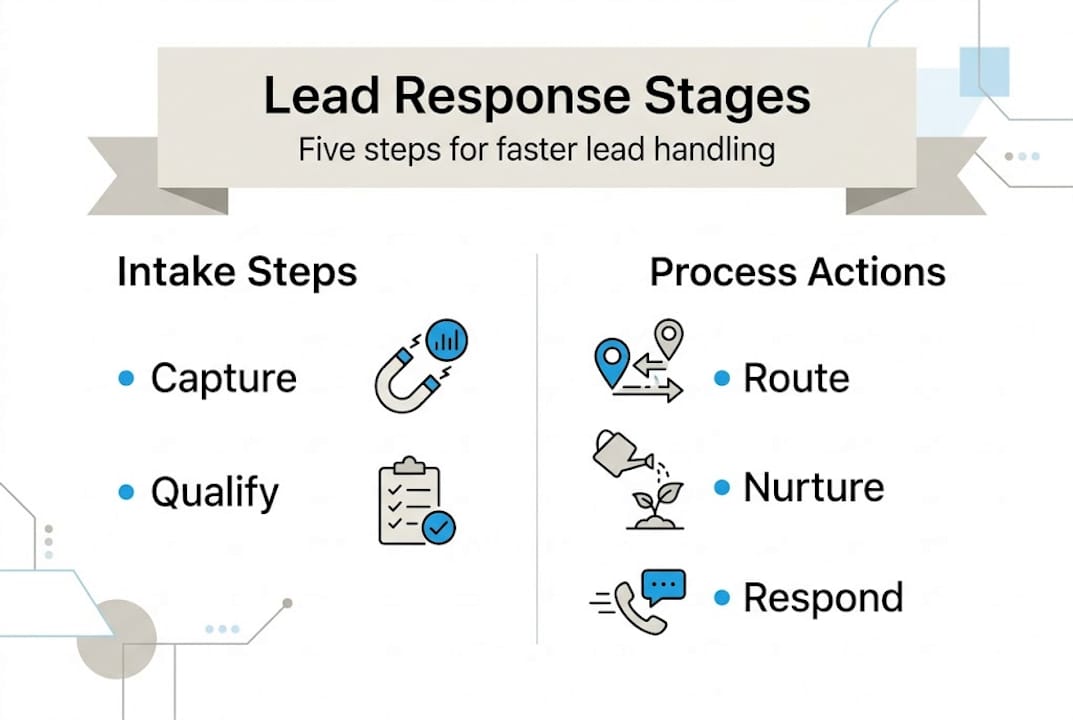
| Stage | Purpose | Typical owner |
|---|---|---|
| Capture | Collect lead data from all channels | Marketing ops |
| Qualify and score | Assess fit and intent | Marketing or rev ops |
| Route | Assign to the right rep or team | CRM automation |
| Nurture and respond | Engage and advance the lead | Sales or SDR |
| Track and improve | Measure cycle times and outcomes | Rev ops or leadership |
Each stage feeds the next. A breakdown at capture creates bad data that breaks routing. Poor routing means leads sit in no-one’s queue. Skipped nurture steps mean warm leads go cold before anyone speaks to them.
For firms investing in scalable lead generation, this structure isn’t optional. It’s the foundation that lets volume campaigns actually convert. Strong lead nurturing in services contexts depends on knowing where each lead stands, which means your tracking stage must feed insights back into every prior step. You can also layer in lead segmentation strategies at the qualify stage to ensure the right message reaches the right prospect at the right moment.
The firms that grow fastest aren’t necessarily generating more leads. They’re processing existing leads better.
Essential tools, data fields, and SLAs you need
Before you automate anything, you need the right infrastructure in place. Trying to build workflows on top of missing data or mismatched tools is like optimizing a leaking funnel.
Your core tech stack should include:
- A CRM (HubSpot, Salesforce, or similar) to serve as the system of record
- A marketing automation platform to handle triggers, sequences, and scoring
- A routing tool or native CRM rules engine to assign leads by defined criteria
- A form or intake layer that enforces minimum required fields before submission
Minimum required data fields for routing:
- Company name and industry
- Job title or seniority level
- Geographic territory
- Service line of interest or inquiry type
- Lead source
Missing or dirty data at intake is the single most common reason routing fails. If your form doesn’t require a territory-identifying field, your automation has nothing to work with and the lead lands in a default queue, which is often no one’s priority.

SLAs give your process teeth. Lead response automation should be SLA-driven and operationalized with automation for routing and stage progression, not left to manual follow-up. A practical SLA framework for professional services might look like this:
| SLA element | Example standard |
|---|---|
| First response time | Within 5 minutes during business hours |
| Owner assignment | Auto-routed within 60 seconds of capture |
| First human outreach | Within 1 business hour |
| Follow-up cadence | 3 touches within 5 business days |
| Escalation trigger | No activity after 24 business hours |
Pro Tip: Always build a triage or fallback queue in your CRM for leads that arrive with incomplete data. This queue should have a dedicated owner who validates and re-routes within the hour, keeping your SLA clock accurate and your pipeline clean.
For teams running strategic messaging for lead gen, pairing message strategy with SLA discipline is what separates campaigns that generate meetings from campaigns that generate noise.
Step-by-step: How to automate and operationalize your lead responses
With your stack and SLAs defined, here’s how to wire it all together into a functioning lead response engine.
- Automate capture. Every lead source, whether LinkedIn, your website, or paid campaigns, should feed directly into your CRM with no manual entry. Use native integrations or middleware like Zapier to eliminate the copy-paste step entirely.
- Set up scoring on intake. Define a simple lead scoring model using fit criteria (title, company size, industry) and intent signals (pages visited, content downloaded). Assign scores automatically on form submission.
- Configure routing rules. Lead routing is the critical mechanism that reduces delays. Route leads to the right owner quickly using defined rules, such as territory, segment, product interest, or deal size, and remove manual handoffs completely.
- Trigger outreach sequences automatically. The moment a lead is routed, fire an automated first-touch message personalized to their intake data. This can be an email, a LinkedIn message, or both. Speed matters here.
- Set reminders and escalation triggers. If the assigned rep doesn’t log activity within a defined window, the CRM should notify their manager or re-route the lead. No lead should age silently.
- Track stage progression. Every move through your pipeline should be timestamp-logged. This is what makes SLA measurement real rather than aspirational.
“The firms consistently winning on response time aren’t faster because they have better reps. They’re faster because their process removes every step that used to require a human decision.”
Pro Tip: Build an after-hours rule set. Leads that arrive outside business hours should be time-stamped on receipt but SLA-clocked from the start of the next business day. This prevents your team from appearing to fail SLAs they couldn’t physically meet, and it keeps reporting honest.
A well-designed personalized prospecting process should plug directly into this automation framework, so that LinkedIn-sourced leads enter your CRM with all the context needed to route and personalize instantly. Your outreach tips for lead generation strategy only pays off when the backend can handle the volume without dropping leads.
Troubleshooting, edge cases, and practical tips
Once your automation is live, real-world messiness will test it. Here’s what to prepare for.
Common issues and quick fixes:
- Missing routing fields: Set up field validation on intake forms to prevent submission without required data. For leads that slip through, the fallback queue owner manually completes validation before re-routing.
- Duplicate leads: Use CRM deduplication rules to merge records automatically on shared email or phone. Without this, one prospect can appear as two separate leads and receive conflicting outreach.
- Re-engaged leads misrouted as new: Leads who return after visiting a pricing page or attending a webinar often re-enter your funnel as fresh contacts. Lifecycle-based automation should detect prior CRM records and route to the original owner rather than creating a new assignment.
- Stale owner assignments: When reps leave or change roles, their unworked leads must be auto-reassigned. Build a monthly audit workflow or a trigger that fires on user deactivation.
- SLA distortion from after-hours leads: Always define what counts as “first touch” explicitly in your SLA documentation, and use business-minute calculations in your reporting rather than calendar-minute totals.
Effective lead response automation requires accounting for edge cases like missing intake fields, after-hours timing, and lifecycle-based re-qualification, not just first-touch speed.
Pro Tip: Partner with your IT or operations team to build field validation at the form level rather than relying on reps to catch errors downstream. Firms working with IT strategies for professional services know that system-level controls outperform process-level reminders every time.
For teams focused on optimizing outreach campaigns, fixing these edge cases isn’t a nice-to-have. It’s the difference between a campaign that shows ROI and one that bleeds qualified leads into the void.
Our perspective: The hidden obstacles and high-reward tweaks in lead management
Most firms we talk to have some version of a lead response process. The problem is it exists mostly in someone’s head, or in a slide deck that never got operationalized. The tools are there. The intent is there. But the discipline around intake data quality and SLA measurement is almost always missing.
Here’s what actually moves the needle. When your reps know that every lead that hits their queue is clean, pre-scored, and arrived within SLA, their confidence goes up and their response quality improves. Routing isn’t just a logistics function. It directly affects rep morale and cycle time because working clean leads feels different from sorting through a messy inbox.
The marginal gain from shaving five minutes off your response time compounds over hundreds of leads. That’s not theory. It’s arithmetic.
Make-or-break tweaks most teams skip:
- Require minimum fields at intake, not after the fact
- Measure SLA in business minutes, not calendar time
- Build re-engagement detection into your lifecycle automation
- Audit routing assignment accuracy monthly, not quarterly
For teams investing in strategic lead response messaging, the message is only as good as the system delivering it. Fix the system first.
Ready to optimize your lead response process?
Building a high-performing lead response process takes more than the right tools. It takes experienced hands to configure the workflows, design the messaging, and close the gaps that silently kill conversions.
The Lead Lab specializes in done-for-you LinkedIn outreach and lead management for professional services firms. From prospect targeting to response workflows and campaign analytics, we handle the operational complexity so your team focuses on closing. Browse our portfolio of success stories to see how firms like yours have accelerated results, or join one of our lead management webinars to go deeper on the tactics covered here. If you’re ready to build a process that actually converts, let’s talk.
Frequently asked questions
What is the optimal response time to a new lead?
Firms should respond within minutes, ideally under one minute, to maximize conversion rates. Faster response times measurably improve both lead qualification and downstream conversion outcomes.
How do you route leads when information is missing or incomplete?
Establish a triage or fallback queue as a safety net and require a minimum set of fields for any lead to enter the main routing workflow. Missing intake fields are the leading cause of routing failure, so preventing gaps at the form level is always preferable to fixing them downstream.
What automation triggers are essential for effective lead response management?
Fundamental triggers include stage progression on outreach completion and auto-routing based on defined segments like territory or deal size. SLA-driven automation for routing and stage progression removes the manual steps that slow most teams down.
How do after-hours leads impact SLA reporting?
After-hours leads can distort your SLA metrics if you measure in calendar minutes rather than business minutes. Business-minute calculations combined with an explicit definition of what counts as first touch ensure your reporting reflects reality, not a misleading clock.
Recommended
- CRM’s potential to drive lead generation: 20-50% lift – The Lead Lab
- Personalized Prospecting Process: Boost B2B Leads – The Lead Lab
- Lead generation strategies that drive results on LinkedIn – The Lead Lab
- What is scalable lead generation? Strategies for growth – The Lead Lab
- Agency leadership for scale: 20% faster pipeline in 2026 – wearebeyondgreatness.co.uk
One Response