
TL;DR:
- Most B2B teams treat CRM as a simple contact list instead of a strategic system.
- Using CRM enhances LinkedIn outreach through better segmentation, personalized messaging, and real-time tracking.
- Strong CRM discipline and data hygiene are essential for scalable, effective outreach results.
Most B2B marketing teams treat their CRM (customer relationship management) system like a glorified address book. They store contacts, log a few notes, and call it a day. That’s a costly mistake. CRM-driven lead generation delivers a 20-50% lift in effectiveness when used strategically, yet most professional services firms still run LinkedIn outreach campaigns without connecting them to a real CRM workflow. The result? Missed follow-ups, duplicated outreach, and leads that quietly disappear. This guide breaks down exactly how CRMs power smarter LinkedIn lead generation, from segmentation to campaign optimization, so your outreach actually converts.
Table of Contents
- Why CRM is essential for modern outreach
- How CRMs supercharge LinkedIn outreach campaigns
- Designing an effective B2B outreach workflow using CRM
- Measuring and optimizing outreach for better ROI
- The overlooked power of CRM in outreach: Beyond the basics
- Scale your LinkedIn outreach with expert CRM strategies
- Frequently asked questions
Key Takeaways
| Point | Details |
|---|---|
| CRM centralizes outreach | Contact and campaign data lives in one place for consistent LinkedIn lead generation. |
| Segmentation boosts results | CRMs enable precise targeting for relevant, high-conversion campaigns. |
| Metrics drive optimization | Track key outreach data within your CRM to improve response and conversion rates. |
| Process trumps tools | Sustained ROI comes from disciplined CRM process, not just adopting new technology. |
Why CRM is essential for modern outreach
Spreadsheets feel manageable until they don’t. The moment your LinkedIn outreach scales beyond 50 active prospects, you’re juggling follow-up dates, message history, and deal stages across a document that was never built for that job. A CRM changes everything. It’s not just a better spreadsheet. It’s a system that thinks alongside your sales process.
Modern CRMs centralize contact data, streamline follow-ups, and prevent lost leads from falling through the cracks. That means your team always knows where a prospect stands, what was said last, and what needs to happen next. No guesswork. No duplication. No awkward “Did someone already reach out to this person?” moments.
For LinkedIn outreach specifically, CRM integration creates three compounding advantages:
- Faster follow-up: Automated reminders trigger at the right moment, not when someone happens to check a spreadsheet
- Personalized messaging: Every message pulls from stored context, so your outreach feels relevant rather than templated
- Performance visibility: You can see which outreach sequences are working and which are wasting your team’s time
Without a CRM anchoring your LinkedIn efforts, B2B teams face a predictable set of problems. Leads get contacted twice by different team members. Promising conversations fall silent because no one set a follow-up task. Conversion data is scattered across inboxes and notebooks. These aren’t small inefficiencies. They’re the reason good lead nurturing strategies fail in execution even when the targeting was solid.
“The biggest CRM mistake in outreach isn’t picking the wrong tool. It’s using the right tool the wrong way — as storage instead of a system.”
Think of your CRM as the operating system for your outreach. LinkedIn is the channel. The CRM is the intelligence layer behind it. When those two work together, your outreach becomes a repeatable, scalable engine rather than a series of one-off attempts.
How CRMs supercharge LinkedIn outreach campaigns
With CRM’s foundational importance clear, let’s break down the specific ways CRMs elevate LinkedIn outreach results.
The first major advantage is segmentation. LinkedIn segmentation strategies improve lead targeting and campaign results by letting you group prospects based on industry, seniority, company size, or behavior. Instead of sending the same message to a CFO at a 500-person firm and an operations manager at a 10-person startup, your CRM enables you to craft distinct sequences that speak directly to each segment’s pain points.
Here’s how a CRM-powered LinkedIn outreach process typically flows:
- Import and tag prospects by segment using CRM custom fields (industry, role, company revenue)
- Build message templates that pull dynamic fields from those CRM records for personalization
- Set automated follow-up sequences with defined timing gaps between each touchpoint
- Log every LinkedIn interaction back into the CRM contact record for full conversation history
- Track reply rates and conversion per segment to identify your highest-performing audience
Pro Tip: Don’t just personalize with first names. Use CRM fields like “recent company news” or “shared connection” to make your LinkedIn opener feel genuinely researched, not just mail-merged.
Personalization at scale is where most teams underestimate the CRM’s role. Manually customizing every LinkedIn message is impossible beyond a small number of prospects. But customized LinkedIn campaigns built on CRM data fields let you achieve that personalized feel across hundreds of prospects simultaneously.
| Feature | Without CRM | With CRM |
|---|---|---|
| Follow-up consistency | Manual, often missed | Automated, scheduled |
| Message personalization | Generic templates | Dynamic, data-driven fields |
| Lead tracking | Scattered notes | Centralized history |
| Campaign ROI visibility | Unclear | Real-time dashboards |
| Team coordination | Risk of duplication | Shared, synced records |
Tracking ROI is the other area where CRM integration pays off visibly. Every message sent, every reply received, and every meeting booked gets logged. When you’re reviewing outreach campaign ideas and wondering which ones actually drive pipeline, your CRM gives you the answer instead of a guess.

Designing an effective B2B outreach workflow using CRM
So how do you put CRM features into play for a real B2B outreach campaign? Here’s a proven workflow.
The key is to map your outreach to defined pipeline stages inside the CRM. Each stage should trigger a specific action, and each action should generate data you can learn from. Scalable lead generation depends on CRM workflows that drive consistent handoff between marketing and sales, without relying on individual memory or habit.
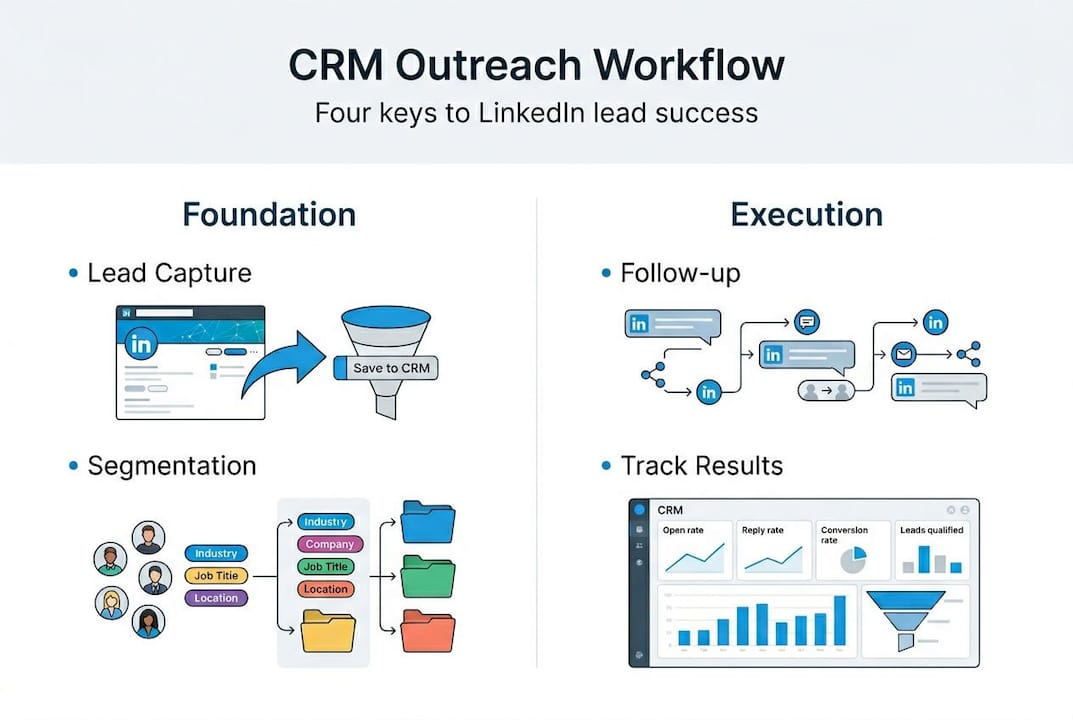
| Outreach phase | CRM action | Goal |
|---|---|---|
| Connection request | Create contact, assign segment tag | Establish initial touchpoint |
| Acceptance | Trigger welcome message sequence | Begin relationship |
| Pitch message | Log send, set reply reminder | Qualify interest |
| Follow-up | Automated nudge at 5 and 10 days | Maintain engagement |
| Lead qualification | Score based on reply and engagement | Prioritize for sales handoff |
Here’s the step-by-step workflow to implement this inside your CRM:
- Capture all LinkedIn leads into the CRM immediately upon connection, with source and segment tagged
- Assign a lead score based on seniority, company fit, and engagement level with your messages
- Automate your message cadence so each stage of the sequence fires without manual triggering
- Flag high-score leads for personal outreach by a senior team member or account executive
- Run a weekly review of CRM pipeline data to identify stalled leads and adjust messaging
Pro Tip: Build a “lead rescue” filter in your CRM that surfaces any prospect who received 3+ messages without a reply. A fresh, shorter message sent after a 2-week pause often reactivates cold leads that seemed lost.
The handoff between marketing and sales is where most outreach workflows break. A lead warms up through LinkedIn engagement, gets passed to sales with zero context, and the momentum dies. CRM workflows solve this by attaching full conversation history, lead score, and engagement notes to every handoff. Sales walks in prepared, not starting from scratch.
Measuring and optimizing outreach for better ROI
Once your outreach workflow is running, the real value comes from tracking and optimizing using CRM data.
Most teams track one metric: did this person reply? That’s a starting point, but it misses the full picture. Here are the metrics that actually reveal campaign health:
- Response rate by segment: Which audience types are engaging most with your LinkedIn messages?
- Conversion rate from reply to meeting: Are replies translating into actual pipeline, or just polite declines?
- Time-to-close: How long does a prospect take to move from LinkedIn connection to qualified lead?
- Message sequence performance: Which step in your cadence gets the most replies? Which one causes drop-off?
- A/B test results: Are subject-line variants or opener changes moving the needle on engagement?
CRM dashboards let you monitor all of this in real time. You’re not waiting for a monthly report. You’re watching the campaign breathe and adjusting as you go.
“The teams that win at LinkedIn outreach are the ones who treat their CRM data as a feedback loop, not a filing cabinet.”
Outreach optimization for lead quality is what separates firms that grow through LinkedIn from those that plateau. The difference is almost always data discipline. When you know which segments convert fastest, which message sequences drive meetings, and which outreach timing works best for your audience, every new campaign starts smarter than the last.
A/B testing inside your CRM doesn’t require a massive sample size. Even 50 conversations split across two message variants will show you meaningful directional data. Test one variable at a time: the opener, the call to action, or the follow-up timing. Let the CRM track the results, then scale the winner.
The overlooked power of CRM in outreach: Beyond the basics
Here’s something most LinkedIn outreach guides won’t tell you: the tool matters less than the discipline around it.
We see professional services firms invest in premium CRM platforms, spend weeks on setup, and then fall back into old habits within a month. Messages don’t get logged. Lead scores don’t get updated. Follow-up tasks pile up unmarked. The CRM becomes expensive software gathering digital dust.
The real differentiator isn’t which CRM you use. It’s whether your team has built the habits and accountability structures that make CRM data trustworthy. If your data is stale or inconsistently logged, your segmentation breaks, your personalization misfires, and your optimization becomes guesswork.
The best outreach teams we’ve worked with treat CRM reviews as a non-negotiable rhythm, not a quarterly chore. They check pipeline data weekly, flag anomalies, and hold brief retrospectives on what’s working. That discipline is what turns a decent CRM into a serious growth asset.
Building strategic B2B messaging on top of clean, well-maintained CRM data produces compounding returns. The longer you invest in good data hygiene, the sharper your targeting becomes. Most firms underestimate this compounding effect because they abandon the practice before the returns show up.
Adopting a CRM is the easy part. Building a culture of process discipline around it is where the actual work lives.
Scale your LinkedIn outreach with expert CRM strategies
If you’re ready to move beyond ad hoc outreach and build a CRM-powered LinkedIn engine, The Lead Lab LinkedIn outreach team is built exactly for this. We design and execute done-for-you LinkedIn campaigns that integrate CRM workflows, personalized messaging, and campaign analytics from day one.
You don’t have to figure out segmentation, lead scoring, and outreach sequencing alone. Browse our client success stories to see how professional services firms like yours have used CRM-driven outreach to fill their pipelines with qualified meetings. Or join one of our CRM and outreach webinars to see these strategies applied live. Book a free consultation and let’s map out what a CRM-powered LinkedIn campaign looks like for your firm.
Frequently asked questions
What is the main advantage of using a CRM in LinkedIn outreach?
A CRM centralizes contact data, automates follow-ups, and enables personalized messaging at scale, which directly raises outreach response rates and reduces the manual effort your team carries.
How does CRM segmentation improve LinkedIn lead generation?
Segmentation via CRM allows you to tailor messages to specific audience groups, so your LinkedIn campaigns reach the right prospects with relevant messaging instead of broadcasting generic content.
What CRM metrics should I track to optimize my outreach campaigns?
Prioritize response rate, reply-to-meeting conversion rate, and A/B test sequence performance. These three together reveal exactly where your outreach optimization efforts should focus to move ROI.
Can small teams benefit from CRM-driven outreach?
Absolutely. Scalable CRM workflows allow even a two-person team to run consistent, measurable LinkedIn campaigns without losing track of leads or missing follow-up windows.