TL;DR:
- Generic LinkedIn outreach often results in wasted effort due to lack of a targeted, signal-driven process. Building a reliable workflow involves defining a precise Ideal Customer Profile, leveraging tools like Sales Navigator, and executing daily multi-touch sequences. Success depends on patience, context-aware messaging, and coordinated multi-channel follow-up rather than volume or templates alone.
Generic LinkedIn outreach is one of the most reliable ways to waste your business development budget. You send a wave of connection requests, copy-paste a vague pitch, and then wonder why nobody replies. The uncomfortable reality is that most professional services firms are not struggling with LinkedIn itself. They are struggling with the absence of a repeatable, signal-driven process for reaching real decision makers. This guide walks you through every step of building that process: from defining who you actually want to reach, to executing daily outreach routines that consistently convert cold contacts into qualified, booked meetings.
Table of Contents
- What you need to target decision makers effectively
- Step-by-step: The daily decision-maker targeting workflow
- Avoiding workflow pitfalls and multitouch mistakes
- Optimizing messaging for decision-makers: Relevance and timing
- What most LinkedIn outreach guides miss about real-world decision maker workflows
- Ready to accelerate your decision-maker targeting workflow?
- Frequently asked questions
Key Takeaways
| Point | Details |
|---|---|
| Workflow beats random outreach | A structured step-by-step workflow consistently outperforms ad hoc LinkedIn prospecting. |
| Follow-up drives results | Most positive responses come from sequenced touchpoints after your first message. |
| Sync channels for success | Align LinkedIn and email outreach to feel like a single, coordinated conversation with each decision maker. |
| Relevance is key | Tailored, activity-based messaging consistently earns more replies from true decision makers. |
What you need to target decision makers effectively
To create a reliable workflow, you first need to lay the right groundwork. Skipping this step is why so many outreach efforts feel random and yield inconsistent results.
Define your Ideal Customer Profile
Your Ideal Customer Profile (ICP) is not a vague description like “B2B companies in finance.” It is a tightly scoped profile that names the job titles, company sizes, industries, geographies, and pain points that map directly to your service offering. A LinkedIn outreach workflow starts with defining an ICP and building a targeted list outside of the default home feed, because that feed surfaces content based on engagement algorithms, not your strategic priorities.
Start by looking at your five best clients. What do they have in common? Not just industry, but also growth stage, team size, budget signals, and the specific problems that made them seek you out. That pattern becomes your ICP.
Build your targeting stack
With your ICP locked, you need the right tools to operationalize it. Here is what a solid targeting stack looks like for professional services:
- LinkedIn Sales Navigator: The core tool for finding and filtering decision makers by title, seniority, function, company growth signals, and recent job changes
- CRM or lead list: A spreadsheet or platform where you log prospects, track outreach stages, and record replies
- Alert system: Sales Navigator’s built-in alerts notify you when a target changes roles, engages with content, or appears in the news
- Optional enrichment tools: Platforms that append email addresses or phone numbers for multichannel follow-up
Sales Navigator’s advanced filtering and alerting capabilities are what separate a targeted workflow from random browsing. You can filter by Boolean keywords, department headcount, and even recent activity to find the exact person at the exact company who fits your ICP.
Pro Tip: Build a dedicated “Decision Maker” list in Sales Navigator with no more than 200 active prospects at any time. Smaller, actively managed lists outperform massive, neglected ones every time.
| Tool | Primary use | Key benefit |
|---|---|---|
| Sales Navigator | Prospect discovery and filtering | Precision ICP targeting |
| CRM or spreadsheet | Pipeline tracking | Workflow visibility |
| Alert tools | Trigger monitoring | Timely, relevant outreach |
| Email enrichment | Multichannel sequencing | Broader reach |
Knowing the common workflow pitfalls to avoid before you launch will save you from rebuilding your process after early failures. Get the groundwork right, and everything downstream becomes far more predictable.
For a deeper orientation on the platform’s capabilities, the LinkedIn Sales Navigator essentials guide covers the features most relevant to professional services outreach leaders.
Step-by-step: The daily decision-maker targeting workflow
With tools and prerequisites ready, it is time to put a high-impact workflow into action.
A 5-step LinkedIn workflow moves prospects from stranger to meeting through a structured sequence: targeted feed, meaningful comments, watching for signals, personalized connect and DM, and systematized follow-up. Here is how each step plays out in practice.
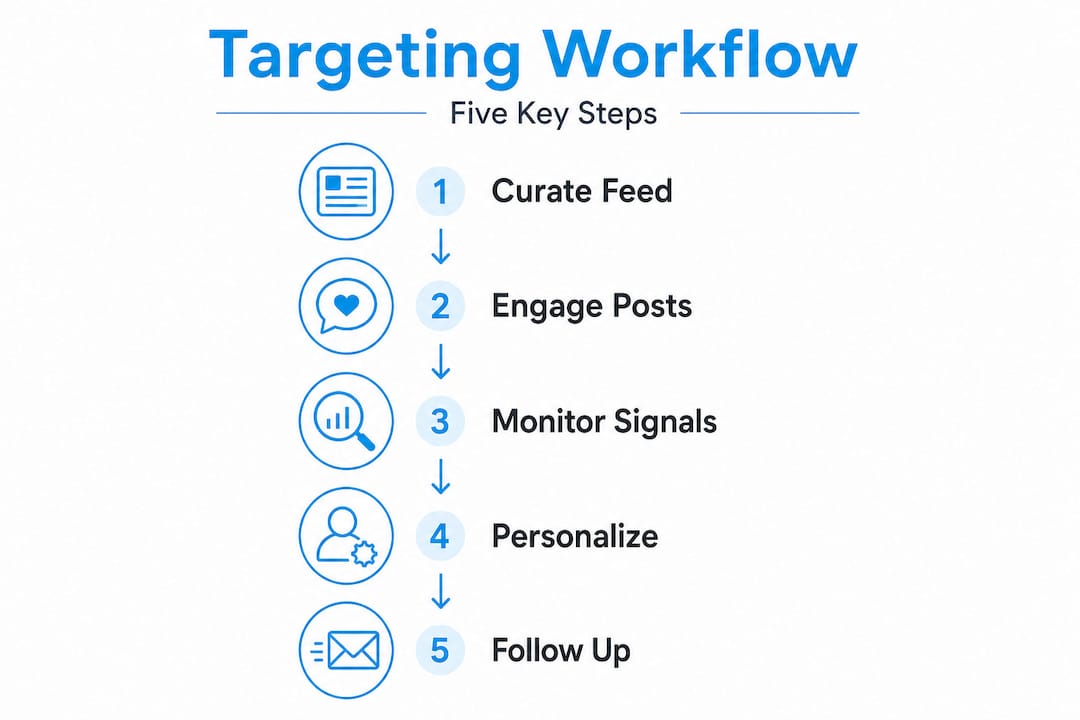
Step 1: Build and curate your targeted feed
Every morning, spend 10 minutes in your Sales Navigator list reviewing recent activity from your saved leads. You are not scrolling your general feed. You are looking for who posted, who commented on a relevant thread, or who just changed roles. These are your warm entry points for the day.

Step 2: Engage with content before connecting
Before you send a connection request, leave one or two thoughtful comments on your target’s recent posts. Not “Great post!” but a genuine reaction that adds a perspective or asks a relevant question. This plants your name in their memory and makes your connection request feel far less cold.
Step 3: Monitor for warm signals
Set up alerts in Sales Navigator to notify you when prospects change jobs, get mentioned in news, or engage with specific topics. A decision maker who just moved to a new role is actively building their vendor shortlist. A prospect who just liked a post about a challenge you solve is signaling a pain point. These signals are gold.
Step 4: Send personalized connection requests and DMs
This is where most firms get it wrong. They send the default LinkedIn request or paste a generic intro. Instead, reference the specific signal: the post they wrote, the comment they made, or the role they just started. Keep your connection note under 280 characters. After they accept, wait 24 to 48 hours, then send a short, value-led DM.
Here is a sample opener that consistently performs well:
“Hi [Name], saw your recent post on [topic] and found your take on [specific point] genuinely useful. We work with [ICP type] firms on [relevant outcome]. Would a quick 20-minute chat make sense?”
Short. Specific. Easy to say yes to.
Step 5: Systematized follow-up
Here is the data most people ignore: meeting rates spike after multiple touches, and follow-up messages account for up to 70% of all responses. One message is not a campaign. It is a one-way broadcast. Build a sequence of four to five touches spread across two to three weeks.
| Activity | Tool | Objective | Tip |
|---|---|---|---|
| Prospect review | Sales Navigator | Identify warm leads | Filter by recent activity |
| Content engagement | LinkedIn feed | Warm up cold prospects | Comment before connecting |
| Signal monitoring | Sales Navigator alerts | Catch key trigger moments | Set daily alert reviews |
| Connect and DM | LinkedIn messaging | Open the conversation | Reference a specific signal |
| Follow-up sequence | CRM plus LinkedIn | Drive toward a meeting | Space touches 3–5 days apart |
When a prospect does not reply on LinkedIn after two touches, move to email with full context intact. Reference your LinkedIn connection and the topic you mentioned. This preserves continuity and avoids the “who is this?” reaction.
For proven outreach campaign ideas that work in professional services, and detailed guidance on how to craft impactful outreach messages, both resources go deeper on the copy and sequencing mechanics.
Pro Tip: Schedule your daily workflow in a 30-minute block at the same time each morning. Consistency compounds. Prospects who see your name repeatedly in their notifications register you as present and credible long before they reply.
Avoiding workflow pitfalls and multitouch mistakes
Even with a well-designed workflow, awareness of workflow risks helps you avoid losing key opportunities.
The coordination problem
Disjointed, uncoordinated outreach across LinkedIn and email leads to confusion and poor response experiences. A prospect who receives a LinkedIn DM on Monday and a cold email on Tuesday from the same person, with different messaging, reads that as either careless or manipulative. Either way, it kills trust.
Use a single tracking document or CRM to log every touchpoint across every channel. The rule is simple: if they reply anywhere, all outreach stops immediately and you shift to conversation mode.
Common mistakes that undermine otherwise strong workflows:
- Sending follow-ups too quickly: Back-to-back messages within 24 hours feels aggressive, not persistent
- Inconsistent messaging across channels: LinkedIn says one thing, email says something else, prospect gets confused
- Stopping too soon: Most firms quit after one or two touches. Sequences that stop after one touch massively underperform compared to four-to-five-touch sequences
- No pause on reply: Continuing automated follow-ups after a manual reply has already been sent is one of the fastest ways to annoy a warm prospect into silence
- Ignoring engagement cues: If someone views your profile three times and does not reply, that is a warm signal, not a rejection. A soft, curiosity-led follow-up at that moment often converts
“The biggest workflow killer is not bad copy. It is sending the right message on the wrong day through the wrong channel because you are not tracking where each conversation actually stands.”
For a detailed breakdown of the LinkedIn outreach mistakes professional services firms make most often, and how to apply smart follow-up best practices, both resources are worth reviewing before you run your first sequence.
Pro Tip: Add a “channel status” column to your CRM: LinkedIn active, email active, or replied. Update it every time you send or receive anything. This simple habit prevents the most common coordination failures.
Optimizing messaging for decision-makers: Relevance and timing
Now that you know what to avoid, let us ensure every message pushes response rates upward.
Why activity-triggered messages win
Brief LinkedIn messages tailored to recipient activity, such as referencing a recent post or mutual connection, outperform cold, generic scripts. The reason is psychological: a message that demonstrates you actually paid attention signals that you are not a bot running a blast campaign. Decision makers receive dozens of pitches a week. The ones that stand out always begin with something specific and earned.
The highest-performing openers tend to follow one of these patterns:
- Reference a post the prospect published in the last seven days
- Mention a shared connection who can serve as a bridge
- Acknowledge a company announcement or funding round
- Note a comment they left on a third-party post about a relevant topic
Each of these shows context and relevance without requiring a long, elaborate introduction.
Timing your messages for maximum impact
Timing matters more than most people realize. The best moments to reach out include:
- Within 48 hours of a job change or promotion
- Within 24 hours of a relevant post or public comment
- After a mutual connection makes an introduction
- Monday through Thursday, between 8 and 10 a.m. in the prospect’s time zone
Key stat: Between 50 and 70% of all responses in a LinkedIn sequence occur on messages two through four. The first message sets context. The follow-ups close the loop.
Sample CTAs that move conversations forward naturally
Avoid asking for a 45-minute call in the first message. That ask is too large for someone who does not know you yet. Instead, use low-friction CTAs:
- “Would it be useful to share a quick example of how we solved this for a similar firm?”
- “Happy to send over a short case study if that would be helpful.”
- “Would a 15-minute call next week work if this sounds relevant?”
Each of these gives the prospect an easy out while still moving the conversation toward a meeting. Explore more techniques in our guides on personalized LinkedIn messaging and LinkedIn messaging tips for converting leads into appointments. You can also see how customized outreach strategies apply these principles across full campaigns.
Pro Tip: Write every message as if you are sending it to one person, even if you are using a template. Read it aloud before sending. If it sounds like a sales robot wrote it, rewrite it until it does not.
What most LinkedIn outreach guides miss about real-world decision maker workflows
Here is the honest, uncomfortable observation from working inside professional services outreach at scale: most LinkedIn guides treat “workflow” as a synonym for “checklist.” Follow these seven steps, use these templates, and you will get meetings. But real workflow discipline is a mindset, not a mechanical sequence.
The firms that consistently book qualified meetings do not have better templates than everyone else. They have better judgment about timing. They know when to push and when to wait. They recognize that a prospect who views your profile twice in three days but does not reply is not a dead lead. It is a prospect doing due diligence. The right response is patience and one well-timed nudge, not a frustrated follow-up demanding a reply.
Another thing most guides get wrong: the obsession with volume. More connections, more messages, more automation. But optimizing for quality often means running fewer, deeper conversations with highly targeted prospects rather than spray-and-pray sequences. One conversation with a true decision maker who has budget authority and an active need is worth fifty surface-level connections with vaguely relevant job titles.
The contrarian truth is this: the bottleneck in most professional services LinkedIn outreach is not message quality or tool selection. It is the willingness to be genuinely patient and strategic between touchpoints. Blasting is not a workflow. It is just noise at scale.
Ready to accelerate your decision-maker targeting workflow?
Building and running this kind of workflow in-house takes real time, consistent execution, and ongoing iteration. If your firm does not have bandwidth to manage it all, or you want to see what a fully built-out, high-conversion campaign looks like before you commit resources to building one yourself, that is exactly where The Lead Lab comes in.
The Lead Lab designs and runs done-for-you LinkedIn outreach campaigns built specifically for professional services firms. From ICP definition and prospect targeting to message sequencing, response management, and analytics, every component is handled by a team that runs these workflows daily. Browse real lead generation results from firms in your space, or join one of our webinars on LinkedIn targeting to see the strategies in action before you take the next step.
Frequently asked questions
What is the typical response rate with targeted LinkedIn outreach?
With a well-executed workflow and consistent follow-up, response rates often range from 20 to 40%, especially when using personalized messages and sequenced touchpoints. Follow-up messages account for 50 to 70% of total responses, making sequence length a critical variable.
How do I coordinate LinkedIn and email outreach without spamming decision makers?
Use a centralized workflow that pauses all outreach channels the moment a prospect replies on either one, preventing disjointed or overlapping communications. As the SalesTarget playbook notes, outreach should feel like a single conversation, not parallel pitches.
What is the best way to personalize LinkedIn connection requests?
Reference a recent post, a mutual connection, or an activity the prospect engaged in to show genuine interest and relevance. Messages referencing recent activity or mutual connections consistently outperform generic connection templates.
Is it necessary to use Sales Navigator for targeting decision makers?
While not strictly required, Sales Navigator makes targeting dramatically more efficient through its precision filters and alerting system. Sales Navigator’s advanced filtering and lead alerts streamline the entire targeting and monitoring process for professional services outreach teams.