
Most sales professionals treat LinkedIn like a digital Rolodex, scrolling past a tool that could transform their pipeline. LinkedIn Sales Navigator sits unused in browser tabs, dismissed as just another premium feature. Yet this platform drives 10-20x ROI for deals over $10,000, turning cold outreach into warm conversations through advanced targeting and timely engagement signals. This guide breaks down what LinkedIn Sales Navigator actually is, how its core features support targeted lead generation, and the response benchmarks you should expect when using it strategically.
Table of Contents
- Key takeaways
- Understanding LinkedIn Sales Navigator’s core features
- Mastering lead generation mechanics with Sales Navigator
- Evaluating ROI and response benchmarks for LinkedIn Sales Navigator
- Leverage expert support to maximize your Sales Navigator results
- Frequently asked questions
Key Takeaways
| Point | Details |
|---|---|
| Advanced targeting filters | Sales Navigator offers over 50 filters to identify decision makers who match your ideal customer profile. |
| Real time alerts | Real time alerts notify you when saved leads engage or change roles so you can strike at the right moment. |
| InMail and AI tools | InMail credits plus AI tools enable personalized outreach at scale without relying on cold connections. |
| Warm introductions via TeamLink | TeamLink surfaces warm referral paths through colleagues to boost connection acceptance rates. |
| ROI benchmarks | The platform delivers ten to twenty times ROI on deals over ten thousand dollars when used strategically. |
Understanding LinkedIn Sales Navigator’s core features
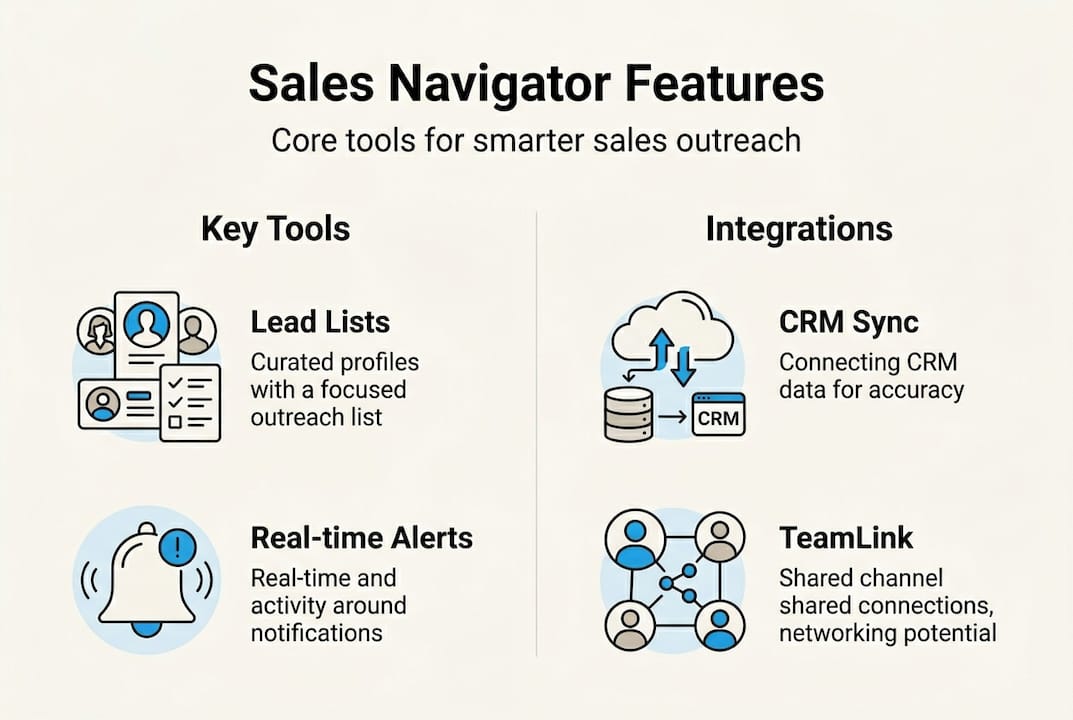
LinkedIn Sales Navigator transforms basic LinkedIn functionality into a precision targeting engine. The platform provides over 50 advanced search filters that let you narrow prospects by job function, seniority level, company size, industry, geography, and even recent activity like job changes or content engagement. This granularity means you can build lead lists of decision makers who match your ideal customer profile with surgical accuracy, eliminating hours of manual research.
Real-time alerts keep you informed when saved leads or accounts trigger engagement signals. You receive notifications when prospects view your profile, change jobs, share content, or get mentioned in the news. These alerts create natural conversation starters and help you reach out when prospects are most receptive. Timing matters in sales, and these signals tell you exactly when to strike.
InMail messaging gives you direct access to prospects outside your network. The Core plan includes 50 InMail credits monthly, letting you bypass connection requests and start conversations immediately. Effective InMail focuses on specific pain points and offers genuine value rather than generic pitches. The key is personalization at scale, referencing recent posts or company news to demonstrate you have done your homework.
CRM integrations streamline your workflow by syncing Sales Navigator data with platforms like Salesforce, HubSpot, and Microsoft Dynamics. Lead information, notes, and activity history flow automatically between systems, eliminating duplicate data entry and ensuring your team works from a single source of truth. This integration means insights from Sales Navigator immediately inform your broader sales process.
TeamLink reveals warm introduction paths through your colleagues’ networks. When researching a prospect, you can see which team members share connections and request introductions. Warm referrals dramatically outperform cold outreach, yet most users ignore this feature. Prioritizing TeamLink introductions can boost your connection acceptance rates significantly.
AI-powered tools like Account IQ, Lead IQ, and Message Assist optimize your targeting and messaging. Account IQ surfaces key insights about target companies, Lead IQ recommends prospects based on your saved leads, and Message Assist suggests personalized message templates. These tools help you work smarter, not just harder, by pointing you toward the highest-value opportunities.
Exploring our portfolio shows how professional services firms apply these features to build systematic lead generation engines.
Pro Tip: Most users undervalue TeamLink connections. Prioritizing warm introductions through colleague networks can significantly boost connection acceptance rates compared to cold outreach alone.
Mastering lead generation mechanics with Sales Navigator
Boolean search operators transform basic keyword searches into precision targeting instruments. Using AND combines multiple criteria that must all be present, OR expands results to include any matching term, and NOT excludes unwanted results. For example, searching “VP AND (marketing OR sales) NOT agency” finds VP-level marketing or sales leaders who don’t work at agencies. This syntax lets you build complex queries that mirror your ideal customer profile exactly.
Layering filters creates increasingly refined prospect lists. Start broad with industry and company size, then add job title and seniority level. Next, apply activity filters like “posted on LinkedIn in past 30 days” to find engaged users, or “changed jobs in past 90 days” to catch professionals settling into new roles. Each additional filter narrows your list, ensuring you contact only the most relevant prospects.
Follow this systematic approach:
- Define your ideal customer profile with specific job titles, industries, company sizes, and geographic regions that match your best current clients.
- Build your initial search using Boolean operators and 5-7 core filters that capture your ICP’s essential characteristics.
- Save your search and create a lead list, naming it clearly so you can track performance by segment over time.
- Set alerts for saved leads to receive notifications about profile views, job changes, posts, and mentions that signal engagement or transition moments.
- Review alerts daily and prioritize outreach to prospects showing recent activity, as engagement spikes indicate higher receptiveness to new conversations.
- Refine your filters weekly based on which segments generate the highest response rates and meeting bookings.
Saved lead lists become your prospecting database. Sales Navigator lets you organize prospects into multiple lists, tag them with custom labels, and add notes about their interests or pain points. This organization ensures you can segment outreach campaigns and personalize messaging based on specific characteristics. Lists also make it easy to track which segments convert best, informing future targeting decisions.

Intent signals reveal when prospects are actively researching solutions or experiencing changes that create buying opportunities. Profile views indicate interest, content engagement shows alignment with your messaging, and job changes create windows when new leaders evaluate vendors. Setting alerts for these signals means you reach out when prospects are most open to conversation, dramatically improving response rates.
The mechanics work best when you treat Sales Navigator as a research and timing tool rather than a mass outreach platform. Quality trumps quantity. A smaller list of highly targeted prospects with personalized messaging outperforms broad campaigns every time. The Lead Lab applies these mechanics systematically, building campaigns around precise targeting and timely engagement rather than spray-and-pray approaches.
Pro Tip: Review your alerts each morning to identify engagement spikes from saved leads. Reaching out within 24 hours of a profile view or content interaction significantly improves response rates compared to delayed follow-up.
Evaluating ROI and response benchmarks for LinkedIn Sales Navigator
Understanding realistic performance benchmarks helps you set appropriate expectations and measure campaign effectiveness. Sales Navigator delivers 10-20x ROI for deals valued at $10,000 or more, making it a worthwhile investment for professional services firms and B2B companies with substantial contract values. The key is consistent execution over months, not weeks, as relationship-building takes time.
Response rates vary by message type and targeting precision. InMail messages achieve approximately 31% response rates when personalized effectively, far exceeding cold email benchmarks. Connection requests see 72% acceptance rates when you reference shared connections or mutual interests. Follow-up messages to accepted connections generate around 15% response rates, highlighting the importance of strong opening messages that establish credibility and relevance.
| Metric | Benchmark | Notes |
|---|---|---|
| InMail Response Rate | 31% | Requires personalized messaging referencing prospect’s recent activity or pain points |
| Connection Acceptance | 72% | Higher with warm introductions through TeamLink or shared group membership |
| Message Response Rate | 15% | Follow-up messages to accepted connections; timing and value proposition critical |
| Expected ROI | 10-20x | For deals over $10,000; requires consistent 3-6 month campaigns with proper nurturing |
Calculating ROI involves tracking revenue generated from Sales Navigator sourced leads and dividing by your subscription cost plus time investment. If you close three $15,000 deals per quarter from Sales Navigator campaigns, that is $45,000 in revenue. With a Core subscription at roughly $1,000 annually plus 10 hours monthly of prospecting time valued at $100/hour, your total investment is approximately $13,000. This yields a 3.5x ROI, which compounds as you refine targeting and messaging over time.
Tracking performance requires disciplined measurement. Tag leads by source in your CRM, noting which came from Sales Navigator campaigns. Monitor response rates by message template and prospect segment. Calculate cost per meeting and cost per closed deal. These metrics reveal which targeting criteria and messaging approaches work best for your specific market, allowing continuous optimization.
“Consistent tracking and optimization separate Sales Navigator users who see marginal results from those achieving 10-20x returns. The platform provides data; success comes from analyzing that data and adjusting your approach based on what actually drives meetings and revenue.”
Exploring Sales Navigator ROI insights helps you understand how professional services firms structure campaigns to hit these benchmarks consistently rather than sporadically.
Leverage expert support to maximize your Sales Navigator results
Mastering LinkedIn Sales Navigator takes months of testing, refinement, and consistent execution. Professional services firms often lack the bandwidth to experiment while maintaining client delivery. The Lead Lab specializes in building done-for-you LinkedIn outreach campaigns that apply these Sales Navigator strategies systematically, handling prospect targeting, message copywriting, response management, and performance analytics so you focus on closing deals rather than prospecting mechanics.
Our team has refined targeting frameworks and messaging templates across dozens of professional services verticals, compressing your learning curve from months to weeks. We handle the daily prospecting grind, alert monitoring, and follow-up sequencing while you receive qualified meeting requests. Explore our service portfolio to see case studies from firms similar to yours and understand how expert support accelerates results compared to solo efforts.
Pro Tip: Collaborating with LinkedIn outreach specialists accelerates your learning curve and improves lead quality significantly compared to trial-and-error solo campaigns, letting you focus energy on closing rather than prospecting.
Frequently asked questions
What is LinkedIn Sales Navigator used for?
LinkedIn Sales Navigator is a premium B2B sales tool designed for targeted lead generation and prospect engagement. It helps sales professionals identify decision makers matching specific criteria, track engagement signals indicating buying intent, and reach prospects directly through InMail messaging. The platform transforms LinkedIn from a passive networking site into an active prospecting engine for professional services firms and B2B companies.
How does Boolean search improve lead targeting in Sales Navigator?
Boolean search uses AND, OR, and NOT operators to combine or exclude search criteria, creating highly specific prospect lists. AND requires all terms to be present, OR expands results to include any matching term, and NOT excludes unwanted results. This precision eliminates irrelevant prospects and ensures your outreach focuses only on leads matching your ideal customer profile exactly.
What are realistic response rates when using InMail on Sales Navigator?
InMail messages achieve approximately 31% response rates when personalized effectively, far exceeding typical cold email benchmarks of 1-3%. Success requires referencing specific details about the prospect’s recent activity, company challenges, or shared connections rather than sending generic pitches. Personalization at scale, not mass messaging, drives these response rates.
How can CRM integrations enhance Sales Navigator workflows?
CRM integrations automatically sync lead data, notes, and activity history between Sales Navigator and platforms like Salesforce or HubSpot. This eliminates duplicate data entry, ensures your team works from a single source of truth, and allows Sales Navigator insights to inform your broader sales process seamlessly. Integration saves hours weekly and reduces errors from manual data transfer.
How long does it take to see ROI from Sales Navigator campaigns?
Most professional services firms see initial meetings within 4-6 weeks of consistent outreach, with measurable ROI emerging after 3-6 months of sustained campaigns. Relationship-building takes time, especially for high-value deals. Early months focus on building your saved lead lists, testing messaging, and establishing credibility, while later months benefit from compounding relationships and referrals from initial conversations.
This blog is a great mix of informative and entertaining content It keeps me engaged and interested from start to finish