
TL;DR:
- A strong job introduction email is concise, personalized, and ends with a clear, low-friction call to action. Personalization, a specific reason for reaching out, and a single CTA significantly increase reply and open rates. Writing about the recipient’s needs rather than yourself drives more meaningful connections and higher engagement.
A great job introduction email does one thing well: it lowers the barrier to reply. Keep it under 150 words, lead with a specific reason you’re reaching out, and close with a single low-friction ask. Here are three copy-and-send templates to get you started.
Template A: Introducing a new hire internally
Subject: Meet [Name], your new [Role]
Hi team, I’m thrilled to introduce [Name], who joins us as [Role] starting [Date]. [Name] brings [one specific skill or background detail] and will be focused on [project or area]. Reach out directly at [email] or find [him/her/them] on Slack at @[handle]. [Name] will be connecting with each of you over the next few weeks.
Template B: Introducing a new hire to a client
Subject: Introducing [Name], your new point of contact at [Company]
Hi [Client Name], I wanted to introduce [Name], who is taking over as your primary contact here at [Company]. [Name] has [one relevant credential]. [He/She/They] will be in touch by [date] to schedule a brief handover call. Any questions before then, just reply here.
Template C: Self-introduction to a client or external contact
Subject: [Your Name] from [Company] — quick intro
Hi [Name], I’m [Your Name], the new [Role] at [Company]. I’ll be your main contact going forward. I’ve already reviewed [specific project or account detail] and have a few thoughts to share. Would a 15-minute call this week work for you?
Personalized subject lines increase open rates by about 26% compared to generic lines. At The Lead Lab, every introduction sequence starts with a subject line that names either the recipient’s company or a shared context — never a generic “Just reaching out.”
Table of Contents
- What does a job introduction email need to include?
- How do you adapt tone by audience?
- What subject lines and opening sentences actually increase opens?
- What mistakes make introduction emails feel like spam?
- Pre-send checklist: final checks before you hit send
- Six ready-to-use templates plus a follow-up
- How do you measure success and when should you follow up?
- How The Lead Lab applies these rules in live campaigns
- Key Takeaways
- The one habit that separates good introductions from great ones
What does a job introduction email need to include?
Six elements separate a professional introduction email from one that gets archived unread.
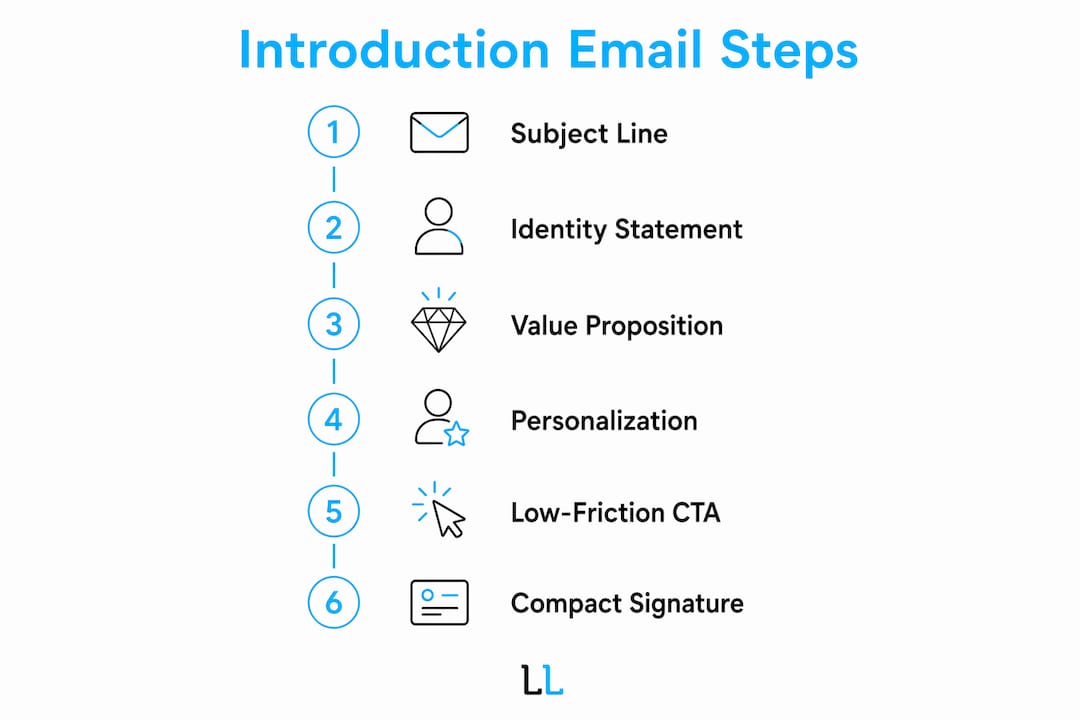
1. A clear subject line. It should name who is being introduced and why. “Meet [Name], your new [Role]” works for internal sends. For clients, include the company name.
2. A one-line identity statement. State who you are and your role in the first sentence. Don’t bury it.

3. A single-sentence value proposition. What does this person bring, and why does it matter to the recipient? One sentence. Not a paragraph.
4. One personalization detail. Reference something specific: a project, a shared contact, or a recent piece of work. Generic outreach reads like spam because it is.
5. One low-friction CTA. A specific, time-bounded ask outperforms open-ended ones. “Would a 20-minute call Thursday work?” beats “Let me know if you’d like to connect.”
6. A compact signature. Include your direct email, phone number, and a personalized LinkedIn URL so recipients can verify you in one click.
Target 120–150 words total. Anything longer reads like a resume, and introductions under 150 words consistently outperform longer versions in reply rate.
Pro Tip: Attach materials only when explicitly requested or when you’re referencing a specific deliverable. An unsolicited attachment in a cold intro raises spam flags and adds friction.
How do you adapt tone by audience?
The same introduction sent to a teammate, a client, and a LinkedIn prospect will land differently — and should be written differently.
| Audience | Tone | Length | Key context to include | Best CTA |
|---|---|---|---|---|
| Internal teammates | Warm, casual | 120–150 words | Role, start date, area of focus | “Let’s grab a quick sync” |
| Existing clients | Professional, outcome-focused | 120–150 words | Transition details, continuity assurance | “I’ll reach out by [date] to schedule a handover call” |
| LinkedIn/network contacts | Brief, credibility-first | — | Shared contact or specific reason for reaching out | “Would a 20-minute call work?” |
A single personalization detail shifts the entire feel of an email. Compare these two openers:
- Generic: “I’m reaching out to introduce myself as your new account manager.”
- Specific: “I’ve already reviewed the Q1 campaign results for [Client Project] and have a few ideas I’d like to walk you through.”
The second version signals preparation and gives the recipient a reason to reply.
For distribution: send internal introductions by email or Slack on the hire’s first day. For clients, email is the primary channel; follow with a LinkedIn connection request the same week. For network contacts, combining email with a LinkedIn sequence consistently produces higher engagement than either channel alone.
What subject lines and opening sentences actually increase opens?
Subject line formulas that work across the three main scenarios:
- Warm intro: “[Mutual Contact] suggested I reach out — [Your Name]”
- Client-facing: “Introducing [Name], your new contact at [Company]”
- Cold LinkedIn follow-up: “[Your Name] from [Company] — quick question about [specific topic]”
- Role-based (hiring context): “Application: [Position Title] — [Your Name]” — a format ATS and recruiter workflows are built to parse
For first sentences, specificity is the differentiator. Three patterns that work:
- Reference a shared contact: “Maria Chen suggested I reach out after we worked together on the Apex account.”
- Reference recent work: “I came across your piece on B2B pipeline strategy — it matched something we’re working through right now.”
- Reference a project: “I’ve just taken over the [Account Name] account and wanted to introduce myself before our next review.”
Personalized subject lines increase open rates by about 26%. When A/B testing, pit a personalization token (recipient’s company name) against a referral line (mutual contact’s name). Expect the referral line to win on cold sends; the company-name token tends to win on warmer lists.
Pro Tip: Test one variable at a time. Changing both the subject line and the first sentence in the same test tells you nothing useful about which element drove the result.
What mistakes make introduction emails feel like spam?
Most introduction emails fail for the same reasons.
Here’s what to fix:
- Generic opener → Replace “I’m reaching out to introduce myself” with a specific reason tied to the recipient.
- Mass CC to a department → Segment your list and send individually. Bulk blind CCs signal low effort and damage long-term relationships.
- Vague CTA → Replace “Let me know if you’d like to connect” with a specific time and format: “Are you free for 15 minutes on Thursday at 2 PM ET?”
- Long bio → Cut anything that doesn’t directly explain why you’re relevant to this recipient.
- Multiple competing CTAs → One ask per email. Two options create decision fatigue and reduce replies.
Pro Tip: Before sending to any client contact, confirm you have permission or a legitimate business reason to reach out. A well-written email sent to the wrong person still damages your reputation.
Pre-send checklist: final checks before you hit send
Run through this before every send, especially for client-facing introductions.
- Recipient name and email address are correct.
- Role title is accurate and current.
- At least one personalization detail is present in the body.
- Subject line is specific and under 60 characters.
- Attachments are included only if requested or referenced in the body.
- Signature includes direct email, phone, and LinkedIn URL.
- Suggested meeting times include the correct timezone.
- No bulk blind CCs — each email is addressed individually.
- For client introductions, get a brief internal sign-off before sending.
Six ready-to-use templates plus a follow-up
1. Internal new-hire introduction
Subject: Meet [Name], your new [Role]
Hi team, [Name] joins us as [Role] on [Date]. [He/She/They] will be leading [specific area]. Reach out at [email] or Slack @[handle].
2. Client-facing new-hire introduction
Subject: Introducing [Name], your new contact at [Company]
Hi [Client Name], [Name] is taking over as your primary contact. [He/She/They] brings [specific credential] and will reach out by [date] to schedule a brief handover call.
3. New-hire self-introduction to a client
Subject: [Your Name] from [Company] — quick intro
Hi [Name], I’m [Your Name], the new [Role] at [Company]. I’ve reviewed [specific account detail] and have a few thoughts. Would a 15-minute call this week work?
4. LinkedIn message announcing a hire to prospects
Subject: Someone you should meet: [Name] at [Company]
Hi [Name], I wanted to introduce [Name], who recently joined [Company] as [Role]. Given your work in [relevant area], I thought a quick connection might be worthwhile. Happy to make a formal intro if useful.
5. Referral introduction email
Subject: Job referral for [Position]: [Candidate Name]
Hi [Hiring Manager], I’m writing to refer [Name] for the [Role] position. [He/She/They] has [X years] of experience in [relevant area] and I’ve seen [his/her/their] work firsthand. Resume attached. Happy to answer any questions. For referral-email structure, the University of Maryland’s referral guide is a solid reference.
6. Handover/point-of-contact email
Subject: Your new point of contact at [Company]: [Name]
Hi [Client Name], as of [Date], [Name] will be your primary contact. [He/She/They] is already up to speed on [specific project]. [Name] will be in touch by [date].
Follow-up template (send at 3–5 business days if no reply):
“Hi [Name], just following up on my note from [date] — happy to find a time that works better for you.”
For LinkedIn outreach sequences, templates 3, 4, and 6 adapt well to automated sends. Always include at least one personalization token (company name, role, or project reference) before scaling any template.
How do you measure success and when should you follow up?
| KPI | Definition | How to calculate |
|---|---|---|
| Open rate | % of recipients who opened the email | Opens ÷ delivered |
| Reply rate | % of recipients who responded | Replies ÷ delivered |
| Meeting conversion rate | % of replies that became booked meetings | Meetings booked ÷ replies |
| Response time | Average hours from send to first reply | Sum of response times ÷ total replies |
A healthy reply rate for a personalized introduction email in professional services sits above 15%. Open rates above 40% indicate your subject line is working.
Follow-up cadence: send the first follow-up at 3–5 business days. If still no reply, a second follow-up at 7–10 business days is reasonable. After that, stop. Pushing beyond two follow-ups damages the relationship you’re trying to build.
For A/B testing, personalized subject lines increase open rates by about 26% — test your subject line first, then your CTA. Measure reply rate, not just opens, as the primary success metric for lead nurturing sequences.
How The Lead Lab applies these rules in live campaigns
The Lead Lab runs done-for-you LinkedIn outreach campaigns for professional services firms, and introduction emails are a core part of every sequence.
A typical campaign starts with accurate prospect targeting: identifying the right decision-makers by role, industry, and company size. From there, The Lead Lab builds a message sequence where the first touchpoint functions as a professional introduction email — specific, concise, and built around one clear CTA. Response management handles replies in real time, and qualified conversations convert to booked calendar meetings delivered directly to the client.
Pro Tip: When scaling introductions across a LinkedIn campaign, combine one meaningful personalization detail with a tight template structure. That balance is what separates a campaign that books meetings from one that gets ignored.
Clients working with advisory and consulting firms often find that the introduction email sets the tone for the entire client relationship — which is exactly why The Lead Lab treats message copywriting as a core deliverable, not an afterthought.
If you’re running introduction emails as part of a LinkedIn lead gen campaign and want a done-for-you approach, The Lead Lab builds and manages the full sequence — from prospect targeting to booked meetings.
Key Takeaways
A well-written job introduction email is specific, under 150 words, and closes with exactly one low-friction ask tied to a clear next step.
| Point | Details |
|---|---|
| Keep it under 150 words | Introductions under 150 words consistently outperform longer versions in reply rate. |
| Personalize the subject line | Personalized subject lines increase open rates by about 26% compared to generic alternatives. |
| One CTA only | A single specific ask (e.g., a 15-minute call) outperforms multiple options every time. |
| Tailor tone by audience | Internal, client-facing, and LinkedIn introductions each require a different length, tone, and CTA. |
| Always include your LinkedIn URL | A direct link lets recipients verify you instantly and reduces friction before replying. |
The one habit that separates good introductions from great ones
Most people write introduction emails about themselves. The ones that get replies are written about the recipient.
That sounds obvious, but watch how quickly it gets ignored under pressure. When you’re onboarding a new hire, announcing a team change to a client, or scaling outreach across a LinkedIn campaign, the temptation is to default to a template that covers all the bases for the sender. Role, background, responsibilities, contact info. The recipient ends up reading a memo, not a message.
The fix is simple but requires discipline: before you write a single word, ask what the recipient actually needs to know to feel confident about this introduction. A client doesn’t need your new hire’s full career history. They need to know the transition is handled, who to call, and that nothing will fall through the cracks. An internal teammate doesn’t need a formal bio. They need a name, a role, and a reason to say hello.
At The Lead Lab, this principle drives every message sequence we build. Specificity isn’t a nice touch. It’s the mechanism. A single concrete detail — a project reference, a shared contact, a recent piece of work — does more for reply rates than any structural trick. Pair that with a subject line that names the recipient’s context and a CTA that asks for exactly one thing, and you have an introduction that works.
The templates in this article are built on that logic. Use them as a starting point, but don’t skip the personalization step when you adapt them at scale. That’s the part that makes them perform.