You can’t legally maintain two personal LinkedIn accounts and expect both to survive. LinkedIn’s User Agreement permits exactly one personal profile per person, and running a second one is the fastest way to get both flagged, merged, or permanently shut down. The workaround isn’t a clever technical trick. It’s structural: keep your single profile, then build everything else you need on top of it with Company Pages, delegated admin seats, or a managed service that handles multi-account complexity for you.
That’s the whole verdict. Here’s what it means in practice:
- One person, one profile. No exceptions for “business” versus “personal” versions of yourself.
- Multiple brands or clients? Use Company Pages and Showcase Pages, not duplicate personal accounts.
- Managing someone else’s account? Get delegated admin access. Never log in with their password from your own device.
- Need to scale outreach? Use a pool of real, warmed-up sender accounts with proper session isolation, not one person cloning themselves.
Pro Tip: If you’re already running a second personal profile “just in case,” close or merge it now, voluntarily. LinkedIn’s enforcement almost always finds duplicates eventually, and a voluntary merge preserves far more of your network and content than a forced suspension does.
Key Takeaways
Running one well-maintained LinkedIn profile, supported by Company Pages and delegated access, consistently beats splitting your identity across duplicate personal accounts, both for policy safety and lead generation results.
| Point | Details |
|---|---|
| One profile per person | LinkedIn’s User Agreement allows a single personal profile; duplicates get merged, restricted, or closed. |
| Use Company Pages for brands | Create a Page for each business or client instead of a second personal account. |
| Delegate access, don’t share passwords | Grant admin roles on Pages rather than handing over personal login credentials. |
| Isolate sessions for multi-seat management | Use separate browser profiles or antidetect tools when managing several legitimate accounts at once. |
| Close duplicates voluntarily | If you already have two personal profiles, merge or close the extra one now rather than waiting for enforcement. |
| Outsource when volume exceeds capacity | The Lead Lab manages verified, warmed-up sender seats and documented access for firms scaling outreach beyond DIY limits. |
Table of Contents
- Can You Have Multiple LinkedIn Accounts?
- Why People Want Multiple LinkedIn Accounts
- How to Get Multi Account Benefits Without Breaking the Rules
- Tools People Use to Manage Multiple LinkedIn Profiles
- What to Do if You Already Have a Duplicate Account
- How LinkedIn Detects Automation and Unusual Behavior
- Security and Governance Checklist for Managing LinkedIn Accounts
- Why One Strong Profile Beats Several Weak Ones
- When to Bring in a Managed LinkedIn Service
- A Publisher’s Note on Why We Don’t Recommend Duplicate Profiles
- Get Multi Seat LinkedIn Outreach Without Managing the Risk Yourself
- Sources
Can You Have Multiple LinkedIn Accounts?
No, not as an individual maintaining two personal profiles. LinkedIn’s Help Center is explicit about this: duplicate personal accounts get merged or closed, and the underlying User Agreement principle is that your profile represents your true identity, once. There’s no “professional” and “personal” split allowed the way some people run separate Instagram accounts.
What happens when LinkedIn catches a duplicate depends on severity and history. A first-time, obviously accidental duplicate (someone signs up twice by mistake) typically gets merged with minimal friction. Repeated or intentional duplication, especially when one account is used for outreach automation or is registered under a fake name, tends to draw harsher outcomes:
- Temporary account restriction while LinkedIn reviews activity.
- Forced merge or deletion of the newer/less-active profile.
- Identity verification requests (uploading a photo ID) before restoring access.
- Permanent suspension for repeat offenders or accounts tied to clear policy abuse.
LinkedIn doesn’t rely on one signal to catch duplicates. It cross-references phone numbers, email domains, device and browser fingerprints, overlapping contact lists, and behavioral patterns, how you type, when you’re active, who you message. Explainers on duplicate detection consistently note that changing your email or hopping on a VPN doesn’t reliably beat this system, because the detection stack looks at dozens of overlapping data points, not just your IP address. The contractual basis for all of this sits in the User Agreement’s identity provisions, which require accurate information tied to a single real person.
Why People Want Multiple LinkedIn Accounts
Almost nobody wants a second profile for its own sake. They want a solution to a specific operational problem, and duplicate accounts feel like the obvious fix. It usually isn’t.
Here’s how the common motivations map to what actually works:
- Privacy separation (keeping job search or side projects invisible to your employer): Adjust your visibility settings and “who can see your connections” controls instead of forking your identity.
- Brand separation (you run two businesses or a consultancy plus a personal brand): Create a Company Page for each business. Your personal profile can list multiple roles and experiences without confusion.
- Outreach volume (you need to message more prospects than one account safely allows): Use a legitimate pool of team member accounts, each representing a real employee, rather than cloning yourself.
- Client account management (you run campaigns on behalf of clients): Request delegated admin access to their Company Page or use authorized seat access. Don’t ask for their personal password.
- Multilingual audiences (you want to post in two languages to two different regions): Use Showcase Pages under one Company Page, or maintain separate language-specific content calendars from the same profile.
The line that matters: multiple Company Pages are fully allowed and expected for agencies managing several clients. Multiple personal profiles for the same human being are not, regardless of the reason behind them. If you’re debating whether to consolidate, the LinkedSignal framework is a good gut check: one profile, unlimited Company Pages, delegated roles for everyone else who needs access.
How to Get Multi Account Benefits Without Breaking the Rules
Getting the functional benefits of “multiple accounts” without the policy risk comes down to three building blocks: your one profile, Company Pages, and properly delegated access. Here’s how to set that up in order.
- Audit what you actually need represented. List every business, service line, or client relationship you’re currently trying to solve with a second profile. Most of these map cleanly to a Page, not a person.
- Create a Company Page for each distinct business or brand. Company Pages are free and unlimited. Add Showcase Pages under a parent Page if you need to segment a product line or regional audience without splitting the whole brand identity.
- Assign admin roles instead of sharing logins. LinkedIn supports multiple admin levels (Super Admin, Content Admin, Analyst) on Company Pages. Add team members or contractors by their own LinkedIn account, never by handing over your password.
- Separate your content pillars, not your identity. If you post as a consultant and also run a niche newsletter brand, keep your personal voice consistent on your profile and push brand-specific content through the relevant Page. Readers can tell the difference between a business update and a personal opinion.
- Build a lightweight scheduling workflow. Use a native scheduler or an OAuth-connected social media tool to queue Page content in advance, so you’re not logging in and out of multiple sessions all day.
Pro Tip: Before onboarding a new client or Page, run through a short checklist: confirm the right admin level, enable two-factor authentication on the account granting access, and record who has what permission in a shared document. That single step prevents the “who still has admin access from six months ago” mess that derails most agency handoffs.
Tools People Use to Manage Multiple LinkedIn Profiles
Once you’re managing several Company Pages, or several client accounts, or a team of outreach senders, the practical question shifts from “is this allowed” to “how do I keep sessions from colliding with each other.” This is where browser profiles and specialized isolation tools come in.
Native browser profiles are the simplest option. Chrome and Firefox both let you create separate profiles, each with its own cookie jar, saved logins, and extensions. Log into one LinkedIn account per browser profile, and you avoid the most common accidental cross-contamination: leftover session cookies logging you into the wrong account, or LinkedIn seeing two “accounts” active from what looks like the same browser fingerprint.
For agencies juggling many accounts at once, dedicated antidetect browsers go further. Tools like Multilogin and GoLogin create fully isolated browser environments, separate fingerprints, separate local storage, separate proxy assignments per profile, so each session looks like it’s coming from a distinct device. Some agencies pair these with cloud phones for mobile-session isolation.
| Method | What it isolates | Best suited for |
|---|---|---|
| Native Chrome/Firefox profiles | Cookies, saved logins, extensions | Solo professionals managing 2 to 3 Pages |
| Antidetect browsers (Multilogin, GoLogin) | Device fingerprint, local storage, proxy routing | Agencies managing many client seats simultaneously |
| Cloud phones | Mobile device signals, app-level sessions | Teams needing mobile-native LinkedIn sessions per account |
| Social media schedulers | Posting workflow only, not login sessions | Anyone queuing Page content across multiple brands |
A few things worth being blunt about here:
- Isolation tools reduce technical detection signals. They do not make a duplicate personal profile policy-compliant. Two personal accounts, however well isolated technically, still violate the User Agreement.
- Pairing antidetect browsers with residential proxies lowers some risk signals but doesn’t eliminate behavioral detection, LinkedIn still watches how an account acts once it’s logged in.
- For most solo professionals, a native browser profile plus a scheduler is genuinely enough. The heavier antidetect stack earns its complexity only at agency scale, managing legitimate, separate seats (like client outreach accounts, each belonging to a real person) rather than one person’s duplicate identities.
What to Do if You Already Have a Duplicate Account
If you’re reading this because you already have two personal profiles, the cleanup process is more straightforward than most people expect, and doing it voluntarily beats waiting for LinkedIn to act.
- Decide which profile to keep. Usually the one with more connections, endorsements, and content history. That’s your “surviving” profile.
- Export what you can from the account you’re closing. Download your connections list and any content worth preserving before you initiate a close or merge, since not everything transfers automatically.
- Use LinkedIn’s official merge or close process. LinkedIn’s Help Center walks through both options: merging (where supported) folds connections and activity into one account, while closing simply deactivates the duplicate.
- Update your public profile URL and any external links (email signature, website, business cards) to point to the surviving profile once the duplicate is gone.
If LinkedIn flags your account before you get to it, the process runs a little differently:
- Expect a request for ID verification, usually a government-issued photo ID uploaded through LinkedIn’s verification flow.
- Restoration timelines vary, but most verified appeals resolve within a few business days once documentation is submitted.
- If you believe the restriction was a mistake (a shared device, a false-positive on behavioral signals), use LinkedIn’s appeal form rather than creating a third account to “get back online,” which only compounds the problem.
The decision point that trips people up: close voluntarily now, or wait and hope LinkedIn doesn’t notice. Voluntary closure almost always preserves more of your network and gives you control over the timeline. Waiting hands that control to LinkedIn’s enforcement queue.
How LinkedIn Detects Automation and Unusual Behavior
LinkedIn’s detection isn’t a single tripwire, it’s closer to a trust score built from technical and behavioral signals together. A brand-new account that suddenly sends 80 connection requests in an hour looks nothing like a real person’s normal usage pattern, and that mismatch is exactly what gets reviewed.
New or “cold” accounts need a warm-up period: logging in regularly, accepting a few connections, engaging with posts, before ramping up any outreach activity. Consistent location and device signals matter too, an account that logs in from three countries in one week reads as suspicious even if every login is legitimate.
Practices that keep automation from tripping these signals:
- Warm up every new sender seat for one to two weeks before starting outreach, gradually increasing activity rather than jumping straight to full volume.
- Stagger send times across a sender pool rather than firing all messages from all accounts at the same hour.
- Rotate genuine human senders instead of routing everything through a single account, which spreads both volume and risk.
- Auto-withdraw pending connection requests after a conservative window so stale invites don’t pile up and read as spam behavior.
- Monitor acceptance rates closely: a sudden drop is often the earliest warning sign of account health trouble, well before LinkedIn issues a formal restriction.
The data backs the multi-sender approach specifically. HeyReach’s analysis of outreach campaigns found that campaigns spreading volume across 6 to 20 real sender accounts posted higher median reply rates than campaigns relying on a single overloaded account, likely because distributed volume keeps each individual sender’s activity inside a normal, human-looking range. For teams building out this kind of scaled outreach, the sender pool model isn’t just safer, it performs better.
Security and Governance Checklist for Managing LinkedIn Accounts
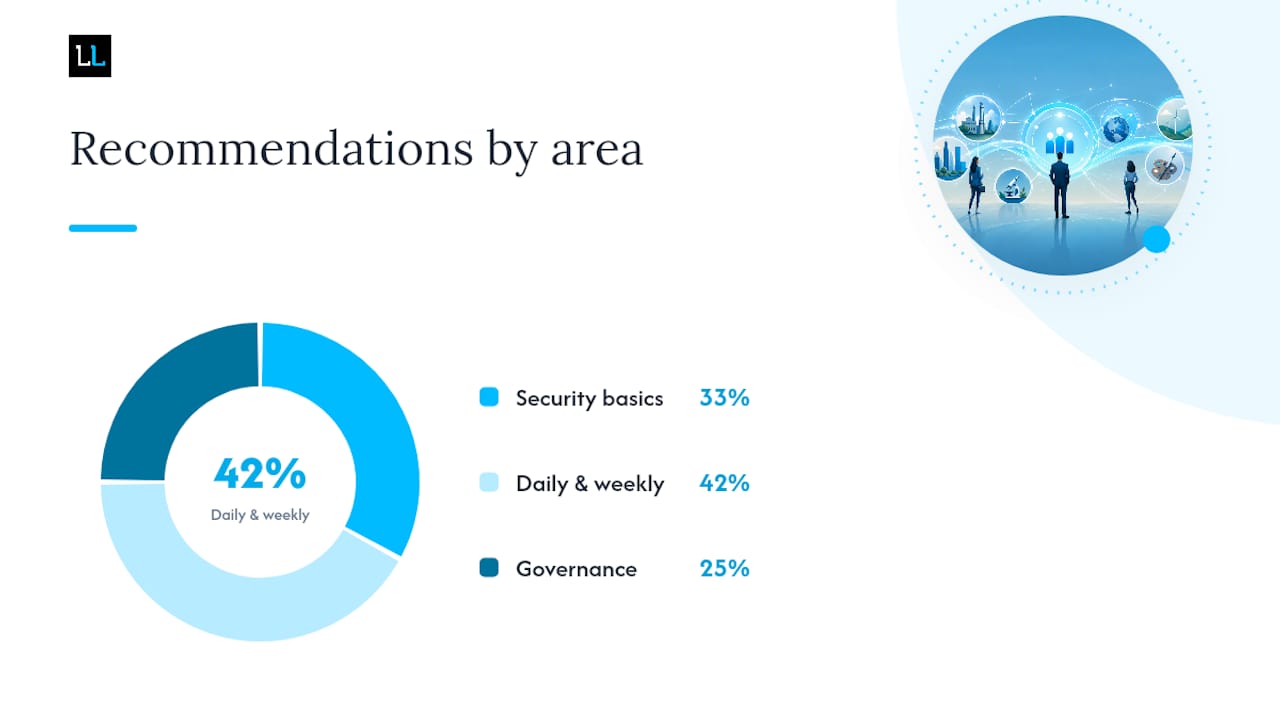
Whether you’re managing three Company Pages or thirty client seats, the operational discipline is the same. Skipping any of these is how “manageable” turns into “chaotic” fast.
Security basics:
- Use a unique email address for every account or admin login, never reused across seats.
- Enable two-factor authentication on every account with access to sensitive Pages or campaigns.
- Store credentials in a password manager, never in a shared spreadsheet or chat thread.
- Use delegated admin roles or OAuth-based tool integrations wherever LinkedIn supports them, instead of raw password sharing.
Daily and weekly hygiene:
- Withdraw stale, unaccepted connection requests on a set schedule rather than letting them accumulate indefinitely.
- Cap daily connection requests per account well below platform maximums to stay inside normal usage patterns.
- Keep every managed profile and Page fully filled out, incomplete profiles read as lower-trust to both LinkedIn’s systems and human prospects.
- Maintain a distinct content calendar for each Page or brand voice so messaging doesn’t blur together.
- Run a quarterly access audit: who has admin rights, who still needs them, and who should be removed.
Governance for teams and agencies means documenting permissions rather than trusting memory: a simple record of who has access to what, signed client consent for account management where applicable, and a recurring health check on connection acceptance rates, message response rates, and any restriction warnings across every managed account.
Why One Strong Profile Beats Several Weak Ones
Splitting your professional identity across multiple personal profiles doesn’t just risk a ban, it actively works against you even when nothing gets flagged. Every recommendation, every endorsement, every meaningful engagement you’d otherwise concentrate on one profile instead gets divided between two half-built ones. Your Social Selling Index, LinkedIn’s own measure of profile strength and network engagement, reflects one account’s history. Split that history and you’re building two mediocre trust scores instead of one strong one.
The compliant pattern isn’t a workaround, it’s the better strategy on its own terms: one well-maintained profile, backed by Company Pages and delegated seats, consistently outperforms a fragmented identity split across duplicate accounts, both for policy safety and for actual lead generation results.
Agencies that manage this well at scale follow a consistent operational pattern: isolate each legitimate sender seat in its own browser environment or workspace, run a deliberate warm-up period before any outreach starts, and monitor account health metrics continuously rather than reactively. A well-run campaign treats each sender account the way a call center treats a phone line, a resource to protect, not a disposable tool to burn through.
The practical recommendation for most readers: consolidate first, expand through Pages and delegated access second. If you’re already running legitimate multi-seat outreach for a team, the priority shifts to isolation and pacing discipline rather than adding more accounts.
- Anonymized pattern: profiles that jump straight from zero activity to high-volume outreach see restriction flags far more often than profiles that ramp up gradually over two to three weeks.
- Anonymized pattern: accounts managed through delegated Page access, rather than shared personal logins, show dramatically fewer session-anomaly flags across client handoffs.
When to Bring in a Managed LinkedIn Service
Some signals make outsourcing the obviously better call rather than a nice-to-have. If you’re trying to hit meaningful outreach volume without the internal bandwidth to manage sender warm-up, session isolation, and daily monitoring, doing it in-house usually means someone on your team becomes an accidental full-time account administrator.
Watch for these signals specifically:
- You need to scale outreach volume beyond what one or two personal accounts can safely handle.
- Nobody on your team has the bandwidth to monitor account health, acceptance rates, and warm-up schedules daily.
- You need verified, properly seasoned accounts rather than brand-new profiles started from zero.
- You’re managing outreach for multiple clients and need documented, auditable admin access rather than informal password sharing.
A professional provider worth working with should offer documented admin access (never raw password handoffs), clear seat management with separate workspaces per client or campaign, a structured account warm-up process before outreach begins, ongoing health monitoring, and marketing campaign management software with transparent reporting you can actually read.
Pro Tip: Before signing with any provider, ask them directly how they handle account access. If the answer involves sharing your personal password rather than delegated admin roles or dedicated managed seats, treat that as a red flag, not a convenience.
This is precisely the gap The Lead Lab is built to close: done-for-you outreach campaigns run through verified, properly warmed-up accounts, with sender pools sized to your volume needs and monitored for account health throughout the campaign, so you get the scale benefit of multiple accounts without personally managing the compliance risk.
A Publisher’s Note on Why We Don’t Recommend Duplicate Profiles
Every time we’ve reviewed how outreach campaigns actually break down, from access disputes to account suspensions mid-campaign, the root cause traces back to the same decision: someone tried to shortcut the system with a second personal account instead of building the boring, durable version, one profile, proper Pages, real delegated access.
It’s not that people don’t know the rule exists. It’s that the rule feels like friction when you’re staring at a growth target, and a second account feels like the fast lane. In practice it’s closer to changing lanes into a lane that closes 200 feet ahead. The account gets flagged, the campaign stalls, and you’ve lost the network history you were trying to protect in the first place.
If you’re evaluating any vendor, ours included, for LinkedIn account management, ask three questions before you hand over anything: How exactly do you get access to my account, do you request delegated admin or do you ask for a password? How do you warm up new sender seats before outreach starts? And what does your monitoring actually catch before an account gets restricted, not after? A vendor that can’t answer those specifically probably hasn’t built the operational discipline this work actually requires.
Get Multi Seat LinkedIn Outreach Without Managing the Risk Yourself
The Lead Lab exists for exactly the gap this article just walked through: you need the reach of multiple active LinkedIn senders, but building and maintaining that safely, warm-up schedules, session isolation, daily health monitoring, isn’t something most professional services firms have the internal bandwidth to run well.
Rather than handing you software and a checklist, The Lead Lab runs the outreach campaign end to end: verified, properly seasoned sender accounts, personalized message copywriting, response management, and campaign analytics, all managed under documented access rather than shared passwords. That’s the difference between DIY multi-account management and a done-for-you campaign: you get the qualified meetings on your calendar without personally tracking acceptance rates or worrying about a flagged account derailing a launch. If your outreach needs have outgrown what one or two personal profiles can safely handle, book a consultation with The Lead Lab and see how a properly managed sender pool fits your specific volume goals.
Sources
- Merge or close duplicate accounts | LinkedIn Help
- Can I Create Multiple LinkedIn Accounts in 2026? — Multilogin blog
- Manage Multiple LinkedIn Accounts Safely — LinkedSignal