
TL;DR:
- Meeting booking is a digital process for reserving shared time slots and physical or virtual spaces for professionals. Effective booking tools and practices prevent conflicts, save time, and foster better organization culture.
Meeting booking is defined as the systematic digital process of reserving shared time slots and physical or virtual spaces so that business professionals can coordinate without conflict. The industry term for this practice is “appointment scheduling,” though meeting booking has become the standard phrase across modern workplace tools. What is meeting booking in practice? It is the combination of calendar logic, availability rules, and confirmation workflows that replaces the old email chain of “does Tuesday work for you?” This guide covers the core methods, the software features that matter most, and the best practices that separate efficient teams from ones that waste hours on coordination alone.
What is meeting booking and how does it work?
Meeting booking is the digital reservation of shared time and physical spaces, acting as a unified source of availability, capacity, location, and equipment information. That definition matters because it frames booking as more than just picking a time. It is a system that governs who can meet, where, and with what resources.

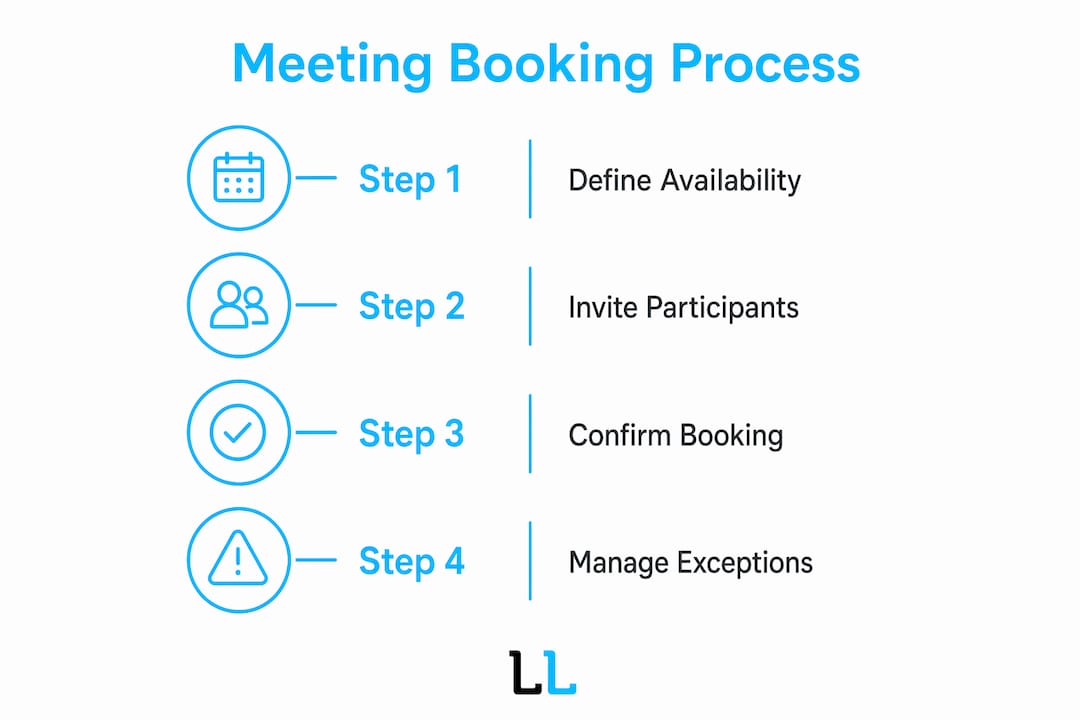
At its core, a booking system works in three steps. First, a host defines available windows on a calendar. Second, an invitee selects from those windows or receives a proposed time. Third, the system confirms the reservation and sends reminders to all parties. The logic is simple. The execution, at scale, is where most teams struggle.
Manual booking still exists in many organizations. A team member sends an email, waits for a reply, and then sends a calendar invite. This process works for one or two meetings a week. It breaks down fast when a sales team needs to book 30 discovery calls in a single day.
What are the common methods and tools used for meeting booking?
Business professionals use three main methods to book meetings: manual email scheduling, shared calendar invites, and automated booking links.
Manual email scheduling is the oldest method. It requires the host to write out proposed times, wait for confirmation, and then send a formal invite. The process is personal but slow.
Shared calendar invites are faster. Platforms like Google Calendar and Microsoft Outlook let users check availability before sending an invite. This cuts one round of back-and-forth but still requires the host to know the invitee’s schedule.
Automated booking links are the most efficient method for high-volume scheduling. The host sets availability rules once, and invitees pick a slot from a live calendar page. Scheduling tools replace the inefficient email exchange by letting attendees select from real-time calendar availability. This is the standard approach for sales teams, consultants, and any professional who books more than five external meetings per week.
Meeting room booking systems add a physical layer to this process. These platforms manage office spaces, conference rooms, and shared equipment. They prevent double-bookings and show real-time room availability across a building or campus.
- Automated booking links eliminate email back-and-forth entirely
- Calendar-integrated tools check availability before an invite is sent
- Room booking systems manage physical space alongside time slots
- Reminder workflows reduce no-shows without manual follow-up
Pro Tip: Set your booking link availability to reflect your actual productive hours, not your full working day. Protecting morning focus blocks from external meetings is one of the highest-leverage scheduling decisions you can make.
Why does strategic meeting scheduling improve productivity?
Efficient meeting scheduling prevents wasted hours, reduces meeting fatigue, and maintains employee morale. That is not a soft benefit. Organizations that schedule well protect the focused work time that drives actual output.
Strategic scheduling means more than just picking a convenient time. It means grouping meetings together, protecting certain days from interruptions, and prioritizing meetings by urgency. Grouping meetings early in the week and instituting meeting-free days protect focused work time and improve productivity. Teams that adopt this practice report fewer context-switching costs and more time for deep work.
Calendar integrations make conflict resolution automatic. When a booking system connects to Google Calendar or Microsoft Outlook, it resolves scheduling clashes before invites are sent. No one gets double-booked. No one has to manually check three calendars before proposing a time.
Meeting scheduling reflects organizational culture. Prioritizing meetings by urgency prevents fatigue and keeps participants engaged. Teams that treat scheduling as a discipline, not an afterthought, run fewer meetings and get more from each one.
The cultural impact is real. When a team sees that its leadership protects focused time and books meetings with clear purpose, that behavior spreads. Scheduling discipline becomes a shared norm, not just a personal habit.
- Group meetings on the same days to protect long blocks of focused time
- Set meeting-free days for deep work, at least one per week
- Prioritize meetings by urgency before adding them to the calendar
- Use calendar integrations to resolve conflicts automatically before sending invites
- Review recurring meetings quarterly and cancel any that have lost their purpose
What features define effective meeting booking software?
The right meeting booking software does more than display a calendar. It manages availability, handles exceptions, and reduces the manual work that slows coordination.
| Feature | What it does |
|---|---|
| Real-time availability display | Shows live open slots based on calendar data, preventing double-bookings |
| Capacity management | Limits bookings to room or call capacity, avoiding overcrowded sessions |
| No-show management | Releases rooms automatically if no check-in occurs within a preset window |
| Calendar integration | Syncs with Google Calendar, Outlook, and communication platforms |
| Custom intake forms | Collects attendee context before the meeting to sharpen preparation |
| Automated reminders | Sends confirmation and reminder messages without manual follow-up |
Meeting room booking software automates no-show management by releasing rooms if no check-in occurs within a preset window, typically 10 minutes. That single feature significantly improves space utility in office environments. Without it, a booked room sits empty while other teams scramble for space.
Real-time room availability is essential in modern flexible office models to avoid booking bottlenecks and maintain workplace harmony. Transparency about what is available drives better behavior across the whole team.
Custom intake forms are underused by most teams. Advanced booking links allow custom intake questions that pre-qualify attendees and gather necessary context, reducing follow-up emails. A sales professional who asks three qualifying questions before a discovery call arrives prepared. That preparation shortens the meeting and improves the outcome.
Pro Tip: When evaluating meeting booking software, test the no-show release feature first. It is the clearest signal of how seriously the platform takes space and time efficiency.
How to book a meeting effectively: best practices for professionals
Booking a meeting well is a skill. Most professionals underestimate how much a poorly written scheduling email or a vague booking link costs in time and credibility.
The foundation of effective meeting booking is specificity. Scheduling emails must include five core elements: purpose, attendees, duration, proposed time slots, and format. Leave any of these out and the recipient has to ask a follow-up question, which adds a full round-trip to the process.
Emails that simply ask “let me know when you’re free” shift the entire burden to the recipient. That approach is slower and signals a lack of preparation. Proposing specific options is always more effective.
- State the meeting purpose in the first sentence, not the last
- Propose 3–5 specific time slots with time zones included
- Specify the format: video call, phone, or in-person, with a link or address
- Include the expected duration so the recipient can plan their day
- Add a booking link as a fallback if none of your proposed times work
Providing 3–5 specific time options is optimal for scheduling emails. Offering too many options overwhelms recipients and slows coordination. Three to five slots hit the sweet spot between flexibility and decisiveness.
For external meetings with prospects or clients, a personalized scheduling email outperforms a bare booking link. The email shows effort. The booking link shows efficiency. Use both: write a short personal note, then include the link as the easiest path to confirmation.
Follow-up discipline matters too. If a proposed meeting goes unconfirmed for 48 hours, send one short follow-up. Reference the original proposal and offer to adjust the times. Keep it to two sentences. Professionals respect brevity.
Pro Tip: Always include the time zone when proposing meeting slots, even for domestic meetings. Remote teams span multiple zones, and one missing time zone detail can turn a confirmed meeting into a missed one.
Key Takeaways
Effective meeting booking combines clear scheduling practices, the right software features, and a culture that treats time as a shared resource worth protecting.
| Point | Details |
|---|---|
| Define the system first | Meeting booking is a structured process, not just picking a time; treat it as a workflow. |
| Use automated booking links | Booking links with real-time availability eliminate email back-and-forth for high-volume scheduling. |
| Protect focused work time | Group meetings and set meeting-free days to preserve deep work blocks across the team. |
| Prioritize software features | No-show management, calendar sync, and custom intake forms are the features that drive real efficiency. |
| Propose 3–5 time slots | Specific options with time zones and meeting purpose reduce coordination time and improve response rates. |
The meeting booking habit most teams skip
The biggest gap I see in how business teams handle scheduling is not the tools. It is the absence of a shared standard for what a meeting request should contain. Teams adopt booking software, set up calendar links, and then still send vague invites with no agenda and no stated purpose. The software does not fix the habit.
What actually works is treating every meeting request as a short brief. Purpose, attendees, duration, format, and proposed times. That structure forces the host to think before they book. Half the time, that thinking reveals the meeting was not necessary at all.
The other shift worth making is separating internal and external booking workflows. Internal meetings can use shared calendar tools with a quick check of availability. External meetings, especially with prospects or clients, deserve a personalized email plus a booking link. The combination signals professionalism without sacrificing speed.
Automation handles the mechanics. The human judgment call is deciding which meetings deserve to exist in the first place. Teams that get that right run fewer meetings, close more deals, and protect the time that actually moves the business forward. For professionals focused on B2B appointment setting, that discipline is the difference between a full pipeline and a full calendar.
— Toby
How The Lead Lab supports professional meeting coordination
Securing qualified meetings is one of the hardest parts of B2B sales, and the booking process is where many opportunities stall. The Lead Lab specializes in done-for-you LinkedIn outreach campaigns that move prospects from first contact to confirmed meeting, handling the targeting, messaging, and follow-up that most teams do not have time to manage.
The Lead Lab’s appointment-setting workflows are built for professional services firms that need a consistent pipeline of booked calls without the manual grind. From prospect targeting to response management, every step is designed to put the right conversations on your calendar. Visit The Lead Lab to see how the service works, or review the client portfolio to see results across industries.
FAQ
What is meeting booking in simple terms?
Meeting booking is the process of reserving a time slot and, where needed, a physical or virtual space for a professional meeting. It covers everything from sending a scheduling email to using automated booking software.
What is a booking system for meetings?
A meeting booking system is a software platform that displays real-time calendar availability, accepts reservations, sends confirmations, and manages room or call capacity. It replaces manual email coordination with an automated workflow.
How many time slots should I propose in a scheduling email?
Propose 3–5 specific time slots. Fewer than three limits flexibility; more than five creates decision paralysis and slows the response.
When should I use a booking link instead of a scheduling email?
Use a booking link for high-volume external meetings where speed matters most. Use a personalized scheduling email when the relationship or context requires a warmer, more considered approach.
How does no-show management work in meeting room booking software?
No-show management automatically releases a reserved room if no attendee checks in within a preset window, typically 10 minutes after the scheduled start. This frees the space for other teams and reduces wasted capacity.