
TL;DR:
- Personalizing your LinkedIn URL enhances your professional credibility by replacing random characters with a memorable, name-based identifier.
- Limit yourself to five changes within 180 days, and update all assets immediately to avoid broken links.
- Using a branded short link like Bitly adds a stable, redirect-friendly layer that protects printed materials and online references.
A custom LinkedIn URL is the professional equivalent of a clean business card: it signals that you take your personal brand seriously. The default URL LinkedIn assigns you looks something like "linkedin.com/in/john-smith-4b2a9c31, which is forgettable, unshareable, and does nothing for your credibility. When you personalize your LinkedIn URL, you replace that string of random characters with something like linkedin.com/in/johnsmith`, a link you can put on a resume, email signature, or business card without embarrassment. This guide covers exactly how to do it, what LinkedIn’s rules allow, and how to protect your link integrity across every place you share it.
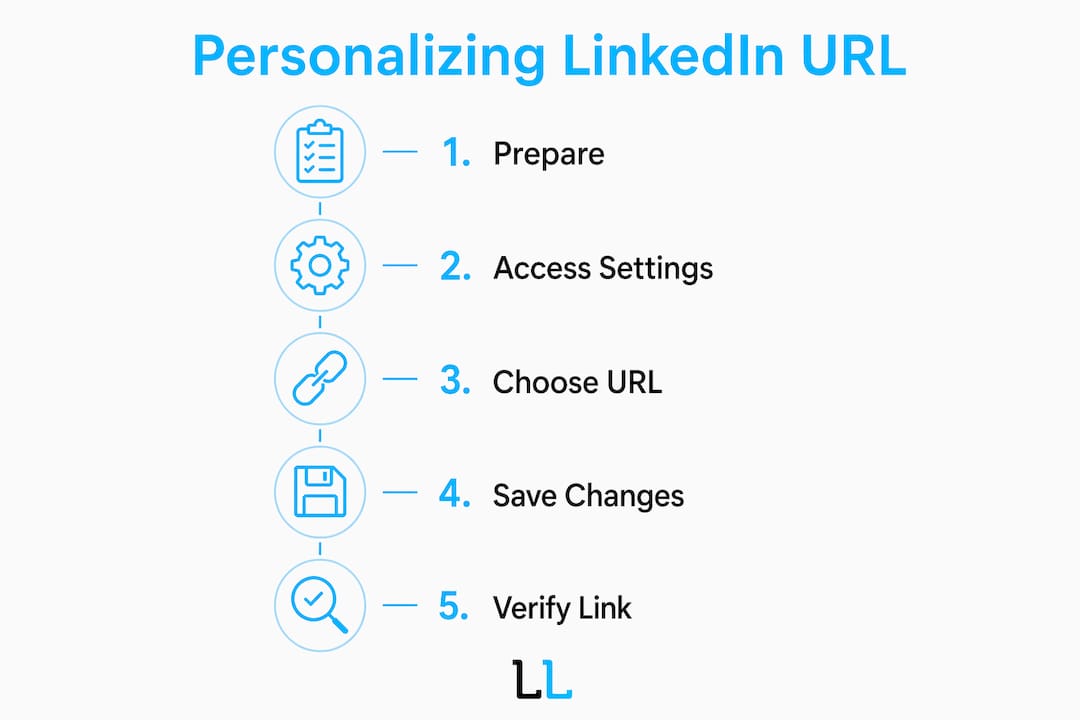
How to personalize your LinkedIn URL: what you need first
Before you touch the settings, three things need to be in place. You need a LinkedIn account in good standing, access to either the desktop site or the mobile app, and a clear idea of what you want your URL to say.

LinkedIn’s formatting rules are strict. Custom URLs must be 3 to 100 characters long, using only lowercase letters and numbers. Spaces, symbols, and special characters are not allowed. That means john.smith or john_smith will be rejected. johnsmith or johnsmith2026 will work.
The naming decision matters more than most people realize. LinkedIn recommends name-based URLs that match your resume and professional documents, because consistency across platforms builds trust with recruiters, clients, and prospects. If your name is common, you have several clean options before you resort to random numbers.
| URL format | Example | Best for |
|---|---|---|
| First + last name | /johnsmith |
Anyone with a unique name |
| First + middle initial + last | /johnmsmith |
Common names with a clear differentiator |
| Name + location | /johnsmithnyc |
Professionals tied to a specific market |
| Name + credential or title | /johnsmithcpa |
Specialists where the title adds authority |
| Random numbers appended | /johnsmith4829 |
Last resort only; avoid if possible |
Pro Tip: Decide on your URL before you open LinkedIn’s settings. Once you type it in and save, the clock starts on your five-change limit.
Step-by-step: how to change your LinkedIn URL on desktop and mobile
The process takes under two minutes on desktop. Mobile requires one extra navigation step, but the outcome is identical.
Desktop instructions
- Log into LinkedIn and click your profile photo in the top navigation bar.
- Select View Profile from the dropdown.
- In the upper right area of your profile, click Edit public profile & URL.
- On the right side of the page that loads, find the section labeled “Edit your custom URL.”
- Click the pencil icon next to your current URL.
- Type your chosen URL slug into the text field.
- Click Save.
LinkedIn confirms the change immediately. Your new URL is live the moment you save.
Mobile app instructions
- Tap your profile photo to open your profile.
- Tap the Edit button (pencil icon) near the top of your profile.
- Scroll down and tap Contact info.
- Tap the pencil icon next to your LinkedIn URL.
- Edit the URL field and tap Save.
The mobile path is slightly buried, which is why most people prefer the desktop route for this particular change.
Pro Tip: After saving, copy your new URL and paste it into a browser tab to confirm it resolves correctly before updating your resume or email signature.
A few common rejection reasons: the URL is already taken by another user, it contains a disallowed character, or it falls outside the 3 to 100 character range. If LinkedIn rejects your first choice, try a variation before assuming the name is unavailable. Sometimes adding your middle initial or dropping a letter resolves the conflict without sacrificing readability.
A clean, short URL improves memorability, sharing, and how search engines index your name. When someone Googles your full name, a matching LinkedIn URL is one of the strongest signals that your profile is the authoritative result. That is a meaningful SEO benefit that the default URL simply cannot deliver.
Best practices for choosing and maintaining your LinkedIn URL
Choosing the right URL is a one-time decision with long-term consequences. Getting it right the first time saves you from the disruption of future changes.
Name-based URLs are the gold standard because they travel with you across jobs, industries, and companies. A URL like /johnsmithmarketing ties your identity to a current role. If you change careers or rebrand, that URL becomes a liability. /johnsmith or /johnmsmith stays relevant regardless of where your career goes.
LinkedIn allows only five URL changes within any 180-day period. That sounds generous until you realize that each change requires you to manually update every place you have shared the link. Your email signature, resume, business cards, website bio, speaker profiles, and any published articles that link to your profile all need updating. There is no automatic redirect system that reliably catches every inbound link.
“Treat your LinkedIn URL the way you treat your email address: change it as rarely as possible, and when you do, update everything immediately.”
The practical implication is that you should treat your URL as a permanent asset from day one. Avoid adding random numbers to your URL just to secure something quickly. A URL like /johnsmith4829 is harder to remember, looks unprofessional in print, and will tempt you to change it later, triggering the update cascade all over again.
One underused solution is a branded short link. Tools like Bitly allow you to create a stable short URL, such as bit.ly/johnsmith, that points to your LinkedIn profile. If your LinkedIn URL ever changes, you update the destination inside Bitly rather than reprinting business cards or editing every document. This approach is particularly useful for consultants and executives who share their profile link frequently across offline and online channels.
Pro Tip: Create a branded Bitly short link the day you set your custom LinkedIn URL. It costs nothing and gives you a permanent, redirect-friendly layer between your printed materials and your LinkedIn profile.
For professionals focused on LinkedIn profile optimization and lead generation, URL consistency is one of the foundational details that separates a polished presence from an amateur one.
Common issues when customizing your LinkedIn URL
The most frequent problem is a taken URL. LinkedIn has over a billion registered users, so common names are often claimed. The right response is not to append four random digits. Adding a middle initial, location, or job title produces a URL that is still readable and professional.
Here is a practical decision framework when your first choice is unavailable:
- Try
/firstmiddlelastbefore anything else. - If that is taken, try
/firstlastcityusing a well-known city abbreviation likenyc,la, orchi. - If you hold a widely recognized credential,
/firstlastcpaor/firstlastmdadds authority rather than noise. - Only use a year, like
/johnsmith1985, if it genuinely distinguishes you and you are comfortable with it long term. - Never use random numbers. They signal that you did not think about this, which is the opposite of the impression a custom URL is meant to create.
Broken links are the second major risk. Even if LinkedIn temporarily redirects an old URL, cached links and bookmarks can break without warning. The moment you change your URL, update your email signature, resume, and any public-facing bio pages the same day. Do not wait until the next time you print business cards.
The five-change limit catches people off guard when they are experimenting. If you use two or three changes testing different formats, you may find yourself locked out of further changes for months. Decide on your final URL before making any changes, and you will never hit this limit.
Pro Tip: Keep a simple text file or note listing every place your LinkedIn URL appears. When you make a change, work through the list systematically rather than relying on memory.
For professionals running customized LinkedIn outreach campaigns, a broken profile link in a message or email sequence can quietly kill response rates. The URL is often the first thing a prospect clicks after reading your outreach.
Key takeaways
A personalized LinkedIn URL is a brand asset that affects how people find you, how they perceive you, and how reliably your profile link works across every channel where you share it.
| Point | Details |
|---|---|
| Use a name-based URL | Choose a format like /firstlast or /firstmiddlelast that stays relevant across career changes. |
| Follow LinkedIn’s formatting rules | URLs must be 3 to 100 characters, lowercase letters and numbers only, no symbols or spaces. |
| Respect the change limit | LinkedIn allows only five URL changes per 180 days, so finalize your choice before saving. |
| Update all assets immediately | After any URL change, update your email signature, resume, and bio pages the same day. |
| Use a branded short link as backup | A Bitly short link gives you a stable, redirect-friendly layer that protects your printed materials. |
Why your LinkedIn URL deserves more strategic attention than it gets
Most professionals treat the LinkedIn URL as a minor housekeeping task. Set it once, forget it. That mindset is the source of most of the problems I see when auditing LinkedIn profiles for outreach campaigns.
The URL is often the first touchpoint a prospect interacts with before they ever read your headline or see your experience. When someone receives a cold message and decides to check you out, they are clicking that link. A URL full of random characters creates a subtle but real credibility gap before you have said a word. It signals that you have not paid attention to the details of your own profile, which raises the question of whether you pay attention to the details of your work.
What I have found working with professional services clients is that the URL problem is almost always paired with other profile inconsistencies: an outdated photo, a headline that describes a job title rather than a value proposition, a summary that reads like a resume. The URL is a symptom. Fixing it alone will not transform your results, but it is the easiest fix on the list and the one with zero downside.
The branded short link strategy is the one piece of advice I give that surprises people most. The idea that you can insulate your business cards and printed materials from future LinkedIn changes with a free Bitly link takes about five minutes to set up and eliminates an entire category of risk. I have seen consultants reprint hundreds of business cards because they changed their LinkedIn URL without thinking through the downstream consequences. That is an avoidable cost.
Custom URLs affect credibility in ways that are easy to underestimate until you are on the receiving end of a prospect’s first impression. Treat the URL the way you treat your professional email address. It is not cosmetic. It is infrastructure.
— Toby
Take your LinkedIn presence further with The Lead Lab
A clean, custom LinkedIn URL is the foundation of a credible profile, but it is only one piece of a high-performing LinkedIn presence. The Lead Lab specializes in done-for-you LinkedIn outreach campaigns for professional services firms, combining profile optimization, targeted prospecting, and personalized message sequences that generate qualified meetings. If you are ready to move beyond profile housekeeping and build a LinkedIn strategy that produces real pipeline, explore The Lead Lab’s services or review the campaign results from clients who have already made that shift.
FAQ
How do I personalize my LinkedIn URL?
Go to your profile, click “Edit public profile & URL,” then click the pencil icon next to your current URL, type your preferred slug, and save. The change takes effect immediately.
How many times can I change my LinkedIn URL?
LinkedIn allows five changes within any 180-day period. Old URLs do not automatically redirect, so every change requires manual updates to all materials where the link appears.
What should my custom LinkedIn URL be?
Use your first and last name as the base, consistent with your resume and professional documents. If that is taken, add a middle initial, city abbreviation, or professional credential rather than random numbers.
What characters are allowed in a LinkedIn URL?
LinkedIn URLs accept only lowercase letters and numbers, with a length between 3 and 100 characters. Spaces, hyphens in the slug, and special characters are not permitted.
Does changing my LinkedIn URL break existing links?
Yes. Old URLs may not reliably redirect, and cached or bookmarked links can break. Update your email signature, resume, and any published bios immediately after making a change.