For most consultants, Pipedrive or HubSpot CRM is the right starting point. Pipedrive wins on simplicity and visual pipeline management; HubSpot wins when you want marketing automation and a free entry tier. If your firm also manages project delivery and billing, Scoro or Insightly close that gap without forcing you to bolt on a separate project tool.
Here’s the short version before you read further:
- Pipedrive — best for consultants who live in their proposal pipeline and want a clean, fast interface
- HubSpot CRM — best free-to-start option with room to grow into marketing automation
- Scoro — best for small firms that need CRM, project tracking, and billing in one place
- Salesflare — best for solos who hate data entry; it auto-captures contacts from email and calendar
- OnePageCRM — best for solo consultants who want a simple next-action follow-up system
- The Lead Lab — if your real problem is not enough pipeline, not a missing CRM, outsourcing LinkedIn outreach and appointment setting gets you booked meetings faster than any CRM rollout will
The U.S. consulting market is large and growing, which makes predictable pipeline tracking a genuine competitive advantage for firms of any size. A CRM is the infrastructure that makes that tracking possible. The question is which one fits how you actually work.
Key Takeaways
The right CRM for most consulting firms is Pipedrive or HubSpot CRM, with Scoro or Insightly for delivery-heavy practices and The Lead Lab as the faster route when pipeline is the immediate priority.
| Point | Details |
|---|---|
| Match CRM to firm type | Solos need simplicity (OnePageCRM, Salesflare); small firms need pipeline + integrations (Pipedrive, HubSpot); delivery firms need project/billing support (Scoro, Insightly). |
| Prioritize bidirectional email sync | One-way email logging is a red flag; bidirectional sync keeps relationship history complete and trustworthy. |
| Budget for the all-in cost | Per-seat base prices exclude automation, reporting, and API add-ons; get a full 12-month cost estimate before committing. |
| Plan a 4–8 week rollout | Pilot one pipeline first, then import data, integrate tools, and train by role; skipping steps is the main cause of failed adoption. |
| The Lead Lab as the alternative | When pipeline is the immediate problem, The Lead Lab’s done-for-you LinkedIn outreach delivers booked meetings faster than a CRM rollout will. |
Table of Contents
- Which CRM for consultants fits your firm?
- How to choose the right CRM for your consulting practice
- What features do consultants actually use day to day?
- Why these CRMs made the shortlist
- The real reason CRM adoption fails in consulting firms
- When outsourcing outreach beats a CRM-first strategy
- Sources
Which CRM for consultants fits your firm?
The table below covers the 16 options most consultants evaluate, including The Lead Lab as the recommended alternative for firms that need pipeline before they have time to implement a CRM.
A few notes on the non-CRM entries: Trello and Airtable are not CRMs. Consultants use them as lightweight substitutes when they have very few clients and no sales motion to manage, but they lack pipeline stages, deal tracking, and relationship history. They work until they don’t, usually around the point you’re managing five or more active client relationships simultaneously.
Streak and Copper both live inside Gmail, which is genuinely useful if you never leave Google Workspace. The trade-off is that you’re locked into that ecosystem; switching later means a full migration.
Dubsado is more of a client operations tool than a sales CRM. It handles proposals, contracts, and invoicing beautifully, but its pipeline visibility is thin. Pair it with a lightweight CRM if you need both.
GoHighLevel is built for agencies running marketing funnels, not for consultants managing relationship-driven sales. Its automation depth is real, but the interface assumes you’re running campaigns, not nurturing senior client relationships.
Monday.com sits in an interesting middle ground. Its professional services CRM includes customizable pipelines, AI scoring, and forecasting dashboards that work well for firms managing multiple practice areas. It’s more setup than Pipedrive but more flexible.
Salesforce is the right answer for large consultancies that need deep customization, complex integrations, or SI-level support. For a 2–10 person firm, the implementation overhead and per-seat cost usually outweigh the benefits. Firms at that scale sometimes bring in implementation partners rather than configuring it themselves, which adds cost and timeline.
How to choose the right CRM for your consulting practice
The decision comes down to three variables: your firm’s size and structure, how you sell, and how much time you can spend on implementation.
Match your firm type to a CRM category
Solo consultant: You need something that stays out of your way. Salesflare, OnePageCRM, or Streak handle contact capture and follow-up with minimal admin. OnePageCRM’s next-action method is particularly well-suited here: every contact has one clear next step, which prevents the “I’ll get to that later” spiral that kills solo pipelines.
2–10 person firm: Pipedrive or HubSpot CRM. Pipedrive if your priority is a clean proposal pipeline. HubSpot if you want to grow into email sequences and marketing automation without switching platforms.
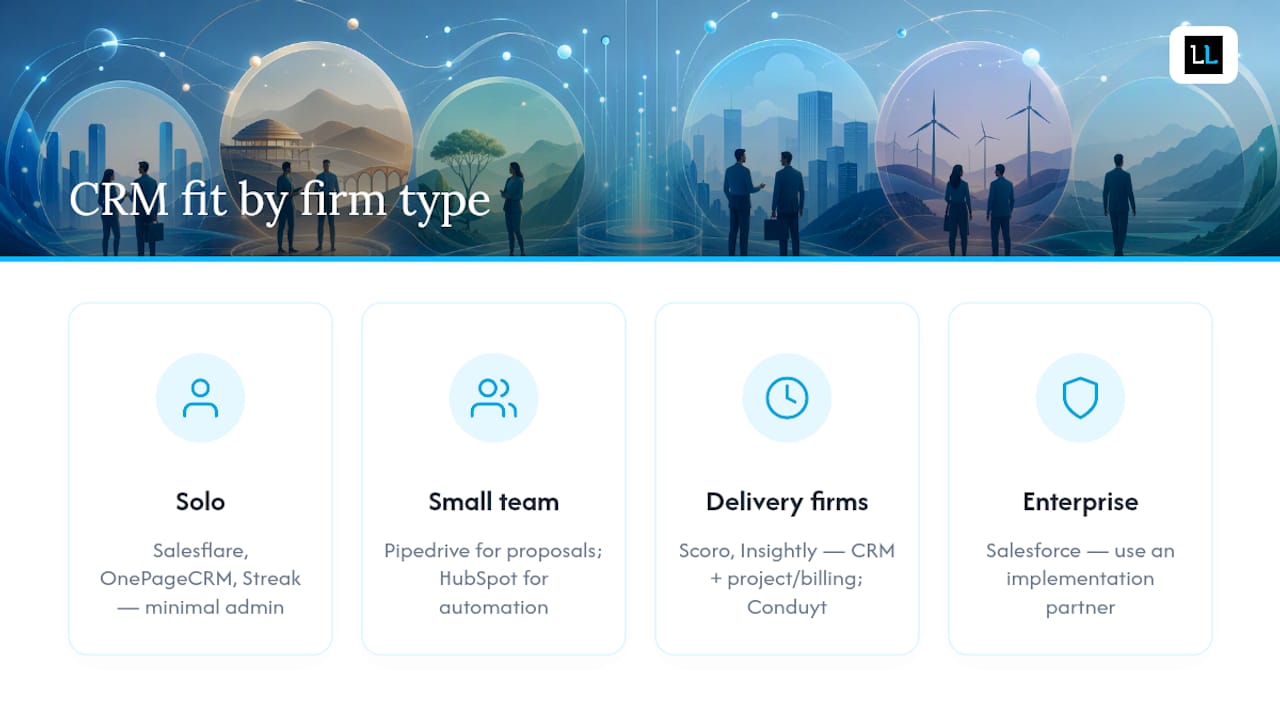
Delivery-heavy firm (project billing, time tracking, retainers): Scoro or Insightly. Both blend CRM with project management. Conduyt is also worth evaluating here: it’s built specifically for consultants with project-based pipelines, renewal tracking, and flat-rate firm-level pricing that avoids per-seat friction.
Larger firm or enterprise consultancy: Salesforce, with an implementation partner. The Salesforce professional services ecosystem includes SI partners who specialize in consulting firm configurations.
Questions to ask vendors during demos
- Who owns the data, and can I export everything in CSV or JSON at any time?
- What’s the per-seat cost at 5, 10, and 20 users, including add-ons?
- Does email sync work bidirectionally, or is it one-way logging?
- What’s the API rate limit, and do you have a native connector for QuickBooks or Xero?
- What are your SLAs for support, and is phone support included at my tier?
- How does the mobile app handle offline access?
- What security certifications do you hold (SOC 2, ISO 27001)?
Pricing checklist: what CRM actually costs over 12 months
Per-seat pricing looks cheap until you add up the real cost. A $25/user/month CRM for a 5-person team is $1,500/year before add-ons. Common add-ons that inflate that number: email automation sequences, advanced reporting, document storage, API access, and phone support. Some vendors (Scoro, Dubsado, GoHighLevel) use flat-rate pricing, which removes per-seat friction but can be expensive at very small team sizes.
Pro Tip: Ask every vendor for an “all-in” price at your expected user count, including the add-ons you actually need. The base plan price is almost never what you’ll pay.
Implementation timeline and migration checklist
A realistic CRM rollout for a 5-person consulting firm takes 4–8 weeks, not a weekend.
- Week 1–2 (Pilot): Set up one pipeline, import 50 contacts, run one deal through the full workflow. Identify gaps before you commit.
- Week 2–3 (Data import): Export contacts from your current system (spreadsheet, email, old CRM). Deduplicate. Map fields to the new CRM’s schema. Run a test import on a subset.
- Week 3–4 (Integrations): Connect email, calendar, and any accounting or proposal tools. Test bidirectional sync.
- Week 4–5 (User roles and training): Set up role-based permissions. Run a 90-minute onboarding session per user group (partners, associates, admin).
- Week 5–8 (Process updates): Update your BD and delivery workflows to reference the CRM. Define who edits which fields and when.
Red flags to watch for: per-seat pricing that jumps sharply at higher tiers; limited or paywalled data export; email sync that only logs sent mail, not received; vague SLA language (“best effort”); no SOC 2 certification for a tool that will hold client data.
What features do consultants actually use day to day?
Most CRM feature lists are written for sales teams, not consultants. Here’s what actually matters in a consulting workflow, mapped to the stages where each feature earns its keep.
The consulting workflow: lead to renewal
Lead capture and outreach → Proposal pipeline → Engagement delivery → Client handoff/renewal
At each stage, different CRM features carry the weight:
- Relationship timeline and email sync: Every email, meeting note, and call log attached to a contact record. This is the feature that prevents “wait, did we already discuss pricing with them?” conversations. Bidirectional sync (not just outbound logging) is non-negotiable.
- Calendar and meeting capture: Automatic meeting logging means you don’t manually enter every call. Salesflare does this particularly well, pulling context from email signatures and calendar invites.
- Proposal pipeline: A separate pipeline stage for proposals in progress, with probability weighting for forecasting. Pipedrive’s visual board makes this intuitive. Nynch takes a different angle, building opportunity memory and nurture rhythms so you don’t lose track of a warm prospect who went quiet.
- Email and proposal templates: Reusable templates for outreach, follow-up, and proposal cover letters cut the time spent on repetitive writing. HubSpot and Pipedrive both handle this well.
- Renewal and retainer tracking: A separate pipeline or tag system for clients approaching contract renewal. This is where most consulting firms leak revenue: no reminder, no conversation, no renewal. Conduyt’s renewal tracking feature addresses this directly.
- Time tracking and billing integrations: If you bill by the hour or need to track project time, you want a CRM that connects to Harvest, Toggl, or your accounting tool. Scoro has this built in. Most others require a Zapier connection or a native integration.
- Reporting and forecasting dashboards: Practice-area revenue forecasting, pipeline velocity, and win/loss rates. Monday.com’s AI-powered dashboards are strong here. HubSpot’s reporting is deep on paid tiers.
- Mobile app: Consultants travel. A CRM that works poorly on mobile means data doesn’t get entered after client meetings. Pipedrive and HubSpot both have solid mobile apps. Salesflare’s mobile app auto-logs meetings, which removes the friction entirely.
Integration priorities
| Integration | Why it matters for consultants |
|---|---|
| Google Workspace / Outlook | Bidirectional email sync and calendar meeting capture |
| Contact enrichment and outreach signal tracking | |
| QuickBooks / Xero | Invoice status visible inside client records |
| Proposal tools (PandaDoc, Proposify) | Proposal sent/viewed/signed status in the pipeline |
| Zapier / Make | Connects tools that lack native integrations |
| Harvest / Toggl | Time tracking linked to client and project records |
Integrating LinkedIn outreach with your CRM is particularly valuable for consultants who prospect on LinkedIn: you can track connection requests, message threads, and meeting bookings inside the same contact record where you manage the relationship.
Why these CRMs made the shortlist
The shortlist above wasn’t built by counting features. These filters drove the selection:
- Consultant-friendly pricing: flat-rate or reasonable per-seat models that don’t punish small firms for adding a partner
- Engagement-focused pipelines: support for separate sales and delivery pipelines, not just a linear sales funnel
- Calendar and email sync quality: bidirectional, reliable, and available without a premium add-on
- Ease of use for senior partners: if it takes a 2-hour training session to log a meeting, partners won’t use it
- Security controls: SOC 2 Type II certification or equivalent for tools holding sensitive client data
- Integration depth: native connectors for Google Workspace, Outlook, and at least one accounting tool
Vendor feature pages, industry write-ups, and market-size data from Statista’s U.S. consulting market figures all informed the selection. For firms that need SI-level implementation support, the Salesforce professional services ecosystem and similar enterprise-grade partners are worth evaluating separately.
Tools like Trello and Airtable appear on the list because consultants frequently ask about them, not because they’re recommended CRM solutions. They’re included with honest caveats.
The real reason CRM adoption fails in consulting firms
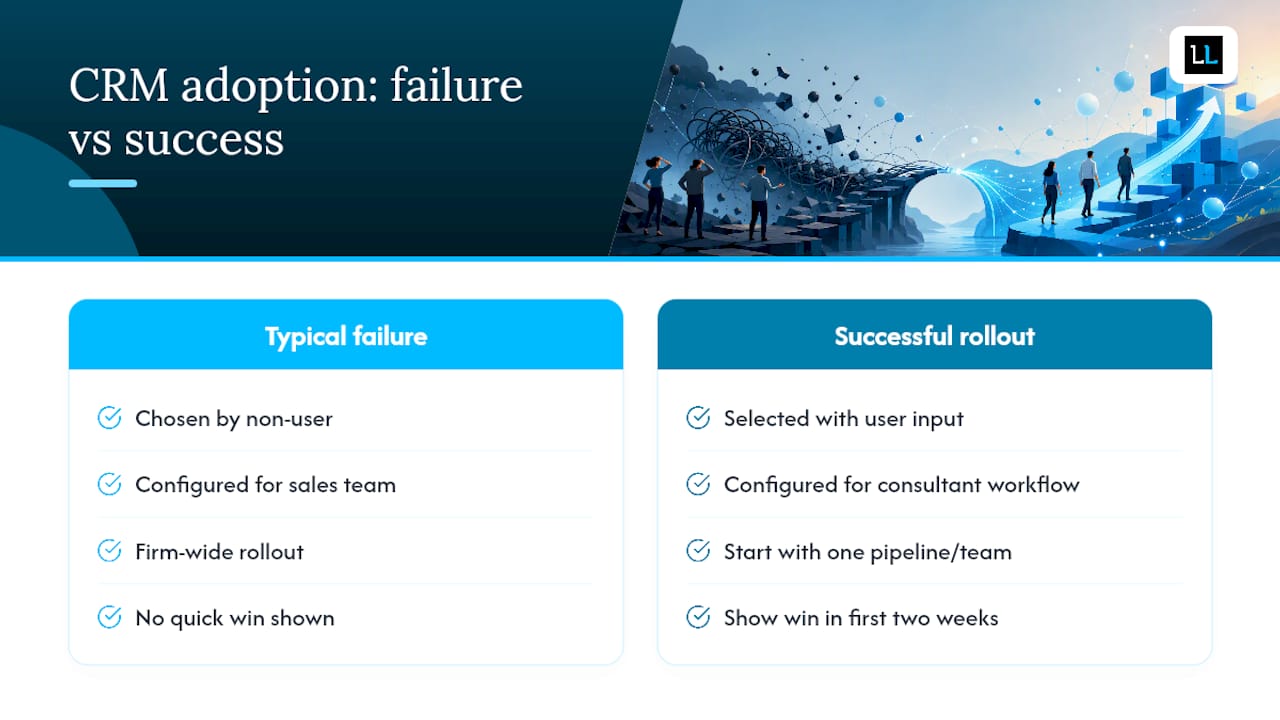
Most CRM rollouts in consulting firms don’t fail because the software is bad. They fail because the CRM was chosen by someone who doesn’t use it, configured for a sales team workflow that doesn’t match how consultants actually sell, and then handed to senior partners with a 30-minute training video.
The pattern is predictable: the CRM gets used for the first month, then contact records go stale, then nobody trusts the pipeline data, then the whole thing gets abandoned. The firm goes back to spreadsheets and email threads.
What actually works is a different sequence. Start with one pipeline and one team, not the whole firm. Pick the workflow that has the most obvious pain point: usually proposal tracking or renewal reminders. Show that team a concrete win in the first two weeks, whether that’s a recovered renewal conversation or a proposal that closed because someone got a timely follow-up reminder. That visible ROI is what gets partners to log their own meetings.
Role-based onboarding matters more than most firms expect. Partners need a 20-minute session focused on logging meetings and viewing their pipeline. Associates need a session on contact management and task assignment. Admin staff need a session on reporting and data hygiene. Running all three groups through the same training is one of the most common adoption mistakes.
A 30/60/90-day adoption plan keeps momentum going after the initial rollout. At 30 days, check that email sync is working and contacts are being created. At 60 days, review pipeline data quality and run your first forecast. At 90 days, assess whether the CRM is actually influencing BD conversations or just recording them after the fact.
Pro Tip: The best CRM governance decision a small firm can make is designating one person as the “CRM owner” who has authority to enforce field standards, merge duplicates, and approve pipeline stage changes. Without that person, data quality degrades within 60 days.
On AI-assisted CRM features: tools like Nynch surface next-action briefs and relationship signals from email and calendar data, which is genuinely useful for partners managing 20+ relationships. The risk is over-relying on AI scoring when the relationship context is nuanced. A CRM that flags a contact as “at risk” because they haven’t replied in 30 days may not know that you saw them at a conference last week. Use AI signals as prompts, not verdicts.
The CRM-to-lead-generation connection is also worth building deliberately. A CRM that captures outreach activity and maps it to pipeline stages gives you data on which lead sources convert, which is the foundation for scaling what works.
When outsourcing outreach beats a CRM-first strategy
Some consulting firms don’t have a CRM problem. They have a pipeline problem: not enough qualified conversations happening, regardless of how well those conversations are tracked.
If that’s your situation, spending 6–8 weeks implementing a CRM before you have enough leads to fill it is the wrong sequence. The Lead Lab’s done-for-you LinkedIn outreach delivers qualified, booked meetings directly to your calendar without requiring you to build a CRM workflow first.
The service covers prospect targeting, personalized message copywriting, response handling, and appointment setting. You get calendar meetings with qualified prospects. The Lead Lab manages the outreach infrastructure, so your partners spend time on conversations, not on campaign management.
This works particularly well for firms that are growing quickly, have just added a new practice area, or are entering a new market where they don’t yet have a warm network to draw on. It also works as a complement to a CRM rollout: outsource the top-of-funnel while you build the infrastructure to manage what comes in.
See The Lead Lab’s client results or request a consultation to find out whether done-for-you outreach fits your current growth stage.
Sources
These are the primary sources used to build the shortlist and evaluate features. Use them to verify pricing, check current feature availability, and dig deeper into specific vendors.
- Statista — Consulting market size in the United States
- CRM for Consultants | Conduyt
- Turn partner relationships into shared commercial memory. | Nynch
- The Best CRM for Consultants | Used in 80+ countries