
Warm up a LinkedIn account by completing your profile fully, acting like a genuine user for several days, then gradually increasing outreach over 2 to 6 weeks. Start connection requests at a modest daily volume and increase gradually over time. This staged approach lowers the odds of restrictions but does not eliminate them. Firms that skip the ramp and hand off warm-up to a managed service like The Lead Lab typically see steadier results.
TL;DR:
- A new or dormant LinkedIn account should not send more than 10 to 20 connection requests weekly initially to avoid triggering restrictions.
- Maintaining consistent device use, login habits, and avoiding sudden location changes helps pass LinkedIn’s fraud detection signals.
- Monitoring a steady acceptance rate between 20% and 40% and avoiding engagement dips can identify when to slow or halt activity.
- Using automation during warm-up requires careful configuration, including daily caps, activity randomization, and manual behavior alongside automation.
- Most restrictions are recoverable through immediate pause, completing verification steps, and resuming activity at reduced volume.
Table of Contents
- What Does It Mean to Warm Up a LinkedIn Account?
- What Is a Safe 4-Week LinkedIn Warm-Up Schedule?
- What Warning Signs Mean You Should Slow Down?
- Is Automation Safe During LinkedIn Warm-Up?
- What Should You Do If LinkedIn Restricts Your Account?
- How Does The Lead Lab Apply Warm-Up in Real Campaigns?
- Skip the Ramp: Let The Lead Lab Warm It Up for You
- Sources
What Does It Mean to Warm Up a LinkedIn Account?
LinkedIn account warmup is the process of building a new or dormant profile’s activity history gradually so it looks and behaves like a real, trusted user before you start heavy outreach. The platform’s automated systems flag accounts that jump from zero activity to dozens of connection requests overnight, regardless of whether a human or a tool sent them. A properly warmed account passes that initial scrutiny because its behavior pattern looks organic rather than mechanical.
Before touching your outreach volume, get the profile itself into shape. LinkedIn’s own trust signals start here, and an incomplete profile makes every subsequent action look more suspicious, not less.
- Upload a professional photo and write a headline that states your actual role, not a generic title.
- Write your About section in first person, with specific details about what you do and who you help.
- Add a banner image, your current role, and 3 to 5 past positions with real descriptions.
- List your education and at least 15 to 20 relevant skills, then request endorsements from a handful of colleagues.
Once the profile fields are filled in, start building organic signals before you send a single connection request:
- Follow 5 to 10 industry pages relevant to your niche.
- Like and comment on posts from people in your target network, using real sentences rather than “Great post!”
- Accept any warm inbound connection requests you already have waiting.
- Add 10 to 30 people you already know personally or have worked with directly.
Device and login habits matter more than most people expect. Use the same device and time zone consistently during the first 30 days, and avoid logging in through datacenter IPs or shared VPNs, since LinkedIn’s fraud detection treats sudden location or device shifts as a risk signal. Pick one browser or app and stick with it rather than bouncing between desktop and mobile constantly during this early window.
What Is a Safe 4-Week LinkedIn Warm-Up Schedule?
The right schedule depends on your account’s history. A brand-new profile, a dormant one that has sat untouched for months, and an established account you want to scale each need a different ramp, even though the underlying logic is the same: gradual increases, mixed activity types, and constant attention to how LinkedIn responds.
Brand-new accounts
Week one is entirely about the profile and organic activity described above. No connection requests, no messages, no outreach of any kind. This is the week LinkedIn’s systems build a baseline picture of how you use the platform.
- Week 1: Zero outreach. Complete your profile, follow pages, like and comment on 5 to 10 posts daily.
- Week 2: Begin sending 5 to 10 connection requests per day, spread across morning and afternoon sessions.
- Week 3: Increase to 10 to 20 requests daily if your acceptance rate holds steady and you see no friction.
- Week 4: Scale to 20 to 30 requests daily, and start layering in a small number of personalized follow-up messages to accepted connections.
Dormant accounts
An account that has been inactive for months should be treated almost like a new one for the first one to two weeks. LinkedIn’s algorithm weighs recent activity far more heavily than an old history of engagement, so a profile that went quiet in early 2024 doesn’t get much credit for connections it made back then. Spend the first week re-engaging: comment on posts, accept pending requests, update stale profile details. If your historic engagement was strong and consistent, you can often accelerate the back half of the ramp, moving from roughly 10 requests per day in week two to 25 to 30 by week four.
Established accounts
If you already have a healthy, active account and simply want to scale up outreach volume, start near your recent baseline rather than resetting to zero. If you’ve been sending 15 requests a day comfortably for months, increasing by 10% to 25% per week is a reasonable pace, according to PhantomBuster’s warm-up guidance, which stresses that LinkedIn evaluates changes relative to your own recent activity rather than a fixed number that applies to everyone. Keep engagement layered in throughout, since a sudden pivot to pure outreach with no likes or comments still reads as anomalous even from an established profile.
The scaling rule that matters most
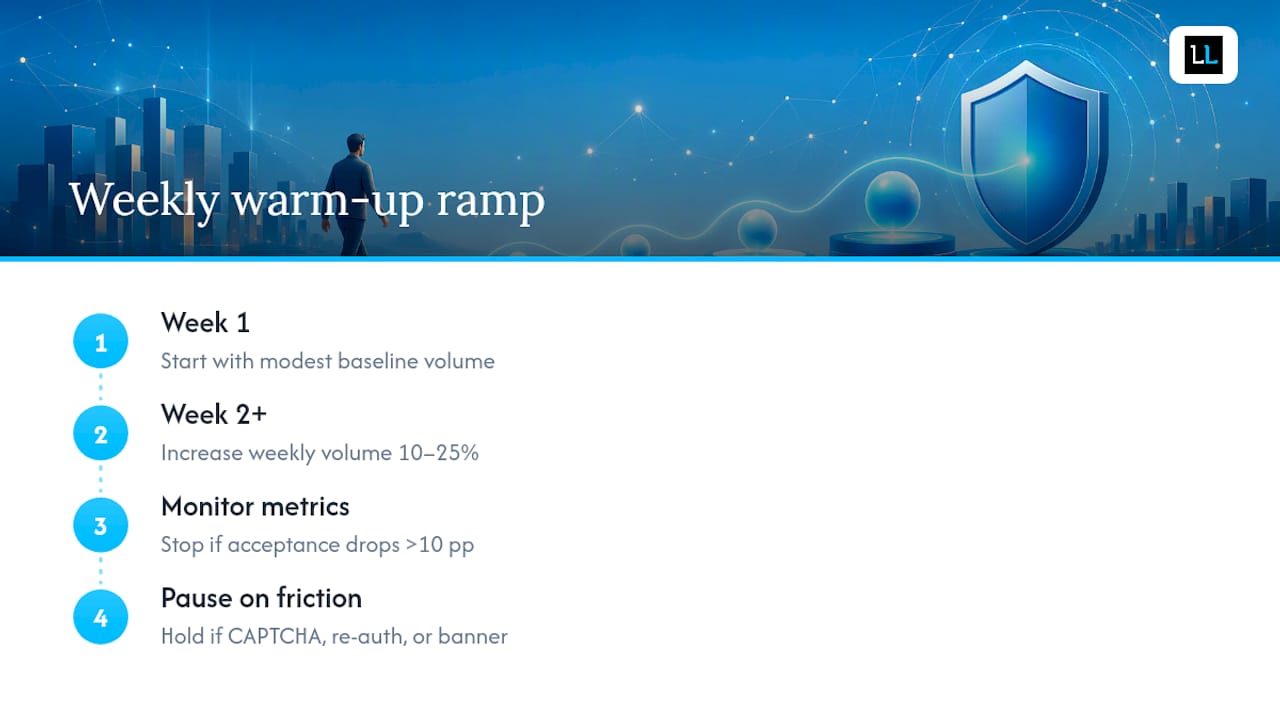
Across all three tracks, the same rule governs how fast you can move: increase weekly volume by roughly 10% to 25%, and watch two numbers closely. If your acceptance rate drops by more than 10 percentage points, or you notice any friction (a CAPTCHA, a re-authentication prompt, a warning banner), stop increasing and hold at your current level for a few more days before trying again. This mirrors the step-by-step ramp Infonet recommends for new accounts, where each week has a specific, modest goal rather than an open-ended target. Spreading your daily actions across several sessions instead of firing them all at once in a five-minute burst also reduces the density spikes that trigger review.
What Warning Signs Mean You Should Slow Down?
LinkedIn rarely bans an account outright without warning first. It shows friction, and learning to read that friction early is what separates a warm-up that works from one that ends in a restricted profile.

Watch for specific warning signs like CAPTCHAs, forced re-authentication, unexpected logouts, or unusual activity banners, and pause activity immediately if any appear.
Beyond session friction, track a handful of numbers daily. Your acceptance rate (the percentage of connection requests accepted within 48 hours) is the single most useful metric, because a healthy rate typically sits between 20% and 40% depending on your targeting. A sudden drop below that range, especially paired with a growing pile of pending, unanswered invites, usually means your outreach looks templated or your targeting has drifted.
Pro Tip: Keep a simple spreadsheet with three columns: date, requests sent, requests accepted. Five minutes a day gives you a trend line that catches problems days before LinkedIn’s own warnings do.
Heuristic markers for a genuinely warmed account include going 10 or more days without a single verification prompt, holding a steady acceptance rate, and reaching a baseline of 80 to 150 connections with a few organic posts that have real engagement, according to Ampliflow’s ramp-up research. If you’re hitting those numbers consistently, you’ve cleared the hardest part.
Is Automation Safe During LinkedIn Warm-Up?
Automation isn’t the problem. Sloppy automation is. LinkedIn’s detection systems look at pattern consistency and action density per session more than they look at whether a human or a tool clicked the button, so a poorly configured automated sequence and a caffeine-fueled manual blitz get flagged for the same reasons.
If you’re using a sequencing tool to automate outreach, configure it conservatively from day one:
- Set daily caps well below the platform maximum, and never max them out during warm-up weeks.
- Randomize send windows so messages go out at slightly different times each day instead of on the hour, every hour.
- Enable auto-pause when a prospect replies, so the sequence doesn’t keep messaging someone already in conversation.
- Stagger activity across business hours rather than firing everything in one morning batch.
Use a residential IP for any account you’re actively running, and keep each account’s session isolated. Sharing cookies or login sessions across multiple seats on the same device is one of the fastest ways to get several accounts flagged at once, per Expandi’s warm-up documentation. The safest workflow blends automation with real manual behavior: browse profiles, leave a handful of personalized comments, and reply to messages yourself alongside whatever sequence is running in the background.
What Should You Do If LinkedIn Restricts Your Account?
A restriction feels alarming, but most soft flags are recoverable if you act immediately and resist the urge to push through with more outreach.
- Stop everything. Pause any automation tool right away and halt manual outreach entirely, even if it feels like you’re losing momentum.
- Clear the verification. Complete whatever LinkedIn is asking for, whether that’s a CAPTCHA, a phone verification, or an ID check, and don’t attempt workarounds.
- Go organic-only for 5 to 7 days. Scroll your feed, like posts, leave a few genuine comments. No connection requests, no messages.
- Resume at half your prior cap. If you were sending 20 requests a day before the flag, restart at 10 and ramp back up slowly while watching your metrics closely.
- Know when to retire the seat. If restrictions repeat within a short window, or CAPTCHAs keep appearing despite a slow, careful ramp, it’s usually faster to warm a fresh seat than keep fighting the old one.
How Does The Lead Lab Apply Warm-Up in Real Campaigns?
Most guides treat warm-up as a one-time checklist. In managed campaigns, it’s closer to ongoing account maintenance. The Lead Lab runs each verified seat through profile prep, a conservative multi-week ramp, and continuous monitoring of acceptance rates and response quality before scaling any single account toward higher outreach volume. Response handling and personalized message copywriting get layered in only once a seat’s baseline signals look stable, not before.
The practical lesson for anyone doing this solo: track your numbers with the same discipline you’d expect from a team running dozens of accounts at once. A weekly review of acceptance rate and friction signals catches problems long before LinkedIn’s warnings do.
— Toby
Skip the Ramp: Let The Lead Lab Warm It Up for You
Running a careful multi-week ramp on your own account is manageable. Doing it across multiple verified seats while also writing copy, managing replies, and tracking acceptance rates weekly is a full-time job most professional services firms don’t have spare hours for. The Lead Lab handles the entire warm-up and outreach cycle on verified LinkedIn seats, so your pipeline starts moving without you personally babysitting daily caps and friction signals.
A consultation walks through your target market, expected campaign timeline, and which service tier fits your volume needs, whether that’s lighter prospecting or a full appointment-setting engagement with qualified meetings landing on your calendar. You can also see how this plays out in practice by reviewing past campaign results before committing to anything. If a structured, professionally managed ramp sounds better than tracking spreadsheets yourself, start a conversation with The Lead Lab about a done-for-you campaign.
Sources
- How To Warm Up a LinkedIn Account for Automation: A Complete Step-by-Step Guide – PhantomBuster Blog
- How To Warm Up a New LinkedIn Account (Without Getting Flagged) | Infonet Blog
- Account Warm-Up | Expandi.io Help Center
- LinkedIn account warm-up: safe ramp-up that actually works