
Mass messages, in the context that matters for a professional services firm, means done-for-you, personalized LinkedIn outreach sent at scale to a defined list of qualified prospects. It is not bulk SMS and it is not a broadcast blast with a merge field for “First Name.” The verdict: yes, with constraints — if your firm sells high-ticket services to a defined ideal client profile and your partners will not tolerate generic spam wearing their name, scaled personalized outreach can fill a calendar with qualified conversations. If those conditions do not hold, skip ahead to the vendor evaluation section before you sign anything. Keep reading for the compliance-first blueprint or request a demo to see how it runs in practice.
Key Takeaways
Personalized, done-for-you LinkedIn outreach at scale works for professional services firms only when targeting, profile authority, and reply handling are all in place together.
| Point | Details |
|---|---|
| Definition matters | “Mass messages” here means personalized LinkedIn outreach at scale, not bulk SMS or generic broadcasts. |
| Personalization drives results | Contextual messages referencing real activity can lift acceptance and reply rates well above generic templates. |
| Vendor deliverables are non-negotiable | Require ICP scoping, partner-voice copywriting, reply triage, and weekly reporting from any provider. |
| Protect the account | Warm-up schedules and daily caps prevent restrictions; avoid unmanaged browser automation. |
| The Lead Lab fits firms wanting done-for-you execution | It handles targeting, copywriting, and reply handling so partners focus only on booked calls. |
Table of Contents
- What makes personalized mass messages actually work?
- How do you launch a compliant, high-performing campaign?
- What should you require from a done-for-you vendor?
- How much should you expect to pay, and how fast will it work?
- How do you keep your LinkedIn account safe?
- An agency’s honest read on what makes this work
- How The Lead Lab runs your outreach for you
- Frequently asked questions
- Sources
What makes personalized mass messages actually work?
Contextual, targeted outreach beats generic templates by a wide margin. Practitioner data on well-targeted LinkedIn campaigns shows connection acceptance rates near 72% and follow-up response rates around 40% when messages reference something specific: a recent post, a shared connection, a role change. Four fundamentals separate campaigns that book meetings from campaigns that get reported as spam.
- Personalization as strategy, not decoration. A first name swapped into a template is not personalization. Real personalization references a visible pain point, a comment the prospect made, or a result your firm delivered for a similar client.
- Profile authority. A partner’s LinkedIn profile needs to look like a person prospects would want to meet: a clear headline, recent posts showing a point of view, and a headshot that looks current rather than a decade old, as detailed in this Executive Photo Checklist for Your LinkedIn Profile.
- Scaled sequencing with real reply management. Sending is the easy part. Someone has to triage replies within hours, not days, or the warm lead goes cold.
The pragmatic split: partners should spend their limited hours on profile content and closing calls, not on sending connection requests. System work (targeting, sequencing, first-line replies) belongs with an operator or agency built for it.
Pro Tip: If a partner can only give you two hours a month, spend it recording one short video or writing one LinkedIn post referencing a client win. That single piece of content does more for profile authority than any amount of message tweaking.
How do you launch a compliant, high-performing campaign?
A campaign that actually converts follows a sequence, not a single blast. Here is the order that works.
- Onboarding (weeks 1 to 2). Build the ideal client profile brief, review and tighten the partner’s LinkedIn profile, and draft the first message sequence for approval. A structured onboarding process at this stage prevents wasted sends later.
- Account warm-up. New or recently dormant accounts need a gradual ramp in connection requests and messages before hitting full volume, protecting the account from LinkedIn’s automated restriction flags.
- Live sends (week 3 onward). Outreach goes live against the approved list, with daily monitoring rather than a “set it and check monthly” approach.
- Reply triage. Every response gets a same-day or next-day answer. Interested replies move straight to calendar booking; objections get a scripted but human follow-up.
- Iteration. Weekly review of acceptance and reply data feeds back into targeting and copy adjustments.
A short sequence in action, using contextual references instead of a generic script:
- Connection note: “Saw your post on outsourced compliance headaches for mid-size firms. We work with a few clients solving exactly that.”
- First follow-up: “Thanks for connecting. Curious how you’re currently handling [specific pain] given the volume you mentioned?”
- Breakup message: “No worries if the timing’s off. I’ll share a short case study on how [similar firm] cut review time by half; take a look whenever it’s useful.”
Before any send goes out, confirm four things: the partner’s profile content is current, the ICP brief is signed off, someone has approved the message copy, and the warm-up schedule is documented in writing.
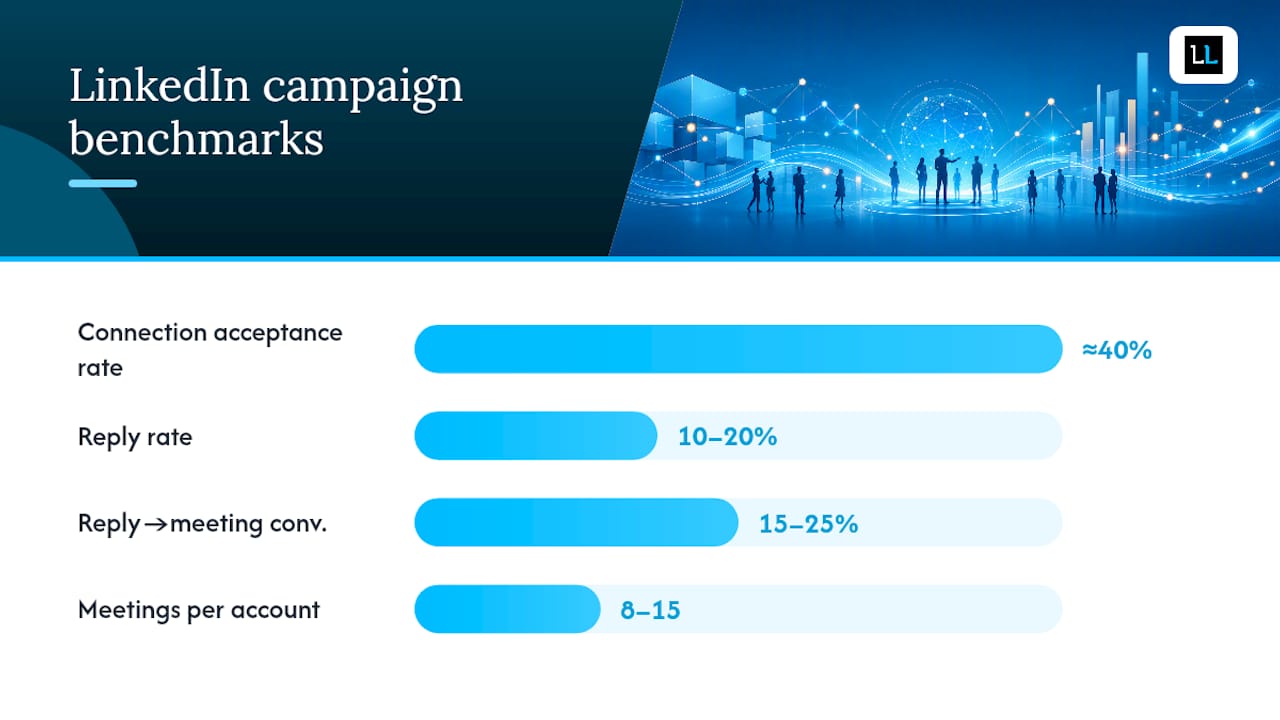
| Metric | What good looks like |
|---|---|
| Connection acceptance rate | around 40% depending on targeting quality |
| Reply rate | 10 to 20% for well-targeted campaigns |
| Reply to meeting conversion | 15 to 25% |
| Meetings per account per month | 8 to 15 in a mature program |
What should you require from a done-for-you vendor?
A vendor worth paying delivers six things, not two. Screen for ICP scoping, copywriting in the partner’s voice, verified account infrastructure, reply triage, weekly reporting, and an escalation protocol for account restrictions. Anything less and you are paying for a mail merge with a monthly invoice.
Ask these questions on the discovery call before you sign anything:
- What automation method do you use, and how do you keep it within LinkedIn’s usage limits?
- Have any client accounts been restricted in the past year, and what was the recovery process?
- How often do we see reporting, and does it include reply-level detail or just send counts?
- What happens to leads that reply outside business hours?
- Do you guarantee meeting volume, or only activity volume?
Red flags to walk away from: vague answers about “the tool we use,” reporting that only arrives monthly, no dedicated reply handling, reliance on unmanaged browser extensions, or an inability to describe how they build the target list beyond “we search LinkedIn.” Each of these tends to show up right before an account gets restricted or leads go stale.
The Lead Lab was built around the deliverables above: accurate targeting, message copy that sounds like your partners wrote it, and a reply-handling process that gets qualified conversations onto a calendar rather than sitting in an inbox.
How much should you expect to pay, and how fast will it work?
Reply rates of 10 to 20% and reply-to-meeting conversion of 15 to 25% are realistic benchmarks for a well-run campaign, with a single optimized account producing 8 to 15 meetings a month once the program matures.
- Onboarding to first sends: roughly two to three weeks including profile work and list building.
- First booked meetings: typically appear within the first four to six weeks of live outreach.
- Compounding effect: reply rates and meeting volume tend to improve over two to three months as messaging gets refined against real response data.
- Pricing drivers: the number of sending accounts, targeting complexity, whether verified account rental is included, and how much human reply handling the tier covers.
Multichannel programs that pair LinkedIn with email tend to outperform LinkedIn-only sequences by a wide margin, with one 2025 campaign analysis showing a 34% cumulative reply rate versus 11.6% for single-channel outreach.
How do you keep your LinkedIn account safe?
LinkedIn restricts accounts that send too fast, use unmanaged browser plug-ins, or ignore daily caps. A responsible operator warms new accounts gradually and never exceeds platform-safe volume.
- Never rely on unmanaged browser automation tools; they carry the highest restriction risk.
- Set daily connection and message caps and respect them even when a campaign is performing well.
- Use a documented warm-up schedule: light activity in week one, moderate in week two, full volume from week three.
- Require your vendor to state their account access model and what happens if an account gets restricted mid-campaign.
Your contract should also cover:
- Who owns the LinkedIn account and what happens if the relationship ends.
- A written contingency plan for account restrictions.
- Data handling terms consistent with GDPR for any prospect data collected or enriched.
- A clear escalation path and response time commitment if something goes wrong.
An agency’s honest read on what makes this work
The firms that get the best results from mass messages are the ones that treat outreach as a system their partners feed, not a job partners do themselves. The pattern shows up again and again: profile content plus disciplined targeting plus fast reply handling outperforms bigger budgets spent on volume alone. If you want to see what a target list and message sequence would look like for your firm, ask for a sample.
How The Lead Lab runs your outreach for you
The Lead Lab is the alternative to hiring and training an in-house SDR for firms that need qualified LinkedIn meetings without the twelve-week ramp-up. Where a DIY effort means a partner or junior hire learning targeting, copywriting, and reply handling from scratch, The Lead Lab starts from a system already built for professional services firms.
Every engagement includes ICP scoping, profile positioning review, message copywriting in your firm’s voice, verified LinkedIn account options, daily reply triage, and weekly reporting with clear metrics rather than vanity send counts. In weeks one and two, expect a short ICP interview and profile review that takes about an hour of partner time total. Live outreach begins in week three, with your team only needed for reviewing qualified replies and showing up to booked calls.
Check the service tiers and case studies to see how similar firms structured their campaigns, then book a discovery call to get a sample target list built around your actual ideal client profile.
Frequently asked questions
Is “mass messages” the same as spam or bulk SMS?
No. In this context it refers to personalized LinkedIn outreach sent to a targeted list, each message tailored to the recipient’s role, activity, or industry, rather than an identical broadcast sent to strangers.
How many LinkedIn messages can you safely send per day?
Safe volume depends on account age and warming history, but responsible operators stay well under LinkedIn’s informal thresholds and increase volume gradually rather than sending at full capacity from day one.
How fast will a mass messages campaign produce meetings?
Most programs book their first qualified meetings within four to six weeks of going live, with volume and reply quality improving over the following two to three months.
Do I need a verified LinkedIn account to run this?
Not always, but verified account options reduce restriction risk for firms sending consistent outreach volume, particularly when running multiple campaigns in parallel.
What’s the difference between LinkedIn outreach and cold email or cold calling?
LinkedIn outreach benefits from visible context (mutual connections, posts, role changes) that email and phone lack, and multichannel sequences combining LinkedIn with email tend to outperform either channel alone.
Sources
- LinkedIn personalized outreach: practical tactics that work | Leadfeeder
- What Does a LinkedIn Lead Generation Agency Actually Do? | LinkedInsider