LinkedIn is a professional networking platform where careers are built, jobs are filled, and B2B relationships start. At its core, it works like this: you build a profile, connect with people in your field, and use the feed, search, and messaging tools to create opportunities — whether that’s landing a job, finding clients, or learning new skills.
Here’s the short version:
- What it is: A professional network, job database, and learning platform rolled into one. LinkedIn is an American business- and employment-oriented social networking service used by professionals in virtually every industry worldwide.
- How it works: You create a profile (your digital resume), build a network of connections and followers, engage with content in the feed, and use search and messaging to reach people and opportunities.
- Who uses it: Individual professionals at every career stage, recruiters sourcing candidates, and B2B marketers reaching decision-makers. With over 1 billion profiles on the platform, it’s the largest professional database most recruiters search daily.
LinkedIn Learning and LinkedIn Premium extend the platform’s core value for those who want structured courses or advanced search and outreach tools. For teams that want someone else to run their LinkedIn outreach entirely, agencies like The Lead Lab handle that end-to-end.
Key Takeaways
LinkedIn works best when your profile, content, and outreach are aligned — optimize your headline first, then build consistency from there.
| Point | Details |
|---|---|
| Headline is highest-weighted | Recruiters search by headline; write it with keywords, not just your job title. |
| 1 billion profiles, real reach | The platform’s scale means almost any professional or company is reachable with the right approach. |
| Algorithm rewards topical alignment | LLM-based ranking matches posts to viewers by topic; your profile and content should cover the same subject area. |
| Free plan is enough to start | Premium pays off for active job seekers, recruiters, and B2B prospectors — not casual users. |
| Consistency beats volume | One post per week and 15 minutes of daily engagement compounds over months; sporadic bursts don’t. |
Table of Contents
- What is LinkedIn and how does it work for professionals?
- Core LinkedIn features you’ll actually use
- How LinkedIn works in practice: profiles, connections, and the feed
- How LinkedIn’s algorithm changed and what it means for your content
- Free vs. Premium: what each LinkedIn plan actually includes
- A practical 30-day starter plan for new LinkedIn users
- Best practices for networking and posting on LinkedIn
- How LinkedIn privacy settings control who sees what
- Pros and cons of using LinkedIn
- The Lead Lab’s perspective on LinkedIn
- Sources
What is LinkedIn and how does it work for professionals?
LinkedIn sits in a category of its own. Unlike Facebook or Instagram, where the social graph is built around personal relationships and entertainment, LinkedIn is organized around professional identity and intent. Your profile is your public record of where you’ve worked, what you know, and what you’re looking for. The platform’s search engine is built to surface people by job title, company, industry, and skill — which is exactly why recruiters and sales teams treat it as a sourcing tool rather than a social network.
The platform serves three distinct audiences, and understanding which one you are shapes how you use it:
- Job seekers and professionals use LinkedIn to get found by recruiters, research companies, apply for roles, and build a reputation through content.
- Recruiters and HR teams use it to search for candidates, post jobs, and message prospects directly.
- B2B marketers and sales professionals use it to identify decision-makers, run outreach campaigns, and generate leads.
LinkedIn’s scale matters here. A platform with over 1 billion profiles isn’t just a directory — it’s a live database of professional intent. People update their profiles when they change jobs, earn certifications, or start new ventures. That recency is what makes it useful for recruiters and marketers in ways that a static database never could be.
Compared to general social platforms, LinkedIn’s key differentiator is searchability. Every profile is indexed. Your headline, skills, and job history are all discoverable. That’s a feature general social networks don’t prioritize, and it’s the reason LinkedIn behaves more like a search engine than a social feed for anyone using it seriously.
Core LinkedIn features you’ll actually use
LinkedIn has a lot of moving parts. Here’s what actually matters and where each feature fits into your workflow:
- Profile: Your professional identity on the platform. It includes your photo, headline, About section, work experience, education, skills, and Featured media. Think of it as a living resume that recruiters and connections can find through search.
- Connections and followers: Connections are mutual (both parties accept); followers are one-directional. You can follow someone without connecting, which is useful for keeping up with thought leaders without cluttering your network.
- Feed and posts: A scrollable stream of updates, articles, and shared content from your network and beyond. LinkedIn supports posts up to 3,000 characters, articles, documents, polls, and video.
- Messaging and InMail: Direct messages to your connections are free. InMail lets you message people outside your network — a feature gated behind LinkedIn Premium.
- Jobs: A full job board with filters for location, seniority, company size, and more. You can apply directly, save jobs, and set up job alerts.
- LinkedIn Learning: An on-platform library of video courses covering business, technology, and creative skills. Many courses come with certificates you can add directly to your profile.
- Company pages: Business profiles where companies post updates, job listings, and content. Following a company keeps you current on their news and open roles.
- Groups: Topic-based communities where members share content and discuss industry issues. Useful for niche networking and visibility within a specific field.
- Analytics: Profile analytics show who viewed your profile and how they found you. Post analytics break down impressions, engagement, and audience demographics.
LinkedIn Premium unlocks a meaningful set of additional tools. Depending on the tier (Career, Business, Sales Navigator, or Recruiter), you get InMail credits, expanded search filters, the ability to see who viewed your profile in full, applicant insights for job listings, and access to LinkedIn Learning’s full course library. The right tier depends entirely on your goal — more on that in the pricing section below.
How LinkedIn works in practice: profiles, connections, and the feed
The mechanics of LinkedIn follow a simple flow: profile → connections/followers → feed and search → opportunities. Each step builds on the last.

Your profile is the foundation. The headline is the highest-weighted field for recruiter search, so it needs to describe what you do in terms people actually search for, not just your job title. Completing your core sections — About, experience, education, skills — raises your profile strength score and improves how often you appear in search results. Adding up to 50 skills helps keyword matching significantly.
Once your profile is solid, your network determines your reach. LinkedIn organizes connections into degrees:
- 1st-degree connections are people you’re directly connected to — you can message them for free.
- 2nd-degree connections are connected to your 1st-degree connections — you can request to connect or send InMail.
- 3rd-degree connections are one step further out — still discoverable through search, but harder to reach without Premium.
The feed surfaces content based on engagement signals, not just recency. A post that gets substantive comments in the first hour gets pushed to more people. That’s why the first 60 minutes after posting matter more than most people realize.
Actions that build visibility over time:
- Write a keyword-rich headline that reflects your actual expertise
- Post consistently (even once a week compounds over months)
- Leave substantive comments on posts in your field — not just “great post,” but a real reaction or added perspective
- Tag relevant people or companies when it genuinely fits the content
- Add media, documents, or links to your Featured section to show work samples
The follow vs. connect distinction is worth understanding early. Following someone means their content appears in your feed. Connecting means you can message them directly and their activity gets more weight in your feed. For building a real network, connecting is stronger. For learning from people you admire but don’t know, following is enough.
How LinkedIn’s algorithm changed and what it means for your content
LinkedIn’s feed ranking has shifted significantly as detailed in AI-Driven Search: Transforming Online Visibility Strategies. By 2026, the platform replaced several separate ranking pipelines with a unified LLM-based retrieval and ranking system that matches posts to viewers based on semantic topic alignment rather than purely who you’re connected to. In plain terms: LinkedIn now reads what your post is about and decides who, across the whole platform, would find it relevant — not just your immediate network.
That change has practical consequences. A post about supply chain risk management will now reach supply chain professionals who don’t follow you, if the topic and your profile align. A post that’s topically mismatched with your profile history gets throttled even if it’s well-written.
Several other recent platform changes are reshaping how content performs:
- Collaborative posts let two or more creators co-author a post, combining their audiences and boosting reach for both.
- Creator marketplace connects brands with LinkedIn creators for sponsored content partnerships.
- In-network vs. out-of-network impressions metric shows you whether your content is reaching new audiences or just recirculating among people who already know you.
- AI slop penalties: LinkedIn is actively reducing distribution of low-quality AI-generated content. Posts that read as generic, templated, or experience-free get pushed down. The platform rewards original, perspective-driven content — AI can assist your drafting, but the insight needs to be yours.
Pro Tip: Check your in-network vs. out-of-network impressions split in your post analytics. If nearly all your impressions are in-network, your content isn’t breaking out to new audiences. To fix it: pick a topic that’s genuinely searchable (not just insider jargon), co-author a collaborative post with someone whose audience differs from yours, and respond to every comment in the first hour to trigger broader distribution.
A practical out-of-network post strategy looks like this: choose a topic that’s broadly relevant to your field (not just your company’s niche), write from direct experience rather than summarizing what others have said, invite a collaborator with a complementary audience to co-author it, and plan to engage with every early comment yourself. That combination signals quality to the LLM ranking system and earns distribution beyond your existing followers.
Free vs. Premium: what each LinkedIn plan actually includes
The free plan is genuinely useful. Most professionals can build a strong presence, apply for jobs, and grow a network without spending anything. Premium becomes worth it when a specific feature solves a specific problem.
Here’s the high-level split:
Free plan includes:
- Full profile creation and customization
- Unlimited connections and followers
- Job applications and job alerts
- Basic search and filters
- Messaging to 1st-degree connections
- Limited profile view history (last 5 viewers)
- Access to some LinkedIn Learning courses
Premium adds (varies by tier):
- InMail credits to message anyone on the platform
- Full list of who viewed your profile
- Expanded search filters and saved searches
- Applicant insights (how you compare to other applicants)
- Full LinkedIn Learning library
- AI-assisted writing tools and profile feedback
- Sales Navigator (advanced tier): lead lists, CRM integration, intent signals
The rule of thumb: Premium pays for itself when you’re actively job searching (applicant insights and InMail speed things up), actively recruiting (Recruiter Lite is purpose-built), or running B2B prospecting at volume (Sales Navigator’s filters are materially better than the free version). If you’re maintaining a presence and posting occasionally, free is fine.
A practical 30-day starter plan for new LinkedIn users
The fastest way to get value from LinkedIn is to treat the first month as a setup sprint, not a passive browsing exercise. Here’s a week-by-week plan:
Week 1: Build your profile foundation
- Upload a clear, professional headshot (profiles with photos get significantly more views).
- Write a headline that describes what you do and for whom — not just your job title. (Recruiters weight this field most heavily in search.)
- Complete your About section with 3–5 sentences covering your background, what you do, and what you’re looking for.
- Add your work experience with 2–3 bullet points per role focused on outcomes, not duties.
- List at least 10 skills relevant to your field.
- Add contact info and a link to your portfolio or website if you have one.
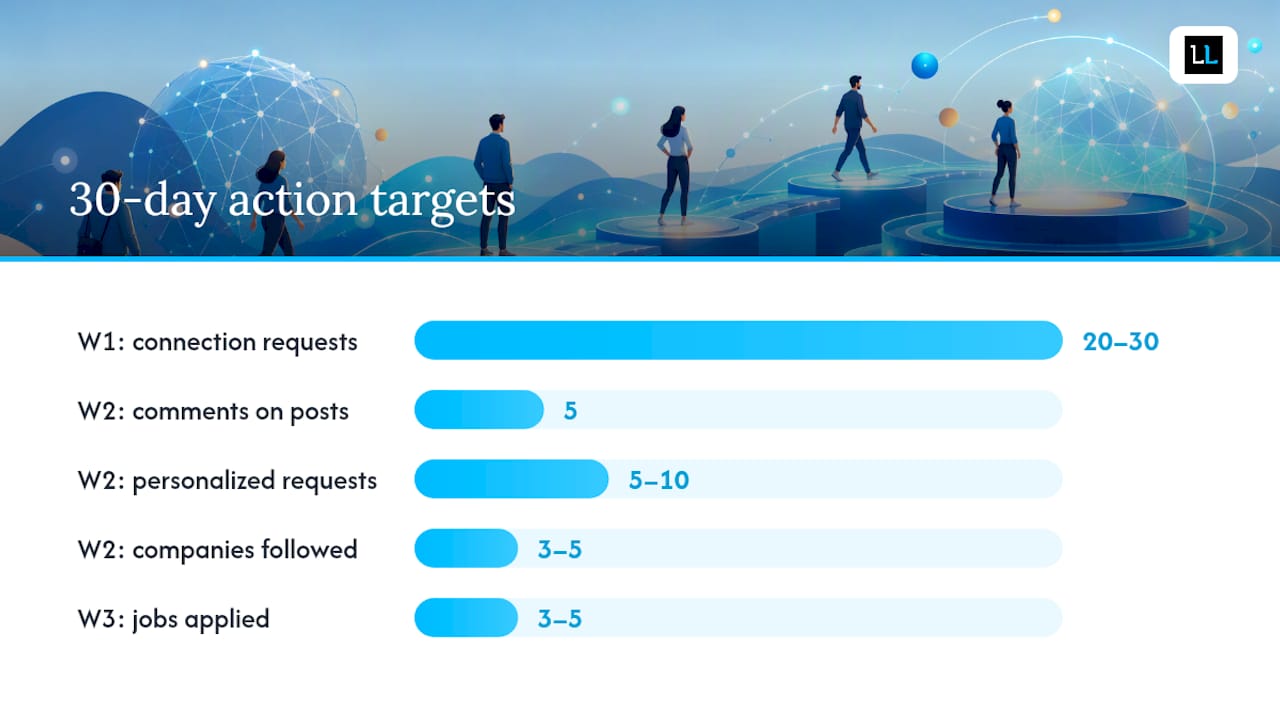
- Send connection requests to 20–30 people you already know (colleagues, classmates, former managers).
Week 2: Start showing up
- Write and publish your first post — a short professional observation, a lesson from your work, or a question for your field.
- Comment substantively on 5 posts from people in your industry.
- Send 5–10 personalized connection requests to people you’d like to know.
- Follow 3–5 companies you’re interested in.
Week 3: Go deeper
- Join 2–3 LinkedIn Groups relevant to your field and introduce yourself.
- Apply to 3–5 jobs using LinkedIn’s Easy Apply where available.
- Research each company before applying — check their Company Page, recent posts, and employee profiles.
- Follow up on any connection requests that were accepted with a short, friendly message.
Week 4: Review and refine
- Check your profile analytics: who viewed your profile and how they found you.
- Review your post analytics: note which post got the most impressions and what made it different.
- Adjust your headline or skills based on what search terms are bringing people to your profile.
- Set a sustainable weekly routine (more on that below).
For outreach, keep your first message short and specific. Here’s a template that works:
For job applications, the mini checklist is: save the job first, research the company’s LinkedIn page, tailor your application message to one specific thing you noticed about their work, and follow up once after 5–7 days if you haven’t heard back.
Best practices for networking and posting on LinkedIn
The professionals who get the most from LinkedIn aren’t the ones posting every day — they’re the ones who post with intention and engage genuinely.
Dos and don’ts:
- Do personalize every connection request with a specific reason for connecting.
- Do respond to comments on your posts within the first few hours — early engagement signals quality to the algorithm.
- Don’t send a pitch in your first message to a new connection. Build rapport first.
- Don’t post generic motivational content. It gets low engagement and trains the algorithm to limit your reach.
- Do use a strong first line in every post — the first sentence is all most people see before clicking “see more.”
- Don’t post links in the body of your post if you want reach. Put them in the first comment instead, since native content consistently outperforms link-heavy posts in LinkedIn’s distribution model.
Pro Tip: Post Tuesday through Thursday between 10 AM and 1 PM for the best chance of catching your audience during active browsing windows. One well-crafted post per week beats five rushed ones.
For messaging, the goal is a conversation, not a conversion. A good outreach message acknowledges something specific about the person, states why you’re reaching out in one sentence, and asks a single easy question. For more tactical message sequencing, The Lead Lab’s guide on B2B LinkedIn messaging covers multi-touch approaches in detail.
A realistic weekly routine for a busy professional:
- Monday: Spend 10 minutes reading your feed and leaving 2–3 substantive comments.
- Wednesday: Publish one post (drafted the day before).
- Friday: Check connection requests, reply to messages, and spend 5 minutes reviewing who viewed your profile.
That’s roughly 30 minutes a week. Consistency over 3–6 months produces compounding results that a single burst of activity never does.
How LinkedIn privacy settings control who sees what
When you view someone’s profile, LinkedIn notifies them by default — showing your name, headline, and profile photo. You can change this.
To switch to private mode:
- Go to Settings & Privacy → Visibility → Profile viewing options.
- Select “Private mode” to browse anonymously.
The trade-off is real: private mode means you also lose visibility into who viewed your profile. You’ll see the count but not the names. For active job seekers or sales professionals, that data is often worth more than anonymity.
Other visibility settings worth knowing:
- Activity broadcasts: You can turn off notifications to your network when you update your profile — useful when you’re quietly job searching.
- Who can see your connections: By default, your connections can see each other. You can restrict this to “Only you” in Settings → Visibility → Connections.
- Open to Work: A green banner on your profile photo signals to recruiters that you’re available. You can limit its visibility to recruiters only (rather than your full network) if you’re employed and searching discreetly.
- Who can see your email address: Controllable under Settings → Visibility → Email address.
The general principle: more visibility helps you get found; more privacy protects you from unwanted attention. Most professionals benefit from keeping their profile public and their connection list private.
Pros and cons of using LinkedIn
Pros:
- Recruiters actively search the platform — a well-optimized profile generates inbound interest without any active job searching.
- The professional network is unmatched in size and intent. Over 1 billion profiles means almost any industry, company, or role is reachable.
- LinkedIn Learning provides structured skill development with certificates that display directly on your profile.
- For B2B marketing, LinkedIn’s targeting precision (by job title, company size, seniority, and industry) is difficult to replicate on other platforms.
Cons:
- The feed has a noise problem. Low-quality content, motivational platitudes, and engagement-bait posts are common. Mitigation: curate your feed aggressively by unfollowing accounts that consistently post low-value content and following people who share genuine expertise.
- Building a meaningful presence takes time. Posting once and expecting results doesn’t work. Mitigation: commit to a consistent but light routine — one post per week and 15 minutes of engagement is enough to compound over months.
- Privacy concerns are real. LinkedIn collects significant behavioral data, and your profile is public by default. Mitigation: review your privacy settings quarterly and restrict connection visibility if you’re in a sensitive role.
One honest expectation to set: LinkedIn amplifies professional work that already exists. It won’t replace a strong resume, real skills, or genuine relationships — but it makes all three more visible to the right people.
The Lead Lab’s perspective on LinkedIn
LinkedIn is the only professional platform where your profile, your content, and your outreach all work together in the same place. That’s what makes it genuinely different from email lists, cold calling, or general social media. When someone receives your connection request, they can immediately see your background, your posts, and your mutual connections — context that no other outreach channel provides by default.
The challenge most professionals and teams face isn’t understanding LinkedIn. It’s finding the time and consistency to use it well. A strong profile takes an afternoon to build. A content habit takes months to develop. And outreach at scale — the kind that generates qualified meetings reliably — requires systems, not just effort.
For firms that want those results without building the system themselves, The Lead Lab runs done-for-you LinkedIn outreach campaigns: prospect targeting, personalized message copywriting, response management, and calendar meetings delivered directly to clients. If you’re curious what that looks like in practice, the client portfolio shows real campaign results.
Sources
- LinkedIn Profile Tips That Actually Get You Noticed in 2026 (Complete Guide) — TieCV
- The New LinkedIn Content Playbook: AI, Collaboration, Creator Marketplace, and Out-of-Network Reach : Social Media Examiner
- 10 Best Practices for LinkedIn Posts in 2026 | PostSyncer Blog
- LinkedIn Profile Optimization Guide 2026 – Get Found by Recruiters | TailorCV Blog