
TL;DR:
- A fully optimized LinkedIn profile is essential for attracting recruiters, building credibility, and generating career opportunities.
- Profiles that reach All-Star status and use semantic skill clusters significantly enhance visibility in recruiter searches in 2026.
A fully optimized LinkedIn profile is the single most effective tool for getting discovered by recruiters, building professional credibility, and generating career opportunities at scale. With over 900 million users on the platform, standing out requires more than just filling in your name and job title. The good news: 92% of recruiters check LinkedIn before making hiring decisions, and profiles built with the right structure receive 40 times more opportunities than incomplete ones. This guide walks you through every step to LinkedIn create profile success, from account setup to AI-driven optimization, so you attract the right people for the right reasons.
How to set up your LinkedIn profile from scratch
Getting your account live takes roughly five minutes if you have your basic information ready. That speed matters because most professionals delay starting entirely, which means every day without a profile is a day recruiters cannot find you.
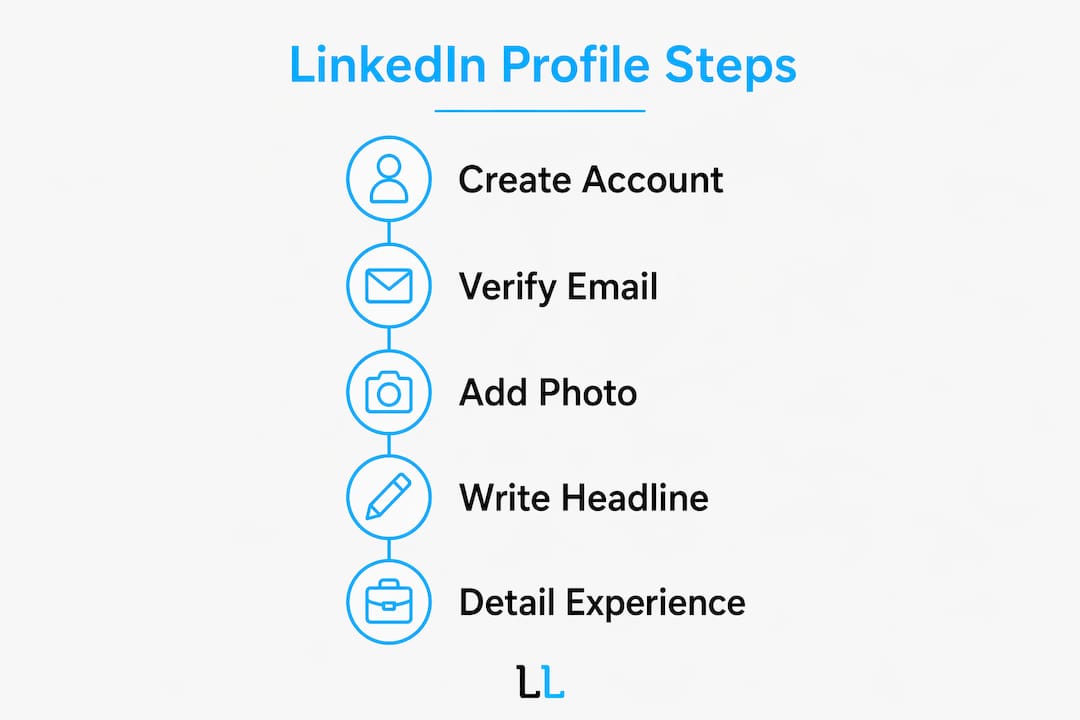
Follow these steps to create a professional LinkedIn account:
- Go to LinkedIn.com or download the LinkedIn app. Click “Join now” on the homepage. You will be prompted to enter your email address and create a password.
- Use a personal email address, not a work one. Your work email may become inaccessible if you change jobs. A personal Gmail or Outlook address keeps your account yours permanently.
- Enter your first and last name exactly as they appear on professional documents. LinkedIn’s algorithm indexes your name as a primary identifier, so consistency matters.
- Add your location, current job title, and employment status. LinkedIn uses this data to surface your profile in local and industry-specific recruiter searches immediately.
- Verify your email address. LinkedIn sends a six-digit code to your inbox. Enter it to activate your account and unlock full profile editing.
- Complete the initial profile prompts. LinkedIn walks you through adding your most recent position, education, and industry. Fill these in now rather than skipping, because partial profiles are deprioritized by the algorithm from day one.
Pro Tip: Choose a password that is at least 12 characters and unique to LinkedIn. Professionals often reuse passwords across platforms, which creates real account security risks.
Once your account is verified, you land on your profile page with a completion meter visible at the top. Do not ignore it. That meter directly reflects where you sit in LinkedIn’s ranking tiers, and reaching “All-Star” status is the threshold that unlocks full algorithmic consideration.

What makes a LinkedIn profile attract recruiters?
Recruiters spend an average of six seconds deciding whether a profile is worth a closer look. That means your headline, photo, and opening About lines carry almost all the weight. Here is how to make each section count.
- Headline. The formula that works is: Role | Value | Differentiator. For example, “B2B Sales Director | Helping SaaS Companies Close Enterprise Deals | $50M+ Revenue Generated.” Keyword-rich headlines increase profile views by 30%, and LinkedIn’s AI treats the headline as a primary indexing signal. Generic titles like “Open to Work” or “Experienced Professional” waste the most visible real estate on your profile.
- Profile photo. Use a high-resolution headshot with a plain or blurred background. Your face should fill roughly 60% of the frame. Profiles with professional photos receive significantly more connection requests and messages than those without. Avoid group photos, vacation shots, or anything cropped from another image.
- Background banner. The default blue banner signals a profile that has not been fully set up. Replace it with a branded image that reinforces your specialty. A consultant might use a banner with their tagline; a marketer might display campaign results. Tools like Canva offer free LinkedIn banner templates sized at 1584 x 396 pixels.
- About section. The About section is viewed four times more than lower experience entries. Write it in first person, open with a specific claim or result rather than “I am a passionate professional,” and close with a clear call to action such as “Connect with me to discuss X” or “Message me at [email].”
- Skills and endorsements. List at least 20 skills. Profiles with validated skill endorsements are 31 times more likely to appear in recruiter searches. Prioritize skills that match the job titles or service categories you want to be found for.
- Featured section. Use this to pin your best work: a case study PDF, a published article, a project video, or a link to your portfolio. Evidence of output builds trust faster than any written claim.
Pro Tip: When writing your About section, run a draft through Grammarly or Hemingway Editor to catch passive constructions and overly complex sentences. Recruiters read fast, so clarity beats sophistication every time.
How does LinkedIn’s 2026 algorithm affect your profile visibility?
LinkedIn no longer ranks profiles based on simple keyword frequency. The platform now uses an LLM-powered matching engine that performs deep semantic analysis, reading your profile the way a human recruiter would rather than scanning for exact-match terms. This changes how you should think about every word you write.
| Profile element | What the algorithm evaluates | Optimization action |
|---|---|---|
| Headline | Role relevance and keyword indexing | Use role, value, and differentiator format |
| Skills section | Semantic skill clusters, not isolated keywords | Group related tools under high-level skills |
| Featured section | Cross-reference with Experience entries | Add attachments that validate your job claims |
| About section | Consistency with headline and Experience | Mirror key terms across all three sections |
| Profile completeness | All-Star tier unlocks full search visibility | Complete every section, including volunteer work |
Profiles that reach All-Star completeness are the only ones that receive full algorithmic consideration. Profiles below that tier are effectively invisible in recruiter searches, regardless of how strong the underlying experience is.
The 2026 LinkedIn AI Hiring Assistant also performs cross-reference validation between your Featured assets and your Experience section. If your headline says you led a $10M product launch but your Featured section contains nothing to support that claim, your authenticity score drops. Add a presentation, a press mention, or a results summary to close that gap.
Building semantic skill clusters is the most underused tactic on the platform. Instead of listing “Excel,” “Google Sheets,” and “Tableau” as isolated skills, group them under “Data Analysis” as the primary skill and treat the tools as supporting evidence. LinkedIn’s algorithm reads that cluster as validated expertise rather than a scattered list of software names.
Common mistakes that kill your LinkedIn profile’s performance
Most professionals make the same five errors when they set up or update their profiles. Each one quietly limits how often the right people find them.
- Generic or third-person About sections. Opening with “John is a results-driven professional with 10 years of experience” reads like a press release, not a person. Write in first person and lead with a specific result or claim.
- Default profile images and banners. Leaving the gray silhouette photo or the standard blue banner signals an incomplete profile to both recruiters and the algorithm. Both take under 10 minutes to fix.
- Skills without endorsements or irrelevant to your goals. Listing “Microsoft Word” as a top skill when you are applying for director-level roles wastes valuable ranking space. Audit your skills list quarterly and remove anything that does not align with your current career direction.
- Passive responsibility descriptions in Experience. “Responsible for managing a team” tells a recruiter nothing. “Managed a 12-person team that reduced customer churn by 18% in Q3 2024” tells them everything. Quantify every accomplishment you can.
- Ignoring Open To Work and privacy settings. Privacy settings directly affect who sees your profile. The “Open To Work” badge set to “All LinkedIn Members” maximizes recruiter exposure but is visible to your current employer. The private setting limits visibility to recruiters only. Choose deliberately based on your situation.
Pro Tip: Customize your LinkedIn URL to linkedin.com/in/yourname instead of the default string of numbers. It takes 30 seconds, looks more professional on a resume, and improves your profile’s discoverability in Google searches.
Your LinkedIn profile completion checklist
Use this as your go-to reference for building and maintaining a profile that stays competitive over time.
- Account setup (5 minutes). Register at LinkedIn.com, verify your email, and complete the initial prompts for name, location, job title, and industry.
- Photo and banner (10 minutes). Upload a professional headshot and a branded background banner. Use Canva if you need a free design tool.
- Headline and About section (20 minutes). Write a role-value-differentiator headline and a first-person About section that opens with a result and closes with a call to action.
- Experience and Education (30 minutes). Add every relevant role with quantified accomplishments. Fill in education, certifications, and any volunteer work to push toward All-Star status.
- Skills and endorsements (15 minutes). Add 20 or more skills organized into semantic clusters. Message five connections and ask for endorsements on your top three skills.
- Featured section (15 minutes). Pin two or three pieces of work that validate your headline claims. A PDF, a link, or a short video all work.
- Custom URL and visibility settings (5 minutes). Set your personalized URL and configure your Open To Work privacy based on your current job situation.
- Quarterly review (30 minutes every three months). Update your headline if your focus has shifted, add new skills as you acquire them, and refresh your Featured section with recent work. Consistent LinkedIn content creation also signals an active profile to the algorithm, which improves your search ranking over time.
Key takeaways
A fully optimized LinkedIn profile built around semantic skill clusters, a keyword-rich headline, and cross-referenced Featured content is the most reliable way to reach All-Star status and maximize recruiter visibility in 2026.
| Point | Details |
|---|---|
| Profile completeness is non-negotiable | Only All-Star profiles receive full algorithmic visibility in recruiter searches. |
| Headline format drives discovery | Use role, value, and differentiator structure to increase profile views by 30%. |
| Skills clusters outperform keyword lists | Group related tools under high-level skills to match LinkedIn’s semantic ranking engine. |
| Featured section validates your claims | Cross-referencing Featured assets with Experience entries raises your authenticity score. |
| Quarterly updates sustain visibility | Regular content and profile edits signal an active, credible presence to the algorithm. |
Why your LinkedIn profile is never really finished
I have reviewed hundreds of LinkedIn profiles for professionals across consulting, financial services, and B2B technology. The single most common mistake I see is treating the profile as a one-time task. People spend two hours setting it up, feel satisfied, and then leave it untouched for three years while the platform’s algorithm and recruiter expectations shift around them.
The professionals who consistently generate inbound opportunities from LinkedIn treat their profiles the way a good SaaS company treats its homepage. They test different headlines, update their Featured section after every major project, and pay attention to which posts drive profile visits. They understand that LinkedIn is a living professional storefront, not a static resume.
What surprises most people is how much the storytelling layer matters. A profile that tells a consistent, verifiable career story using multimedia evidence earns more recruiter trust than a profile with identical credentials but no supporting proof. I have seen a well-placed case study PDF in the Featured section generate more inbound messages than a complete profile overhaul. The evidence does the convincing.
My honest advice: block 90 minutes this week to build or rebuild your profile using the checklist above. Then set a calendar reminder for 90 days from now to review it. The professionals who treat LinkedIn as a living document consistently outperform those who treat it as a box to check. The platform rewards activity, consistency, and specificity. Give it all three.
— Toby
Ready to turn your LinkedIn profile into a lead machine?
A strong profile is the foundation. What you do with it determines the return.
The Lead Lab works with professional services firms to build LinkedIn presences that generate real pipeline, not just profile views. From profile audits and headline rewrites to full outreach campaigns with personalized messaging sequences, the team handles the strategy and execution so you can focus on closing. If you want to see what a properly optimized LinkedIn presence looks like in practice, explore The Lead Lab’s portfolio for real examples of profiles and campaigns that have driven qualified meetings. When you are ready to go beyond optimization and start generating leads, The Lead Lab offers done-for-you campaigns built around your ideal client profile. You can also sharpen your outreach approach with proven LinkedIn messaging strategies that convert connections into conversations.
FAQ
How long does it take to create a LinkedIn profile?
The basic account setup takes approximately five minutes to complete registration, email verification, and core data entry. A fully optimized profile with a polished headline, About section, and Featured content takes closer to 90 minutes.
What is the most important section of a LinkedIn profile?
The headline is the most critical section because LinkedIn’s algorithm treats it as the primary indexing signal, and recruiters see it before any other content. A keyword-rich headline using the role, value, and differentiator format increases profile views by 30%.
How do I make my LinkedIn profile visible to recruiters?
Reach All-Star completeness by filling in every profile section, because profiles below that tier are filtered out of most recruiter searches. Also configure your Open To Work settings and list at least 20 validated skills to maximize search visibility.
What is a semantic skill cluster on LinkedIn?
A semantic skill cluster groups related technical tools under a single high-level skill, such as listing “Python,” “R,” and “SQL” under “Data Analysis.” LinkedIn’s 2026 algorithm reads these clusters as validated expertise rather than isolated keywords, which improves your ranking in relevant searches.
Should I use a personal or work email to register on LinkedIn?
Always use a personal email address when you create a professional LinkedIn account. Work emails become inaccessible when you change employers, and losing access to your email means losing access to your account.
favoritzem.ru