
TL;DR:
- A well-optimized LinkedIn profile greatly increases visibility to recruiters and job opportunities.
- Consistently updating and engaging with your profile ensures it remains high in search rankings.
A LinkedIn new profile is your professional landing page on the world’s largest career network, and how well you build it determines whether recruiters find you or scroll past you. Recruiters source 87% of candidates directly from LinkedIn, which makes a keyword-optimized, complete profile mandatory rather than optional. The difference between a profile that generates interviews and one that collects dust comes down to a handful of deliberate choices: your photo, your headline, your skills, and how active you stay. This guide walks you through every step, with data-backed reasoning at each stage.
What do you need before setting up your LinkedIn new profile?
Before you touch the signup page, gather everything you need. Walking in unprepared leads to a half-finished profile, and a half-finished profile hurts more than it helps.
Assets and information to collect
Start with a professional headshot. This is the single highest-impact element on your profile. Members with a professional photo receive up to 21 times more profile views, 14 times more recruiter discovery, and 36 times more messages than those without one. That gap is too large to ignore. Use a clean background, good lighting, and business-appropriate attire.

Next, write a one-sentence value proposition before you open LinkedIn. Ask yourself: who do you help, what problem do you solve, and what result do you deliver? That sentence becomes the backbone of your headline and About section. Without it, both sections end up vague and forgettable.
Collect the following before you start:
- Full work history with job titles, company names, dates, and three to five accomplishments per role (with numbers where possible)
- A list of 10–15 skills relevant to your target role or industry
- Education details including degrees, institutions, and graduation years
- Any certifications, volunteer work, or publications worth listing
- A custom banner image (1,584 x 396 pixels) that reinforces your professional brand
| Profile element | Recommended asset |
|---|---|
| Profile photo | Professional headshot, plain background |
| Headline | Value proposition sentence, target job title |
| About section | Career story with metrics and a clear call to action |
| Experience | Accomplishment-focused bullet points per role |
| Skills | 10–15 industry-relevant skills |
| Banner image | Custom graphic or industry-relevant visual |
Pro Tip: Use Google’s job search or LinkedIn’s job postings for your target role to identify the exact keywords recruiters use. Copy the language directly into your headline and skills section.
How to create and optimize your LinkedIn profile step by step
Account creation takes five minutes. Getting the profile right takes longer, but the steps below make it systematic.
-
Create your account. Go to LinkedIn.com, enter your name, email, and a strong password. Verify your email immediately. Choose your industry and location accurately since LinkedIn uses these for search filtering.
-
Upload your profile photo. Add your professional headshot before filling in anything else. A quality photo generates 14 times more profile views and 9 times more connection requests. Do not skip this step or use a casual photo.
-
Write a keyword-rich headline. Your headline is the most powerful real estate on your profile. LinkedIn’s algorithm weights keyword placement by section, and headline keywords outrank five identical keywords scattered elsewhere on your profile. Front-load your most important job title or skill into the first 80 characters, because that is what appears in mobile search previews and recruiter cards. A strong formula: Job Title | Key Skill | Specific Value Delivered. For example: “B2B Sales Manager | SaaS Revenue Growth | Helping Tech Firms Hit Quota.”
-
Customize your profile URL. Go to “Edit public profile & URL” and change the default string of numbers to your name. This makes your profile easier to share and looks more professional in email signatures.
-
Write your About section. Think of this as a short cover letter written in first person. Open with your strongest career achievement or a clear statement of what you do. Include two or three metrics that prove your impact. Close with a sentence telling the reader what to do next, whether that is connecting, messaging, or visiting your website. Keep it under 300 words.
-
Fill in your experience section with accomplishments, not duties. Recruiters penalize profiles that list job responsibilities instead of results. “Managed a sales team” tells a recruiter nothing. “Led a 6-person sales team to 140% of quota in Q3 2025” tells them everything. Use numbers wherever you can: revenue generated, percentage growth, team size, projects delivered on time.
-
Add skills strategically. Complete profiles with 5 or more skills increase recruiter contact by up to 33 times compared to profiles with fewer. Add your top skills first since LinkedIn displays them prominently. Ask two or three colleagues to endorse your most important skills right after you connect with them.
-
Enable Open to Work. If you are actively job searching, turn on the public Open to Work frame. Profiles with the public Open to Work setting attract 40% more recruiter InMails than those using the “Recruiters Only” or hidden settings. If you are employed and searching quietly, use the “Recruiters Only” option instead.
-
Add your education, certifications, and Featured section. A complete profile reaches LinkedIn’s “All-Star” status, which significantly boosts visibility in search results. Use the Featured section to pin your best work: a portfolio link, a published article, or a strong post that shows your expertise.
-
Send your first 20 connections. Connect with former colleagues, classmates, and managers. A larger network expands your second-degree reach, which is where most recruiter searches land.
Pro Tip: Write your About section in a Google Doc first. Read it aloud. If it sounds like a resume bullet point, rewrite it as a conversation. LinkedIn rewards personality alongside credentials.
How do you keep your LinkedIn profile visible after launch?
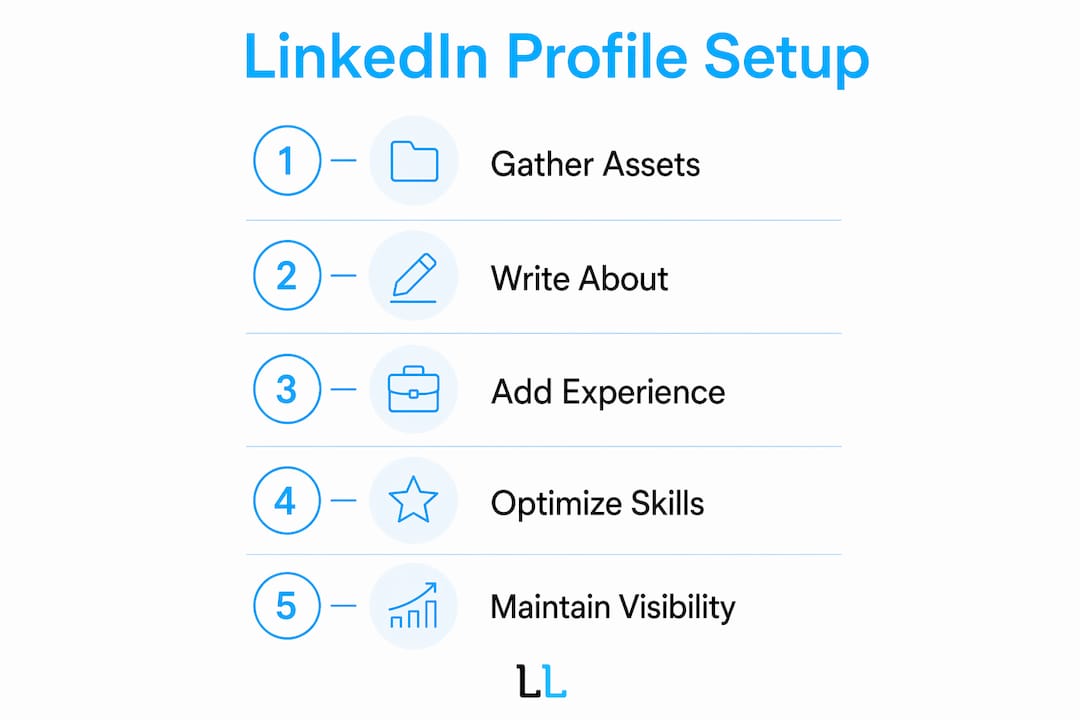
Building the profile is step one. Keeping it visible is the ongoing work that most professionals skip, and that is exactly why staying active gives you a real edge.
Profiles with no posting activity in the past 12 months are deprioritized by LinkedIn’s algorithm. At least one post per month maintains your ranking. Two to three posts per week puts you in the top tier of visibility for your network.
Content ideas that perform well on LinkedIn include:
- Lessons learned from a recent project or challenge
- A short take on a trend in your industry
- A career milestone with the story behind it
- A question that invites your network to comment
Engagement matters as much as posting. Comment on posts from people in your target industry. Thoughtful comments on high-traffic posts put your name in front of thousands of people who have never seen your profile. Sending a short, personalized connection request after commenting on someone’s post converts at a much higher rate than a cold connection with no context. For more on writing messages that get responses, the LinkedIn outreach tips from The Lead Lab cover the mechanics in detail.
Quarterly audits and small updates to your skills, Featured content, and headline keep your profile fresh in LinkedIn’s ranking system. Set a calendar reminder every three months to review your headline, update your most recent accomplishment in your top experience role, and swap out any outdated Featured content.
Pro Tip: Save a text file with your current headline, About section, and top skills. When you do your quarterly audit, compare the current version to the saved one. Small, deliberate changes compound over time.
What are the most common LinkedIn profile mistakes to avoid?
Most profiles fail for the same predictable reasons. Knowing them in advance saves you months of low visibility.
- Generic headline. “Marketing Professional” or “Open to Opportunities” wastes your most powerful keyword slot. Replace it with a specific title and value statement.
- No profile photo or a casual one. A missing or unprofessional photo signals low credibility to both recruiters and the algorithm.
- Duties instead of achievements. Listing what your job description said instead of what you actually delivered is the fastest way to get skipped.
- Fewer than 5 skills listed. This directly reduces recruiter contact rates. Fill all available skill slots with relevant terms.
- Private profile settings. If your profile is not set to public, recruiters cannot find you in search. Check your visibility settings under “Public profile & URL.”
- Zero activity for months. Inactivity drops your search ranking. Even one post per month keeps you in the algorithm’s good graces.
- Fake or mass connection requests. Sending hundreds of generic connection requests to strangers triggers LinkedIn’s spam filters and can restrict your account.
The fastest way to fix a weak LinkedIn profile is not to add more content. It is to replace vague language with specific numbers and replace duties with results.
Key Takeaways
A complete, keyword-optimized LinkedIn profile with a professional photo, achievement-focused experience, and consistent activity is the single most effective way to attract recruiter attention and job opportunities in 2026.
| Point | Details |
|---|---|
| Professional photo is non-negotiable | Members with a professional photo receive up to 21 times more profile views than those without one. |
| Headline keywords drive search ranking | A keyword in your headline outranks five identical keywords placed elsewhere on your profile. |
| Completeness multiplies recruiter contact | Profiles with 5 or more skills increase recruiter contact by up to 33 times compared to sparse profiles. |
| Open to Work boosts InMail volume | The public Open to Work frame attracts 40% more recruiter InMails than hidden or restricted settings. |
| Activity keeps you visible | Posting at least once per month prevents algorithm deprioritization and maintains search ranking. |
LinkedIn profiles reward patience more than perfection
Here is what I have seen consistently working with professionals across industries: most people treat their LinkedIn profile as a one-time task. They build it, feel good about it, and then ignore it for two years. That is the single biggest mistake.
LinkedIn’s algorithm is not a static directory. It rewards recency, engagement, and completeness on a rolling basis. A profile that was strong in january 2025 but has had zero activity since then is effectively invisible by now. The professionals who get consistent recruiter outreach are not always the most credentialed. They are the ones who post regularly, update their headline when their focus shifts, and engage with their network in a way that keeps their name circulating.
The other thing worth saying plainly: your About section is not a biography. It is a pitch. Treat it like a high-conversion landing page that answers three questions in under 8 seconds. Who are you? Why should someone trust you? What should they do next? If your About section does not answer all three, rewrite it before you do anything else.
The professionals I have seen get the most traction on LinkedIn are not the ones with the longest profiles. They are the ones with the sharpest headlines, the most specific accomplishments, and the habit of showing up consistently. Build the profile right, then show up for it every week. The results follow.
— Toby
How The Lead Lab can sharpen your LinkedIn presence
A well-built profile opens the door. What you do with that visibility determines whether it generates real opportunities.
The Lead Lab specializes in LinkedIn outreach and lead generation for professional services firms. If you have built your profile and want to turn it into a consistent source of qualified conversations, The Lead Lab’s done-for-you campaigns handle prospect targeting, message copywriting, and response management so you can focus on the meetings, not the mechanics. Explore The Lead Lab’s services to see how a fully managed LinkedIn outreach program works, or review the client portfolio to see what results look like in practice. For professionals ready to go beyond profile basics, The Lead Lab’s LinkedIn content strategies show how to turn consistent posting into a lead generation engine.
FAQ
What is a LinkedIn new profile?
A LinkedIn new profile is a professional account page that displays your career history, skills, and accomplishments to recruiters, employers, and peers. It functions as a searchable digital resume combined with a networking tool.
How long does it take to set up a complete LinkedIn profile?
A complete LinkedIn profile takes two to four hours to set up properly when you have your work history, photo, and accomplishments ready in advance. Reaching “All-Star” status requires filling in every major section including photo, headline, About, experience, education, and skills.
How many skills should I add to my LinkedIn profile?
Add at least 5 skills, and aim for 10–15 relevant ones. Profiles with 5 or more skills see up to 33 times more recruiter contact than profiles with fewer.
Should I use the Open to Work frame on my profile?
Yes, if you are actively job searching. The public Open to Work frame attracts 40% more recruiter InMails than keeping your job search status hidden or visible only to recruiters.
How often should I update my LinkedIn profile?
Update your profile at least once per quarter. Quarterly audits and small updates to skills, Featured content, and your headline keep your profile ranked higher in LinkedIn’s search algorithm.