
TL;DR:
- Your LinkedIn summary serves as your personal landing page and should tell a compelling story, not just list job titles.
- An effective summary includes a clear hook, keyword integration, quantifiable results, personality, and a call to action to convert visitors into connections.
Your LinkedIn professional summary is your personal landing page. It tells visitors who you are, what you deliver, and why they should connect with you. Most professionals treat it like a resume bio. That is the wrong approach. The About section on LinkedIn allows up to 2,600 characters, enough space to tell a compelling story, not just list job titles. A strong summary converts profile visitors into connections, clients, and opportunities. This article gives you the framework to write one that actually works.
What essential elements make an effective LinkedIn professional summary?
An effective LinkedIn summary opens with a hook that states exactly who you help and what outcome you create. Think of it as your value proposition in one or two sentences. Recruiters, potential clients, and peers decide within seconds whether to keep reading. Your first line must earn that attention.
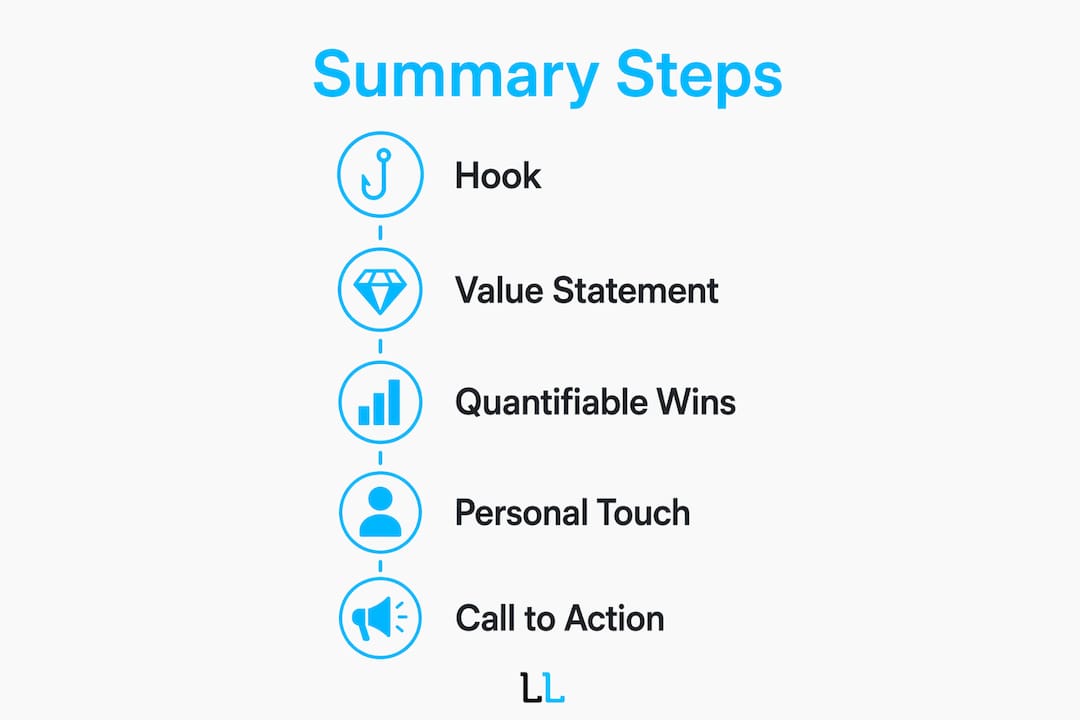
The five core elements of a high-impact summary are:
- A clear hook. State your role, your niche, and the result you produce. “I help SaaS founders reduce churn through customer success systems” beats “Experienced customer success professional” every time.
- Keyword integration. LinkedIn’s search algorithm prioritizes role, niche, and outcome keywords placed naturally in the first paragraph. Stuffing keywords kills readability and triggers ranking penalties.
- Quantifiable results. Specific numbers build credibility fast. Phrases like “reduced churn by 15%” outperform vague buzzwords in profile conversion. Vague claims like “results-driven” signal nothing.
- Personality and passion. Sharing your story after establishing credibility creates emotional connection. Professionals who humanize their profiles are more memorable in crowded networks.
- A call to action. End with a direct invitation. “Connect with me,” “Message me to discuss,” or “Visit [your website]” gives visitors a clear next step.
Profiles with 5 or more skills listed in the summary get 13x more views. Summaries with quantifiable wins lead to 22% more endorsements. Those numbers show that specificity is not optional. It is the difference between a profile that gets found and one that sits invisible.
Pro Tip: Write your hook before anything else. If you cannot state in one sentence who you help and what you deliver, your summary will lack focus no matter how polished the rest of it is.

How to write your LinkedIn summary step by step
Structure separates a forgettable summary from one that converts. The Hook, Value, Proof, Action framework gives you a proven sequence to follow.
-
Write the hook first (characters 1–300). The first 300 characters appear in search results and profile previews before the “See more” button. Front-loading your value proposition here is the single highest-leverage move you can make. Include a micro call to action if possible. Visitors who do not click “See more” still see your core message.
-
Build the value section. Explain what you do and for whom. Be specific about your niche. A financial advisor who writes “I help tech executives build tax-efficient wealth before an IPO” is far more compelling than one who writes “I provide comprehensive financial planning services.”
-
Add proof. Drop two or three concrete results. Revenue generated, costs cut, clients served, awards won. Numbers anchor your claims in reality. If you cannot share exact figures, describe the scale: “teams of 50+,” “enterprise clients across 12 countries.”
-
Write short paragraphs. Short paragraphs of 1–3 sentences reduce bounce rates and keep readers moving through your profile. Dense blocks of text signal effort to the reader’s eye before they even start reading.
-
Close with a call to action. Tell visitors exactly what to do next. Early calls to action drive 27% more message connections. Make yours specific: “DM me ‘CONSULT’ to book a free 20-minute call” works better than “Feel free to reach out.”
| Step | Focus | Common mistake |
|---|---|---|
| Hook (1–300 chars) | Value proposition + micro CTA | Starting with your job title |
| Value section | Niche and audience clarity | Writing for everyone |
| Proof | Specific numbers and results | Vague adjectives |
| Short paragraphs | Readability and flow | Dense, unbroken text |
| Call to action | Clear next step | No CTA at all |
After drafting, run your text through Grammarly to catch passive constructions and wordiness. Then read it aloud. If you stumble on a sentence, rewrite it. Peer feedback from a trusted colleague catches blind spots that self-editing misses.
Pro Tip: Paste your summary into a plain text document and remove all formatting. If the ideas still hold up without bold text or line breaks, the writing is strong. If it falls apart, the structure is doing work the words should be doing.
How to tailor your summary for different professional goals
Neal Schaffer makes this point clearly: a summary written for recruiters should look nothing like one written for potential clients. Each goal requires a different tone, structure, and call to action. Writing one generic summary and hoping it serves all audiences is the most common mistake professionals make.
Define your primary goal before you write a single word. Your goal shapes every decision that follows.
- Job seekers should lead with their target role and the value they bring to a hiring team. Use keywords from job descriptions in your niche. End with “Open to opportunities in [field]” or “Connect with me if you’re hiring for [role].” Avoid listing every position you have ever held.
- Lead generation. If you are a consultant, agency owner, or service provider, write directly to your ideal client. Describe their problem, your solution, and the result they can expect. LinkedIn consultant Alex Boyd frames this well: the summary should focus on who you help and the value you create, not on your own career story. Pair your summary with a strong B2B outreach strategy for maximum impact.
- Thought leadership. If your goal is building an audience or establishing authority, lead with your point of view. Share a belief or observation that defines your professional perspective. Invite readers to follow your content or join a conversation.
Tailoring your summary to your professional goal increases the quality of messages and connection requests you receive. A generic summary attracts generic attention. A targeted summary attracts the right people.
Update your summary every six months or when your role, niche, or goals shift. A summary written for a job search reads poorly when you are now running your own firm.
LinkedIn summary styles compared: which format works best?
Two dominant summary styles exist: narrative and skills-focused. Neither is universally better. The right choice depends on your goal and your audience.
The narrative style reads like a short story. It opens with a hook, moves through a professional journey, and closes with a call to action. This style works well for thought leaders, consultants, and anyone whose personal brand is central to their business. The risk is self-indulgence. A narrative that focuses on your history rather than your visitor’s needs loses readers fast.
The skills-focused style leads with a clear value statement, then uses short bullet points to list key competencies and results. This style works well for job seekers and technical professionals. It is easy to scan and keyword-rich. The risk is feeling cold or impersonal.
| Style | Best for | Strengths | Weaknesses |
|---|---|---|---|
| Narrative | Consultants, thought leaders | Memorable, builds trust | Can feel self-centered |
| Skills-focused | Job seekers, technical roles | Scannable, keyword-rich | Can feel impersonal |
| Hybrid | Most professionals | Balances story and proof | Harder to execute well |
The hybrid approach combines a one-paragraph narrative hook with two or three bullet points of quantifiable results, then closes with a call to action. Most professionals benefit from this format. It tells a story, proves the claim, and gives visitors a next step.
Avoid overly generic language in any format. Phrases like “passionate professional” or “results-oriented leader” appear on millions of profiles. They add no information and waste your character limit.
Key takeaways
A strong LinkedIn professional summary leads with a specific value proposition, integrates keywords naturally, proves claims with numbers, and closes with a direct call to action.
| Point | Details |
|---|---|
| Front-load your value | Put your core message in the first 300 characters where it shows in previews. |
| Use the Hook, Value, Proof, Action framework | This four-part structure converts profile visitors into connections consistently. |
| Quantify your results | Specific numbers like “reduced churn by 15%” outperform vague adjectives in every format. |
| Match your summary to your goal | Job seekers, consultants, and thought leaders each need a different tone and call to action. |
| Update regularly | Revise your summary every six months or when your professional focus changes. |
What I have learned from rewriting hundreds of LinkedIn summaries
Most professionals write their LinkedIn summary the way they write a cover letter. They start with their job title, list their responsibilities, and end with “I am passionate about making a difference.” That summary gets ignored. Every time.
The shift that changes everything is moving from autobiography to value statement. Your visitor does not care where you went to school or how many years you have been in the industry. They care about one thing: can you solve their problem or help them reach their goal?
I worked with a management consultant who had a 400-word summary that read like a Wikipedia page about her career. We cut it to 180 words, opened with the specific type of company she helps and the outcome she delivers, added two numbers, and closed with a direct message invitation. Her connection request acceptance rate jumped within two weeks. The content did not change. The framing did.
The other mistake I see constantly is keyword stuffing. Professionals read that LinkedIn’s algorithm rewards keywords, so they cram 15 buzzwords into the first paragraph. The algorithm penalizes unnatural keyword density. More importantly, real humans stop reading. Keywords work when they are woven into sentences that also make sense to a person. That balance is the craft.
Your summary is not a document. It is a conversation starter. Write it like one.
— Toby
How The Lead Lab can sharpen your LinkedIn presence
Your summary is the foundation, but it is only one piece of a LinkedIn profile that generates real leads. The Lead Lab specializes in LinkedIn outreach and lead generation for professional services firms, and profile optimization is where every campaign starts.
From crafting messaging that speaks directly to your ideal client, to building outreach campaigns that fill your calendar with qualified meetings, The Lead Lab handles the work that most professionals do not have time to do well. You can see real results from real campaigns in The Lead Lab portfolio. If you are ready to turn your LinkedIn profile into a consistent source of new business, visit The Lead Lab to learn how the team can help.
FAQ
What is a LinkedIn professional summary?
A LinkedIn professional summary is the About section on your LinkedIn profile. It allows up to 2,600 characters and functions as your personal landing page for visitors, recruiters, and potential clients.
How long should a LinkedIn summary be?
The practical sweet spot is 300–500 words. The first 300 characters are the most critical because they appear in search previews before the “See more” button.
What should I include in my LinkedIn summary?
Include a hook, a clear statement of who you help, quantifiable results, a brief personal element, and a direct call to action. This structure follows the Hook, Value, Proof, Action framework.
How do keywords affect my LinkedIn summary?
LinkedIn’s search algorithm weights keywords placed naturally in the first paragraph of your About section. Forcing keywords into unnatural sentences reduces both readability and search ranking.
How often should I update my LinkedIn summary?
Update your summary every six months or whenever your role, niche, or primary professional goal changes. A summary written for a job search performs poorly when your goal shifts to client acquisition.