Generic LinkedIn messages are quietly killing your pipeline. 72% of buyers ignore outreach that feels copy-pasted, which means every templated connection request you send is likely landing in a mental trash folder. The good news is that a structured, human-led messaging workflow changes everything. In this guide, you will learn exactly how to build a LinkedIn messaging workflow that generates qualified appointments, not just connection counts. Each step is practical, tested, and designed for professional services firms that need real results from their outreach.
Table of Contents
- Why your LinkedIn workflow matters for lead generation
- What you need before building your LinkedIn messaging workflow
- Step-by-step: Building a high-converting LinkedIn messaging workflow
- Troubleshooting and common LinkedIn messaging mistakes
- Measuring success: Metrics to track and workflow optimization
- Work with experts to scale your LinkedIn messaging results
- Frequently asked questions
Key Takeaways
| Point | Details |
|---|---|
| Personalize every touch | Human-led, trigger-based messages dramatically outperform generic outreach in response rates. |
| Test and refine steps | Continuous testing and adjusting of your workflow boost both appointment rates and overall lead quality. |
| Track the right metrics | Monitoring responses, follow-ups, and conversions helps you optimize every stage of the workflow. |
| Avoid over-automation | Buyers spot automation easily, so balance efficient tools with real personalization. |
Why your LinkedIn workflow matters for lead generation
A LinkedIn messaging workflow is a repeatable, intentional sequence of outreach steps designed to move a prospect from stranger to booked meeting. It is not a spray-and-pray blast. It is a structured process that accounts for who you are targeting, what you say, when you say it, and how you follow up. For professional services firms, where trust and credibility are everything, this structure is not optional. It is the difference between a pipeline that grows and one that stalls.
The data backs this up. Decision-makers respond better to reference triggers and value-driven messaging than to generic pitches. Buyers on LinkedIn are sophisticated. They can read a template in two seconds and dismiss it just as fast. When your message references something specific to them, a recent post, a role change, a shared connection, it signals that you did the work. That signal builds trust before a single call is booked.
Here is what a well-designed workflow delivers for your firm:
- Higher lead quality: You attract prospects who are genuinely relevant, not just anyone who accepts a connection.
- Stronger trust signals: Personalized, value-first messages position you as a peer, not a vendor.
- Consistent pipeline: A repeatable process means your outreach does not stop when you get busy.
- Scalable results: Once the workflow is refined, you can increase volume without sacrificing quality.
- Better data: Structured sequences give you trackable touchpoints to measure and improve.
Building strategic LinkedIn messaging into your firm’s growth engine is not a nice-to-have. It is the foundation of predictable B2B lead generation in 2026.
What you need before building your LinkedIn messaging workflow
Rushing into outreach without the right foundation is one of the most common mistakes professional services firms make. Strategy matters more than execution speed, and human-led personalization is what separates high-performing campaigns from ignored ones. Before you write a single message, get these assets in place.
| Tool or asset | Purpose | Why it matters |
|---|---|---|
| LinkedIn Sales Navigator | Advanced prospect filtering | Finds the right people faster |
| CRM (e.g., HubSpot, Salesforce) | Tracks conversations and follow-ups | Prevents leads from falling through |
| Value proposition document | Clarifies your core offer | Keeps messaging consistent and sharp |
| ICP profile sheet | Defines your ideal customer | Ensures you target the right segment |
| Trigger source list | Identifies personalization hooks | Powers relevant, timely outreach |
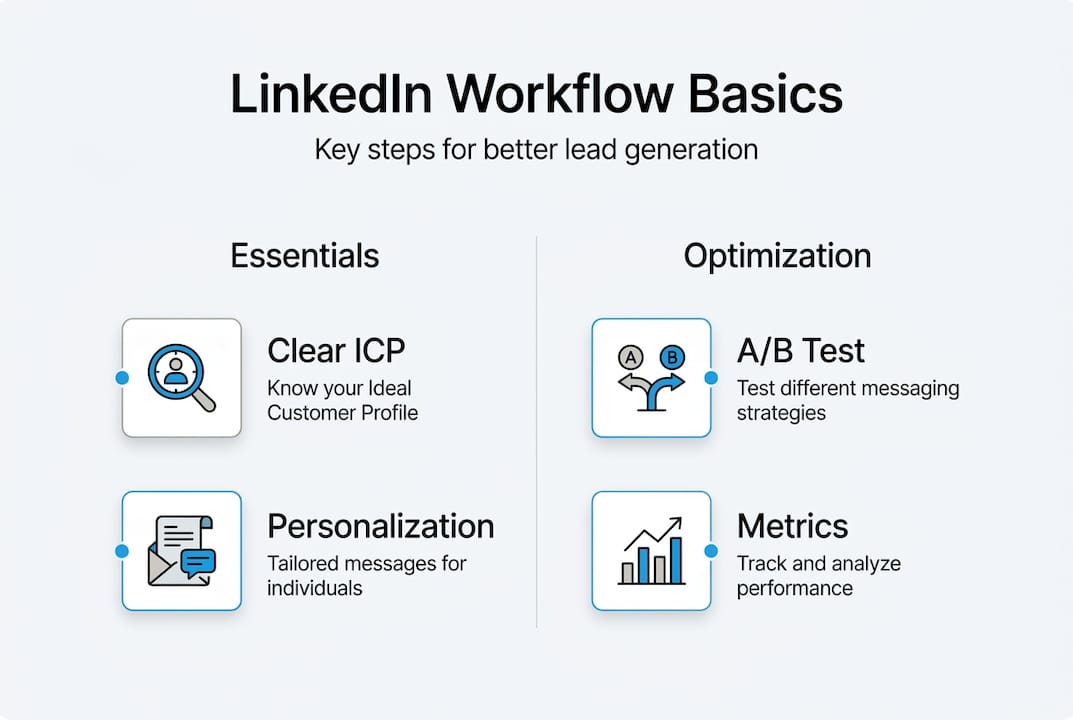
Your Ideal Customer Profile (ICP) is the single most important input to your workflow. This is a detailed description of the type of firm, role, industry, and situation that makes someone a perfect fit for your services. Without a sharp ICP, even the best-written messages go to the wrong people. Segment your list by industry, company size, and seniority so your messaging can be tailored to each group.

Personalization triggers are the raw material of great outreach. These include things like a prospect’s recent LinkedIn post, a company announcement, a job promotion, or a mutual connection. Build a habit of collecting these before you reach out. Your personalized messaging guide should reference at least one specific trigger per prospect to stand out immediately.
For more tactical ideas on getting your targeting right, the outreach tips for B2B leads on our blog cover segmentation and trigger sourcing in depth.
Pro Tip: Before you launch any campaign, define your single most important outcome metric. Is it booked calls? Response rate? Lead quality score? Knowing this upfront shapes every decision you make about message copy, follow-up timing, and sequence length.
Step-by-step: Building a high-converting LinkedIn messaging workflow
Now that your foundation is solid, here is how to build the actual workflow. Each stage has a specific job to do. Skip one and the whole sequence loses momentum.
- Connection request with context. Keep this short, under 300 characters. Reference one specific trigger. Do not pitch. Your only goal here is to earn the connection.
- Opening message after connection. Send within 24 to 48 hours. Lead with value, not your offer. Reference their world, a challenge their industry faces, a win you noticed on their profile.
- Value-driven follow-up. If no reply after 3 to 5 days, send a follow-up that adds something new. Share a relevant insight, a short case study, or a question that invites a response.
- Soft call to action. After genuine engagement or a second follow-up, introduce a low-friction next step. A 15-minute call, a quick question, or a relevant resource works better than a hard pitch.
- Final touchpoint. If still no response, send a brief, gracious close. This preserves the relationship and sometimes triggers a reply weeks later.
Not all workflows are built the same. Here is how the three main approaches compare:
| Workflow type | Pros | Cons |
|---|---|---|
| Human-led | Highest personalization, strongest trust | Time-intensive, harder to scale |
| Fully automated | Fast, high volume | Low response rates, risks account flags |
| Hybrid | Balances scale with personalization | Requires careful setup and monitoring |
For professional services firms, a hybrid approach tends to perform best. Automation handles scheduling and sequencing while humans write and review the actual messages. To optimize outreach campaigns at scale, this balance is critical.
Testing different message sequences is not optional. It is the mechanism that turns a decent workflow into a great one. Run A/B tests on your connection request copy, your opening message subject, and your call-to-action phrasing. Small changes in wording can double your reply rate.
For inspiration on what content to reference in your messages, strong LinkedIn content creation habits give you a steady stream of relevant material to share with prospects.
Pro Tip: The three highest-performing personalization triggers are a prospect’s recent post (shows you are paying attention), a role change in the last 90 days (signals a moment of transition and openness), and a mutual connection (instant social proof). Build these into your trigger source list and use them consistently.
Troubleshooting and common LinkedIn messaging mistakes
Even a well-built workflow can underperform. The most common culprit is not the sequence itself. It is the quality of the messages inside it. Here are the mistakes that kill reply rates most often:
- Too generic: Messages that could be sent to anyone get ignored by everyone. If a prospect cannot see themselves in your message, they will not respond.
- Too frequent: Sending follow-ups every day signals desperation and trains people to ignore you. Space your touchpoints appropriately.
- No clear value: If your message is about you and your services rather than the prospect’s situation, it reads as a pitch, not a conversation starter.
- Ignoring engagement signals: If someone views your profile after receiving a message, that is a trigger. Follow up with something relevant within 24 hours.
- Inconsistent tone: Switching from casual to formal across your sequence creates friction. Pick a voice and stick with it.
“Buyers can spot automation instantly. The moment a message feels like it came from a robot, the conversation is over before it starts.”
Buyers spot automation and ignore generic messages at a rate that should alarm any firm relying on volume-based outreach. The fix is not more messages. It is better ones.
If your reply rate drops below 10%, audit your connection request first. That is the entry point. If your follow-up rate is low, check whether your opening message delivered genuine value or just set up a pitch. For a deeper look at what moves the needle, the guide on lead generation on LinkedIn walks through diagnostic frameworks for each workflow stage.
Measuring success: Metrics to track and workflow optimization
Once your workflow is live, measurement is what separates firms that improve from firms that plateau. You cannot optimize what you do not track. These are the metrics that matter most:
- Connection acceptance rate: Benchmark is 30 to 50%. Below that, your targeting or request copy needs work.
- Reply rate: Aim for 15 to 25% on your opening message. Lower means your value proposition is not landing.
- Follow-up response rate: Tracks how well your sequence sustains interest after the first message.
- Booked call rate: The ultimate conversion metric. Measures how many conversations turn into actual meetings.
- Lead quality score: A subjective but critical measure of whether the people responding are actually a fit for your services.
A/B testing is the fastest way to improve these numbers. Test one variable at a time: the opening line, the trigger reference, the call-to-action phrasing, or the follow-up timing. Run each test for at least two weeks before drawing conclusions. Testing and refining sequences is what drives sustained improvement in appointment rates.
Review your metrics weekly. Look for patterns in which message variants get the most replies and which prospect segments respond best. Use that data to sharpen your ICP and rewrite underperforming messages. To boost lead quality over time, this iterative approach is far more effective than launching a new campaign from scratch every quarter.
Work with experts to scale your LinkedIn messaging results
Building a high-converting LinkedIn messaging workflow takes time, testing, and a sharp understanding of what resonates with your specific audience. Most professional services firms get the strategy right in theory but struggle to execute it consistently at scale.
That is exactly where The Lead Lab comes in. We build and manage done-for-you LinkedIn outreach campaigns for professional services firms, handling everything from ICP targeting and message copywriting to response management and campaign analytics. Our clients do not just get more connections. They get qualified meetings with the right people. If you want to see what that looks like in practice, explore our client success stories to see the results we have delivered across industries. When you are ready to stop guessing and start scaling, we are ready to build your workflow.
Frequently asked questions
What is a LinkedIn messaging workflow?
A LinkedIn messaging workflow is a structured series of steps for personalizing, sending, tracking, and refining connection messages to advance prospects toward appointments and sales. It replaces ad hoc outreach with a repeatable, measurable process.
How many LinkedIn message steps should be in a workflow?
Most effective workflows use 3 to 5 messages: an initial connection request, follow-ups referencing new triggers, and a clear call to action. Successful workflows balance personalization with appropriate follow-up spacing to maintain relevance without overwhelming prospects.
Is automation recommended for LinkedIn messaging?
Automation can reduce manual effort but should never replace human-led personalization, as most buyers ignore generic outreach. A hybrid approach, where automation handles scheduling and humans craft the messages, delivers the best balance of scale and quality.
How long does it take to see results from a new workflow?
With proper testing and refinement, you may see initial qualified leads within 2 to 4 weeks. Testing and refining sequences consistently over time is what drives compounding improvements in appointment rates beyond that initial period.
Recommended
- Blog Archives – The Lead Lab
- Drive B2B lead gen success with strategic messaging – The Lead Lab
- What is personalized messaging? LinkedIn lead gen guide – The Lead Lab
- Master LinkedIn content creation for qualified leads in 2026 – The Lead Lab
- Cómo nutrir a tus leads con automatización de procesos y marketing automatizado | Canal Online
- Social media advertising guide 2026: boost leads & sales
One Response